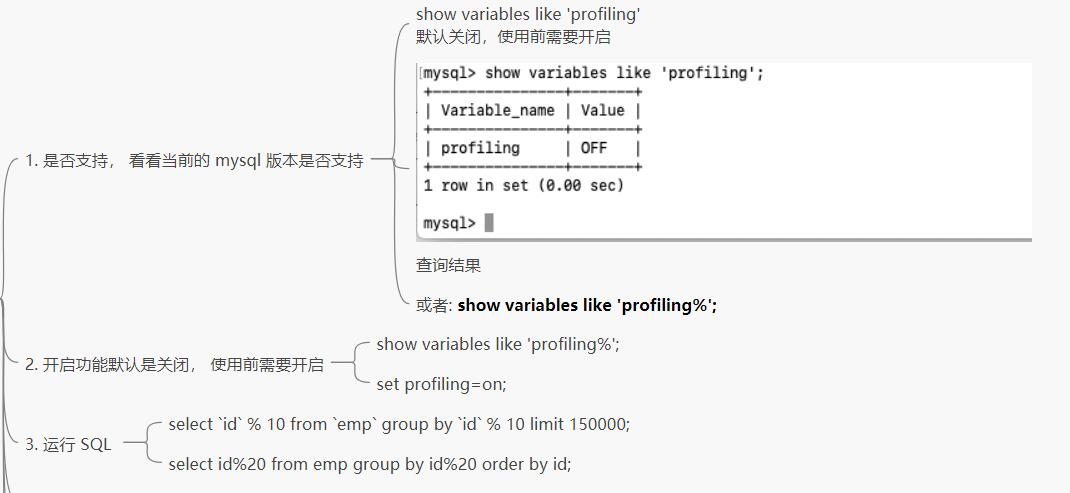
1. 索引优化

1.1 索引分析

一表

1
2
3
4
5
6
7
8
9
10
11
12
13
14
15
16
17
18
19
#建SQL
create table if not exists `article` (
`id` int(11) auto_increment not null,
`author_id` int(11) not null,
`category_id` int(11) not null,
`views` int(11) not null,
`comments` int(11) not null,
`title` varchar(255) not null,
`content` text not null,
primary key(id)
);

insert into `article`(`author_id`, `category_id`, `views`, `comments`, `title`, `content`) values
(1, 1, 1, 1, '1', '1'),
(2, 2, 2, 2, '2', '2'),
(3, 3, 3, 3, '3', '3'),
(4, 4, 4, 4, '4', '4');

select * from `article`;
1
2
3
4
5
6
7
8
9
10
11
12
13
14
15
16
17
18
19
20
21
22
23
24
25
26
27
28
29
30
31
32
33
34
35
36
37
38
39
40
41
42
43
44
# 案例
#查询 category_id 为 1 且 comments 大于 1 的情况下, views 最多的 article_id
explain select id, author_id from article where category_id = 1 and comments > 1 order by views desc limit 1;

#结论:很显然,type 是 ALL, 即最坏的情况。 Extra 里还出现了 Using filesort 也是最坏的情况,必须优化。

#查询表的索引
show index from article;

#1.1 开始优化:(创建索引 + 删除索引)
#alter table `article` and index idx_article_ccv(`category_id`, `comments`, `views`);
create index idx_article_cvv on `article`(`category_id`, `comments`, `views`);
drop index idx_article_cvv on `article`;

#1.2 优化后执行 explain
explain select id, author_id from article where category_id = 1 and comments > 1 order by views desc limit 1;
explain select id, author_id from article where category_id = 1 and comments = 3 order by views desc limit 1;

#结论
#type 变成了 range, 这是可以忍受的。但是 extra 里使用 Using filesort 依然无法接受的。
#但是我们已经建立了索引,为撒没有什么用呢?
#这是因为按照 BTree 的缩影工作原理,
#先排序 category_id
#如果遇到相同的 category_id 则再排序 comments, 如果遇到相同的 comments 则再排序 views.
#当 comments 字段是在联合索引里处于中间位置时,
#因 comments > 1 条件是一个范围值 (所谓 range),
#MySQL 无法利用索引再对后面的 views 部分进行检索, 即 range 类型查询字段后面的索引无效。


#1.3 删除第一次创建的索引
drop index idx_article_cvv on `article`;

#1.4 新创建索引
#alter table `article` and index idx_article_cv(`category_id`, `views`);
create index idx_article_cv on `article`(`category_id`, `views`);


#1.4 重新执行 explain
explain select id, author_id from article where category_id = 1 and comments > 1 order by views desc limit 1;

#结论:
#可以看到 type 变成了 ref , Extra 中的 Using filesort 也消失了,结果非常的理想。

drop index idx_article_cv on article;

两表

1
2
3
4
5
# 建SQL
create table if not exists `class` (
`id` int(11) auto_increment not null, `card` int(11) not null,
primary key(`id`)
);
1
2
3
4
5
6
7
8
9
10
11
12
13
14
15
16
17
18
19
20
21
22
23
24
25
26
27
28
29
30
31
32
33
34
35
36
37
38
39
40
41
42
43
44
45
46
47
48
49
50
51
52
53
54
55
56
57
58
59
60
61
62
63
64
65
66
67
68
69
70
71
72
73
74
#案例
use oemp;

#图书分类
create table if not exists `class` (
`id` int(11) auto_increment not null,
`card` int(11) not null,
primary key(`id`)
);

#图书
create table if not exists `book` (
`id` int(11) auto_increment not null,
`card` int(11) not null,
primary key(`id`)
);

delete from `book`;
delete from `class`;

#图书分类
insert into `class`(`id`, `card`) values(1, floor(1 + (rand() * 20)));
insert into `class`(`id`, `card`) values(2, floor(1 + (rand() * 20)));
insert into `class`(`id`, `card`) values(3, floor(1 + (rand() * 20)));
insert into `class`(`id`, `card`) values(4, floor(1 + (rand() * 20)));
insert into `class`(`id`, `card`) values(5, floor(1 + (rand() * 20)));
insert into `class`(`id`, `card`) values(6, floor(1 + (rand() * 20)));
insert into `class`(`id`, `card`) values(7, floor(1 + (rand() * 20)));
insert into `class`(`id`, `card`) values(8, floor(1 + (rand() * 20)));

#图书
insert into `book`(`id`, `card`) values(1, floor(1 + (rand() * 20)));
insert into `book`(`id`, `card`) values(2, floor(1 + (rand() * 20)));
insert into `book`(`id`, `card`) values(3, floor(1 + (rand() * 20)));
insert into `book`(`id`, `card`) values(4, floor(1 + (rand() * 20)));
insert into `book`(`id`, `card`) values(5, floor(1 + (rand() * 20)));
insert into `book`(`id`, `card`) values(6, floor(1 + (rand() * 20)));
insert into `book`(`id`, `card`) values(7, floor(1 + (rand() * 20)));
insert into `book`(`id`, `card`) values(8, floor(1 + (rand() * 20)));

select * from `class`;
select * from `book`;

#下面的 expain 分析
explain select * from class left join book on class.card = book.card;
#结论 type 有 ALL

#添加索引优化
alter table `book` add index idx_book_c(`card`);

#第二次 explain
explain select * from class left join book on class.card = book.card;
#可以看到第二行的type 变成了 ref, row 也变成了优化比较明显。
#这是由做左链接的特征决定的。 left join 条件用于确定如何从右表搜索行,左边一定有。
#右边是关键点一点要建立索引

#删除旧索引 + 新建 + 第三次 explain
drop index idx_book_c on `book`;
drop index idx_class_c on `class`;
alter table `class` add index idx_class_c(`card`);

explain select * from class left join book on class.card = book.card;

#然后来看一个右链接查询:
#优势比较明显,这是因为 RIGHT JOIN 条件用于确定如何从左表搜索行,右边一定都有, 所以左边我是我们的关键点,一定需要建立索引。
explain select * from class right join book on class.card = book.card;
drop index idx_class_c on `class`;
alter table `book` add index idx_class_c(`card`);

#右链接基本无变化
explain select * from class right join book on class.card = book.card;

show index from `book`;
show index from `class`;

三表

1
2
3
4
5
6
7
8
9
10
11
12
13
14
15
16
17
18
19
20
21
22
23
24
25
26
27
28
29
30
31
32
33
34
35
36
37
38
39
40
41
42
43
44
45
46
47
48
49
50
51
52
53
54
55
56
57
58
59
60
61
62
63
64
65
66
67
68
69
70
71
72
73
74
75
76
77
78
79
80
81
82
83
84
85
86
87
88
89
90
91
92
93
94
95
96
97
98
99
100
101
102
103
104
105
106
107
108
109
110
111
112
113
114
115
116
117
118
#案例
use oemp;

#分类
create table if not exists `class` (
`id` int(11) auto_increment not null,
`card` int(11) not null,
primary key(`id`)
);

#图书
create table if not exists `book` (
`id` int(11) auto_increment not null,
`card` int(11) not null,
primary key(`id`)
);

#手机
create table if not exists `phone` (
`id` int(11) auto_increment not null,
`card` int(11) not null,
primary key(`id`)
);

delete from `book`;
delete from `class`;
delete from `phone`;

#图书分类
insert into `class`(`id`, `card`) values(1, floor(1 + (rand() * 20)));
insert into `class`(`id`, `card`) values(2, floor(1 + (rand() * 20)));
insert into `class`(`id`, `card`) values(3, floor(1 + (rand() * 20)));
insert into `class`(`id`, `card`) values(4, floor(1 + (rand() * 20)));
insert into `class`(`id`, `card`) values(5, floor(1 + (rand() * 20)));
insert into `class`(`id`, `card`) values(6, floor(1 + (rand() * 20)));
insert into `class`(`id`, `card`) values(7, floor(1 + (rand() * 20)));
insert into `class`(`id`, `card`) values(8, floor(1 + (rand() * 20)));
insert into `class`(`id`, `card`) values(9, floor(1 + (rand() * 20)));
insert into `class`(`id`, `card`) values(10, floor(1 + (rand() * 20)));
insert into `class`(`id`, `card`) values(11, floor(1 + (rand() * 20)));
insert into `class`(`id`, `card`) values(12, floor(1 + (rand() * 20)));
insert into `class`(`id`, `card`) values(13, floor(1 + (rand() * 20)));
insert into `class`(`id`, `card`) values(14, floor(1 + (rand() * 20)));
insert into `class`(`id`, `card`) values(15, floor(1 + (rand() * 20)));
insert into `class`(`id`, `card`) values(16, floor(1 + (rand() * 20)));
insert into `class`(`id`, `card`) values(17, floor(1 + (rand() * 20)));
insert into `class`(`id`, `card`) values(18, floor(1 + (rand() * 20)));
insert into `class`(`id`, `card`) values(19, floor(1 + (rand() * 20)));
insert into `class`(`id`, `card`) values(20, floor(1 + (rand() * 20)));


#图书
insert into `book`(`id`, `card`) values(1, floor(1 + (rand() * 20)));
insert into `book`(`id`, `card`) values(2, floor(1 + (rand() * 20)));
insert into `book`(`id`, `card`) values(3, floor(1 + (rand() * 20)));
insert into `book`(`id`, `card`) values(4, floor(1 + (rand() * 20)));
insert into `book`(`id`, `card`) values(5, floor(1 + (rand() * 20)));
insert into `book`(`id`, `card`) values(6, floor(1 + (rand() * 20)));
insert into `book`(`id`, `card`) values(7, floor(1 + (rand() * 20)));
insert into `book`(`id`, `card`) values(8, floor(1 + (rand() * 20)));
insert into `book`(`id`, `card`) values(9, floor(1 + (rand() * 20)));
insert into `book`(`id`, `card`) values(10, floor(1 + (rand() * 20)));
insert into `book`(`id`, `card`) values(11, floor(1 + (rand() * 20)));
insert into `book`(`id`, `card`) values(12, floor(1 + (rand() * 20)));
insert into `book`(`id`, `card`) values(13, floor(1 + (rand() * 20)));
insert into `book`(`id`, `card`) values(14, floor(1 + (rand() * 20)));
insert into `book`(`id`, `card`) values(15, floor(1 + (rand() * 20)));
insert into `book`(`id`, `card`) values(16, floor(1 + (rand() * 20)));
insert into `book`(`id`, `card`) values(17, floor(1 + (rand() * 20)));
insert into `book`(`id`, `card`) values(18, floor(1 + (rand() * 20)));
insert into `book`(`id`, `card`) values(19, floor(1 + (rand() * 20)));
insert into `book`(`id`, `card`) values(20, floor(1 + (rand() * 20)));
#手机
insert into `phone`(`id`, `card`) values(1, floor(1 + (rand() * 20)));
insert into `phone`(`id`, `card`) values(2, floor(1 + (rand() * 20)));
insert into `phone`(`id`, `card`) values(3, floor(1 + (rand() * 20)));
insert into `phone`(`id`, `card`) values(4, floor(1 + (rand() * 20)));
insert into `phone`(`id`, `card`) values(5, floor(1 + (rand() * 20)));
insert into `phone`(`id`, `card`) values(6, floor(1 + (rand() * 20)));
insert into `phone`(`id`, `card`) values(7, floor(1 + (rand() * 20)));
insert into `phone`(`id`, `card`) values(8, floor(1 + (rand() * 20)));
insert into `phone`(`id`, `card`) values(9, floor(1 + (rand() * 20)));
insert into `phone`(`id`, `card`) values(10, floor(1 + (rand() * 20)));
insert into `phone`(`id`, `card`) values(11, floor(1 + (rand() * 20)));
insert into `phone`(`id`, `card`) values(12, floor(1 + (rand() * 20)));
insert into `phone`(`id`, `card`) values(13, floor(1 + (rand() * 20)));
insert into `phone`(`id`, `card`) values(14, floor(1 + (rand() * 20)));
insert into `phone`(`id`, `card`) values(15, floor(1 + (rand() * 20)));
insert into `phone`(`id`, `card`) values(16, floor(1 + (rand() * 20)));
insert into `phone`(`id`, `card`) values(17, floor(1 + (rand() * 20)));
insert into `phone`(`id`, `card`) values(18, floor(1 + (rand() * 20)));
insert into `phone`(`id`, `card`) values(19, floor(1 + (rand() * 20)));
insert into `phone`(`id`, `card`) values(20, floor(1 + (rand() * 20)));

select * from `class`;
select * from `book`;
select * from `phone`;

show index from `class`;
show index from `book`;
show index from `phone`;

#三表关联查询
explain select * from class left join book on class.card = book.card left join phone on book.card = phone.card;

#创建索引
alter table `phone` add index idx_phone_c (`card`);
alter table `book` add index idx_book_c (`card`);
explain select * from class left join book on class.card = book.card left join phone on book.card = phone.card;

#后第二行的 type 都是 ref 且总 rows 优化很好,效果不错。因此索引最好设置在需要进场查询的字段中。
#【结论】
#join 语句的优化
# 1. 尽可能的减少 join 语句中的 NestedLoop 的循环总次数:”永远用小结果集驱动大的结果集“。alter
# 2. 优先优化 NestedLoop 的内层循环;
# 3. 保证 Join 语句中被驱动表上的 Join 条件字段已经被索引。

# 4. 当无法保证被驱动表的join 条件字段被索引且内存资源充足的前提下, 大家不要吝啬 JoinBuffer 的设置。

1.2 索引失效(应该避免)

1.2.1 建表SQL

1
2
3
4
5
6
7
8
9
10
11
12
13
14
15
16
17
use oemp;

create table staffs (
id int primary key auto_increment,
name varchar(24) not null default '' comment '姓名',
age int not null default 0 comment '年龄',
pos varchar(20) not null default '' comment '职位',
add_time timestamp not null default current_timestamp comment '入职时间'
) charset utf8 comment '员工记录表';

insert into staffs(name, age, pos, add_time) values ('z3', 22, 'manager', now());
insert into staffs(name, age, pos, add_time) values ('July', 23, 'dev', now());
insert into staffs(name, age, pos, add_time) values ('2000', 23, 'dev', now());

select * from staffs;

alter table staffs add index idx_staffs_nap(name, age, pos);

1.2.2 案例(索引失效)

1.全值匹配

2.最佳左前缀法则

1
2
3
4
5
6
7
8
9
10
11
如果索引了多列,需要准守最左前缀法则,指的是查询从索引的最左前列开始并且 不跳过索引中的列。

索引失效:
explain select * from staffs where age = 25 and pos = 'dev';
explain select * from staffs where pos = 'dev';

索引正常:
explain select * from staffs where name = 'July';
explain select * from staffs where name = 'July' and age = 25;
explain select * from staffs where name = 'July' and age = 25 and pos = 'dev';

explain select * from staffs where name = 'July' and pos = 'dev1';
1
2
3
MySQL 5.6 以上版本中的新特性,是一种在存储引擎层使用索引过滤数据的一种优化方式。ICP开启时的执行计划含有 Using index condition 标示 ,表示优化器使用了ICP对数据访问进行优化。

ICP(index condition pushdown)是MySQL利用索引(二级索引)元组和筛字段在索引中的WHERE条件从表中提取数据记录的一种优化操作。ICP的思想是:存储引擎在访问索引的时候检查筛选字段在索引中的WHERE条件(pushed index condition,推送的索引条件),如果索引元组中的数据不满足推送的索引条件,那么就过滤掉该条数据记录。ICP(优化器)尽可能的把index condition的处理从Server层下推到Storage Engine层。Storage Engine使用索引过过滤不相关的数据,仅返回符合Index Condition条件的数据给Server层。也是说数据过滤尽可能在Storage Engine层进行,而不是返回所有数据给Server层,然后后再根据WHERE条件进行过滤。

](https://zhangxin-blog.oss-cn-beijing.aliyuncs.com/blog/mysql/zzyy/mq43.jpg)
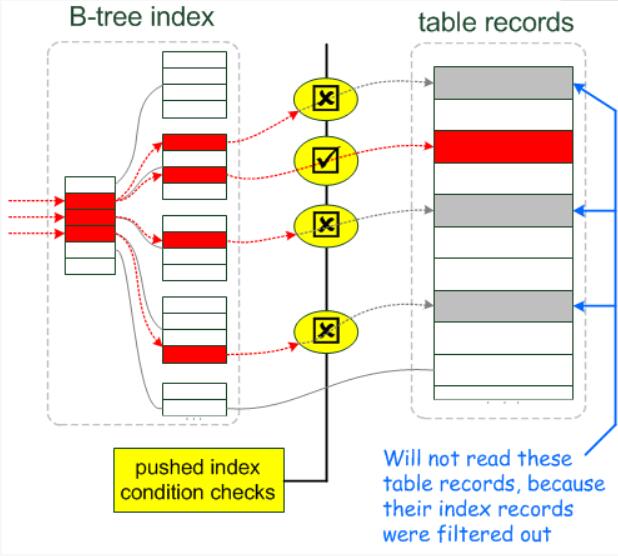
](https://zhangxin-blog.oss-cn-beijing.aliyuncs.com/blog/mysql/zzyy/mq44.jpg)

官方解释:https://dev.mysql.com/doc/refman/5.6/en/index-condition-pushdown-optimization.html

3.不在索引列上左任何操作 (计算、函数、(自动 or 手动)类型转换), 会导致索引失效而转向全表扫描
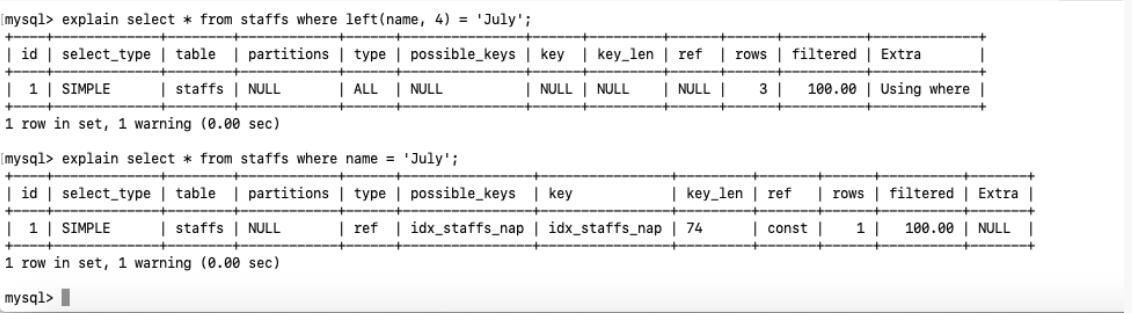
](https://zhangxin-blog.oss-cn-beijing.aliyuncs.com/blog/mysql/zzyy/mq45.jpg)

4.存储引擎不能使用索引中范围条件右边的列
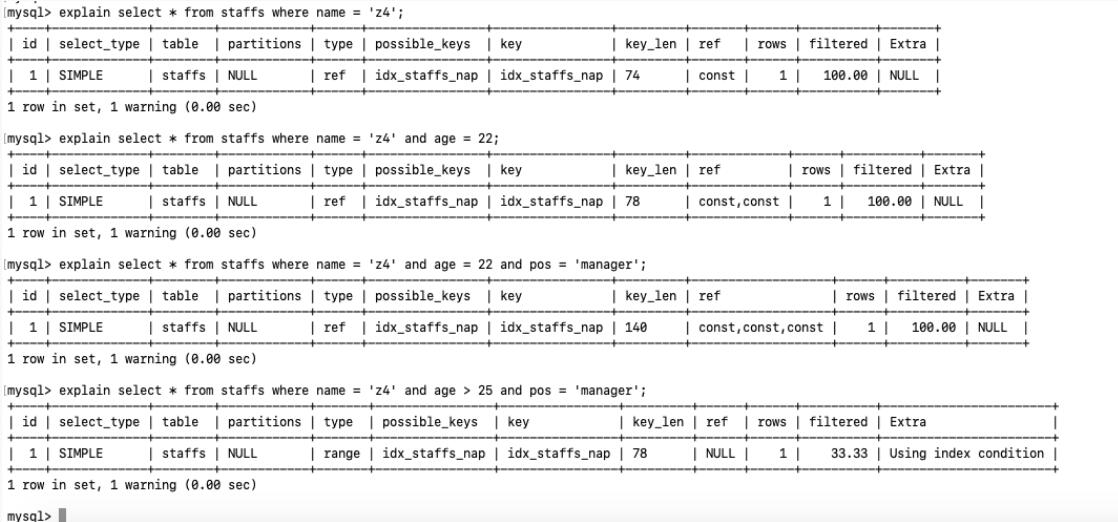
](https://zhangxin-blog.oss-cn-beijing.aliyuncs.com/blog/mysql/zzyy/mq46.jpg)

在 5.6 +, ICP特征可以使用到 Using index condition

**5.尽量使用覆盖索引(只访问索引的查询(索引列和查询列一致)),减少 select ***
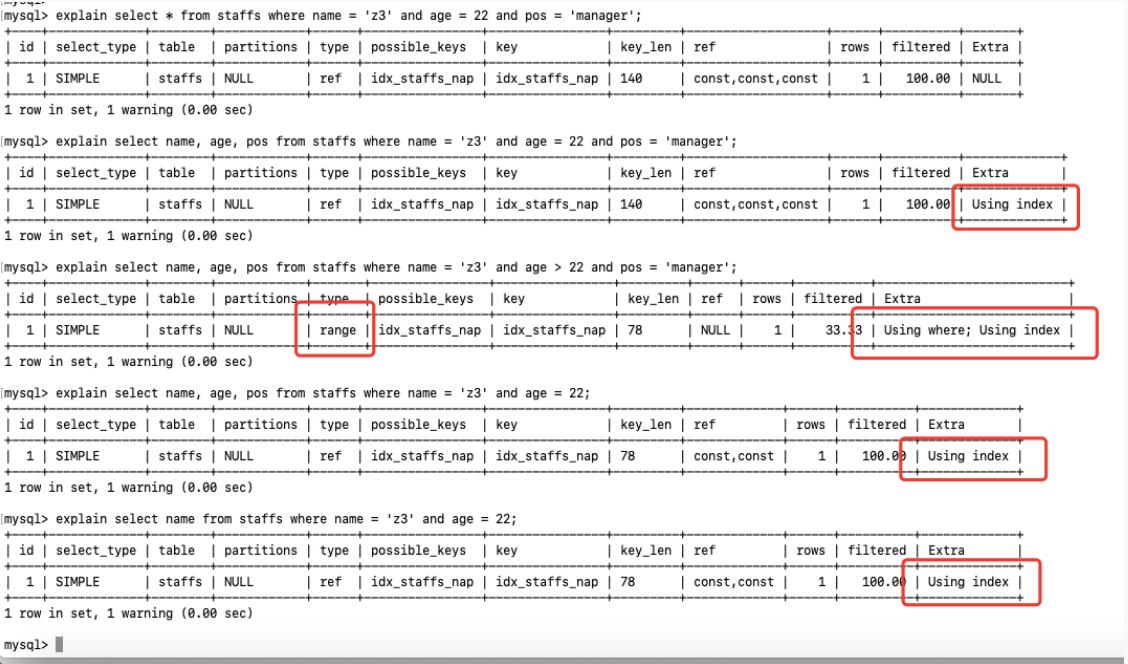
](https://zhangxin-blog.oss-cn-beijing.aliyuncs.com/blog/mysql/zzyy/mq47.jpg)

6.mysql 在适应不等于 (!= 或者 <>)的时候无法使用索引会导致全表扫描
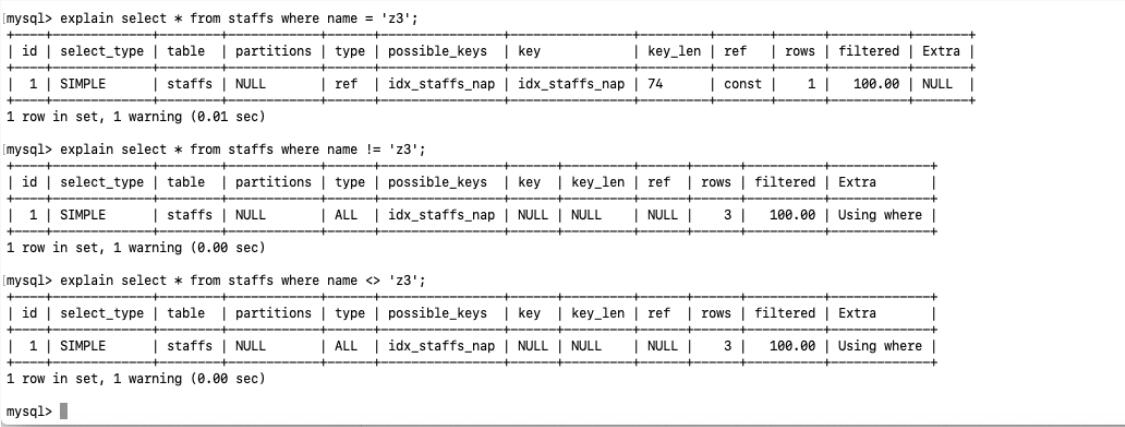
](https://zhangxin-blog.oss-cn-beijing.aliyuncs.com/blog/mysql/zzyy/mq48.jpg)

7.is null, is not null 也无法使用索引
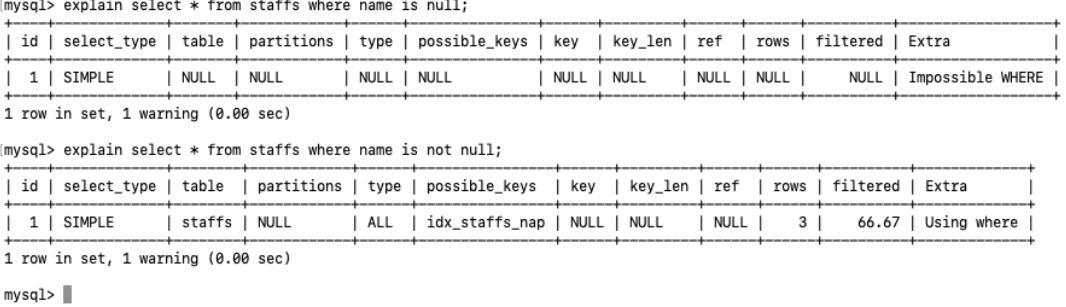
](https://zhangxin-blog.oss-cn-beijing.aliyuncs.com/blog/mysql/zzyy/mq49.jpg)

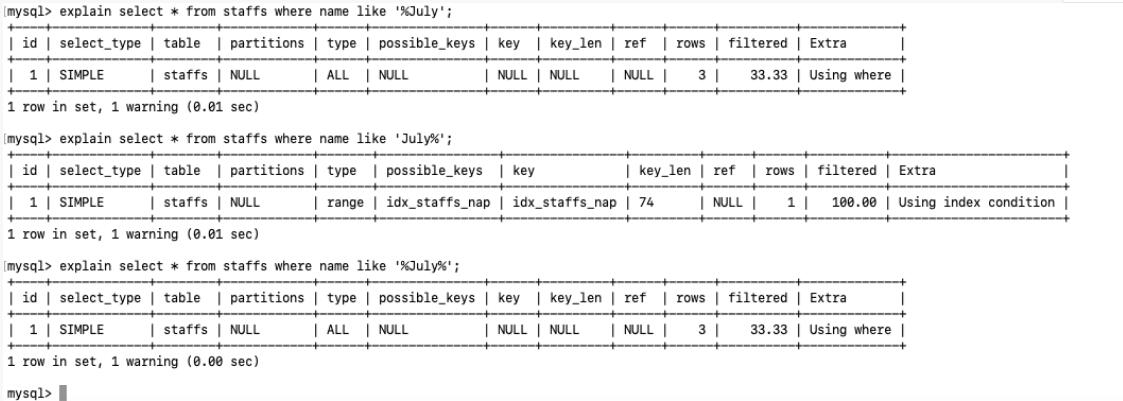
8.like 以通配符开头 (’%abc …’)mysql 索引失效会变成全表扫描的操作

问题:解决 like ‘% 字符串 %’ 索引不被使用的方法 ??

1
2
3
4
5
6
7
8
9
10
11
12
13
14
15
16
17
18
19
20
21
22
23
24
25
26
27
28
29
30
31
#like 关键字 '%%'
create table `tb_user` (
`id` int(11) not null auto_increment,
`name` varchar(20) default null,
`age` int(11) default null,
`email` varchar(20) default null,
primary key(id)
) engine = innodb auto_increment=1 default charset = utf8;

select * from `tb_user`;
#drop table `tb_user`;

insert into tb_user(name, age, email) values ('1aa1', 21, 'b@163.com');
insert into tb_user(name, age, email) values ('2aa2', 222, 'a@163.com');
insert into tb_user(name, age, email) values ('3aa3', 256, 'c@163.com');
insert into tb_user(name, age, email) values ('4aa4', 21, 'd@163.com');

#before index
explain select name, age from tb_user where name like '%aa%';

explain select id from tb_user where name like '%aa%';
explain select name from tb_user where name like '%aa%';
explain select age from tb_user where name like '%aa%';

explain select id, name from tb_user where name like '%aa%';
explain select id, name, age from tb_user where name like '%aa%';
explain select name, age from tb_user where name like '%aa%';

#create index
create index idx_user_na on tb_user(name, age);
explain select id, name, age, email from tb_user where name like '%aa%';

](https://zhangxin-blog.oss-cn-beijing.aliyuncs.com/blog/mysql/zzyy/mq50.jpg)

9.字符串不加单引号索引失效
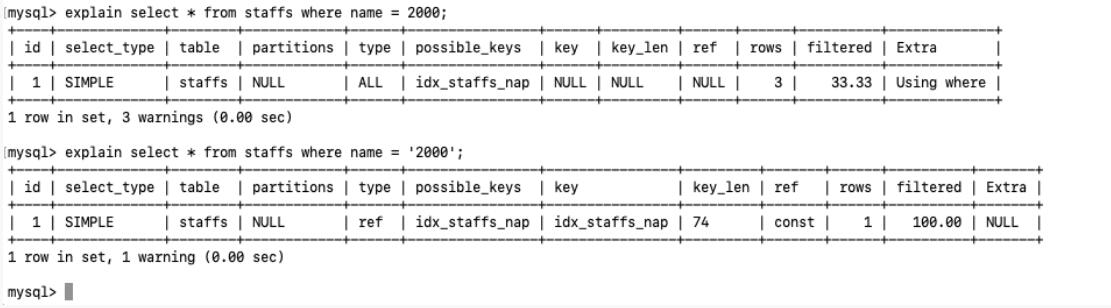
](https://zhangxin-blog.oss-cn-beijing.aliyuncs.com/blog/mysql/zzyy/mq51.jpg)

10.少用 or, 用它来连接时会索引失效

](https://zhangxin-blog.oss-cn-beijing.aliyuncs.com/blog/mysql/zzyy/mq52.jpg)

11.小总结
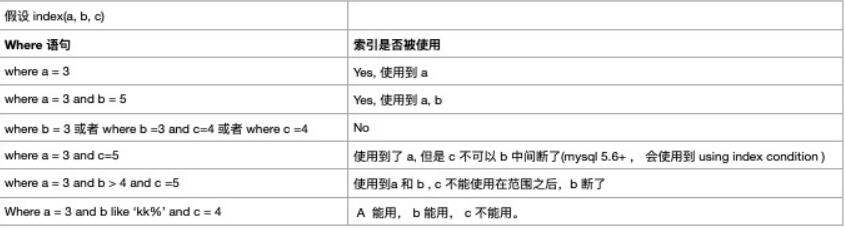
](https://zhangxin-blog.oss-cn-beijing.aliyuncs.com/blog/mysql/zzyy/mq53.jpg)
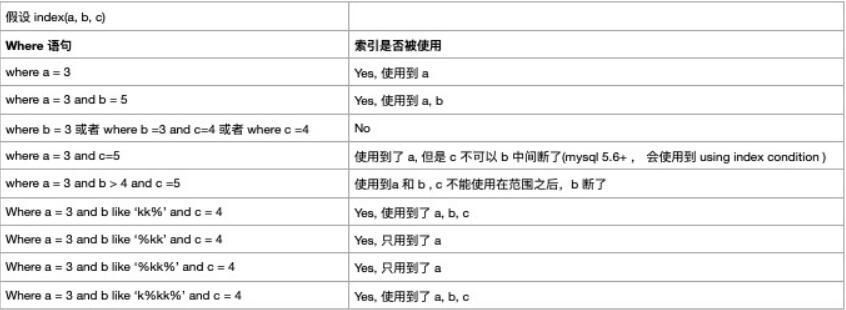
](https://zhangxin-blog.oss-cn-beijing.aliyuncs.com/blog/mysql/zzyy/mq54.jpg)

1.2.3 面试题讲解

SQL 题目

1
2
3
4
5
6
7
8
9
10
11
12
13
14
15
16
17
18
19
#【建表语句】
use oemp;

create table test03 (
id int primary key not null auto_increment,
c1 varchar(10),
c2 varchar(10),
c3 varchar(10),
c4 varchar(10),
c5 varchar(10)
);

insert into test03 (c1, c2, c3, c4, c5) values ('a1', 'a2', 'a3', 'a4', 'a5');
insert into test03 (c1, c2, c3, c4, c5) values ('b1', 'b2', 'b3', 'b4', 'b5');
insert into test03 (c1, c2, c3, c4, c5) values ('c1', 'c2', 'c3', 'c4', 'c5');
insert into test03 (c1, c2, c3, c4, c5) values ('d1', 'd2', 'd3', 'd4', 'd5');
insert into test03 (c1, c2, c3, c4, c5) values ('e1', 'e2', 'e3', 'e4', 'e5');

select * from test03;

解题和分析

1
2
3
4
5
6
7
8
9
10
11
12
13
14
15
16
17
18
19
20
21
22
23
24
25
26
27
28
29
30
31
32
33
34
35
36
37
38
39
40
41
42
43
44
45
46
47
48
49
50
51
52
53
54
55
56
57
58
59
60
61
62
63
64
65
66
67
68
69
70
71
72
73
74
75
76
77
#【建表语句】
use oemp;

create table test03 (
id int primary key not null auto_increment,
c1 varchar(10),
c2 varchar(10),
c3 varchar(10),
c4 varchar(10),
c5 varchar(10)
);

insert into test03 (c1, c2, c3, c4, c5) values ('a1', 'a2', 'a3', 'a4', 'a5');
insert into test03 (c1, c2, c3, c4, c5) values ('b1', 'b2', 'b3', 'b4', 'b5');
insert into test03 (c1, c2, c3, c4, c5) values ('c1', 'c2', 'c3', 'c4', 'c5');
insert into test03 (c1, c2, c3, c4, c5) values ('d1', 'd2', 'd3', 'd4', 'd5');
insert into test03 (c1, c2, c3, c4, c5) values ('e1', 'e2', 'e3', 'e4', 'e5');

select * from test03;

#索引建立
create index idx_test03_c1234 on test03(c1, c2, c3, c4);
show index from test03;

#问题:我们创建了复合索引 idx_test03_c1234, 根据一下 SQL 分析下索引使用情况?

explain select * from test03 where c1 = 'a1';
explain select * from test03 where c1 = 'a1' and c2 = 'a2';
explain select * from test03 where c1 = 'a1' and c2 = 'a2' and c3 = 'a3';
explain select * from test03 where c1 = 'a1' and c2 = 'a2' and c3 = 'a3' and c4 = 'a4';

#1) Yes
explain select * from test03 where c1='a1' and c2='a2' and c3='a3' and c4='a4';

#2) Yes
explain select * from test03 where c1='a1' and c2='a2' and c4='a4' and c3='a3';

#3) Yes(5.6+ Using index condition)
explain select * from test03 where c1='a1' and c2='a2' and c3>'a3' and c4='a4';

#4) Yes(5.6+ Using index condition)
explain select * from test03 where c1='a1' and c2='a2' and c4>'a4' and c3='a3';

#5)Yes(5.6+ Using index condition)
explain select * from test03 where c1='a1' and c2='a2' and c4='a4' order by c3;
#c3 的作用在于排序而不是查找

#6)Yes(5.6+ Using index condition)
explain select * from test03 where c1='c1' and c2='c2' order by c3;

#7) Yes(5.6+ Using index condition)
explain select * from test03 where c1='c1' and c2='c2' order by c4;

#8) Yes(5.6+ Using index condition, Using where)
explain select * from test03 where c1='a1' and c5='a5' order by c2, c3;

#9) NO (Using index condition; Using where; Using filesort)
explain select * from test03 where c1='a1' and c5='a5' order by c3, c2;

#10) Yes(5.6+ Using index condition)
explain select * from test03 where c1='a1' and c2='a2' order by c2, c3;

#11) Yes(Using index condition; Using where)
explain select * from test03 where c1='a1' and c2='a2' and c5='a5' order by c2, c3;

#12) Yes(5.6+ Using index condition)
explain select * from test03 where c1='a1' and c2='a2' and c5='a5' order by c3, c2;
#本例有常量c2的情况,和#9对比

#13) No (Using index condition; Using where; Using filesort)
explain select * from test03 where c1='a1' and c5='a5' order by c3, c2;

#14) Yes(Using where; Using index)
explain select c2, c3 from test03 where c1='a1' and c4='a4' group by c2, c3;

#15) NO (Using where; Using index; Using temporary; Using filesort)
explain select c2, c3 from test03 where c1='a1' and c4='a4' group by c3, c2;

定值、范围还是排序,一般order by是给一个范围

group by 基本上都是需要排序的, 会有临时表产生

1.3 一般性建议

1
2
3
4
对于单键索引,尽量选择针对当前 query 过滤更好的索引
在选择索引的时候,当前 query 中过滤性最好的字段顺序
在选择组合索引的时候,尽量选择可以能够包含当前query 中的where 子句
尽可能通过分析统计信息和调整 query 的写法来达到选择适合索引的目的

1.4 总结

1
2
3
4
全值匹配我最爱,最左匹配前缀要准守
带头大哥不能死,中间兄弟不能断
索引列上少计算,范围之后全失效
LIKE 百分写最右, 覆盖索引不写星

2. 查询截取分析

2.1 查询优化

2.1.1 永远小表驱动大表,类似嵌套循环 Nested Loop
1
2
3
4
5
6
7
8
9
10
11
12
13
14
15
16
17
18
19
20
21
22
23
24
25
26
# 优化原则:小表驱动大表, 即小的数据集合驱动大的数据集合
##################### 原理 (RBO)###############

select * from A where id in (select id from B)
#等价于
for select id from B
for select id from A where A.id = B.id

# 当B表的数据集必须小于A表的数据集时,用in 优于 exists
select * from A where exists (select 1 from B where B.id = A.id)
#等价于
for select id from A
for select id from B where B.id = A.id

#当 A 表的数据集系小于表的数据集, 用 exists 优于 in
#注意: A与B表的id 字段应该建立索引


## exists
select ... from table where exists (subquery);
# 该语法可以理解为:将主查询的数据,放到子查询中做条件验证,根据验证结果(TRUE 或者 FALSE)来决定主查询数据结果是否得到保留。

## 提示
# 1,EXISTS (subquery) 只返回 True 或 False , 因此查询的 SELET * 也可以是SELET 1 或其他, 官方说法是执行时会忽略SELECT 清单, 因此没有区别
# 2. EXISTS 子查询的实际执行过程可能经过了优化而不是我们理解的逐条比对,如果担忧效率问题,可以进行实际检验以确定是否有效率问题。
# 3. EXISTS 子查询往往也可以使用条件表达式、其他子查询或者 JOIN 来代替,何种最优化需要具体分析。

in 和 exstis

1
2
3
explain select * from tb_emp where exists (select 1 from tb_dept where tb_dept.id = tb_emp.dept_id);

explain select * from tb_emp where tb_emp.dept_id in (select id from tb_dept);

2.1.2 order by 关键字优化

order by 子句,尽量使用 index 方式排序, 避免使用filesort 方式排序

1
2
3
4
5
6
7
8
9
10
11
12
13
14
# 建表SQL
create table tb_a(
id int primary key not null auto_increment,
age int,
birth timestamp not null
);

insert into tb_a(age, birth) values (22, now());
insert into tb_a(age, birth) values (23, now());
insert into tb_a(age, birth) values (24, now());

create index idx_a_ab on tb_a(age, birth);

select * from tb_a;

CASE

](https://zhangxin-blog.oss-cn-beijing.aliyuncs.com/blog/mysql/zzyy/mq55.jpg)

1
2
3
4
5
6
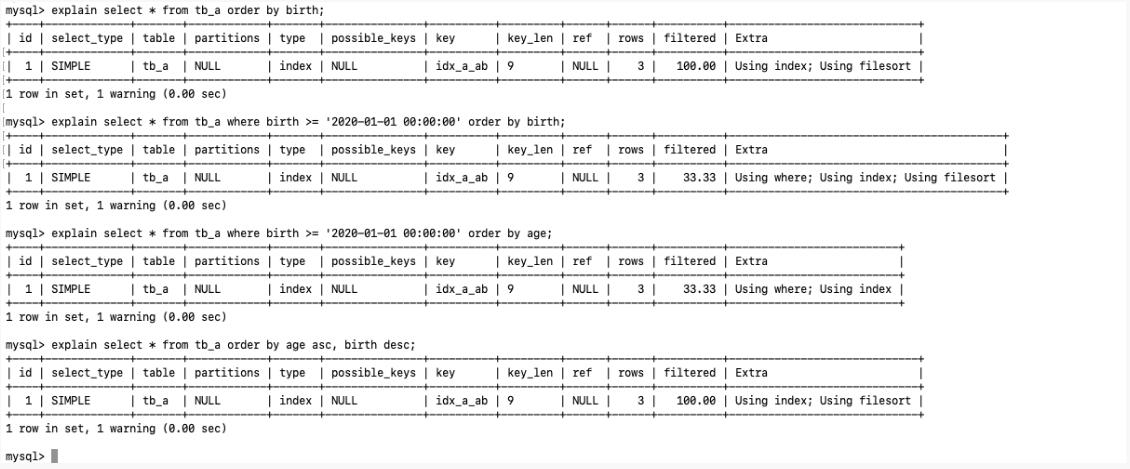
MySQL 支持两种方式的排序, FileSort 和 Index,  Index 效率高
指 MySQL 扫描索引本省完成排序, FlleSort 方式效率低

ORDER BY 满足的两种情况, 会使用 Index 方式排序
ORDER BY 语句使用索引最左前列
使用 Where 子句与 Order By 子句条件列组合满足索引左前列

尽可能在索引列上完成排序操作,准照索引建立的最佳左前缀

](https://zhangxin-blog.oss-cn-beijing.aliyuncs.com/blog/mysql/zzyy/mq56.jpg)

优化策略
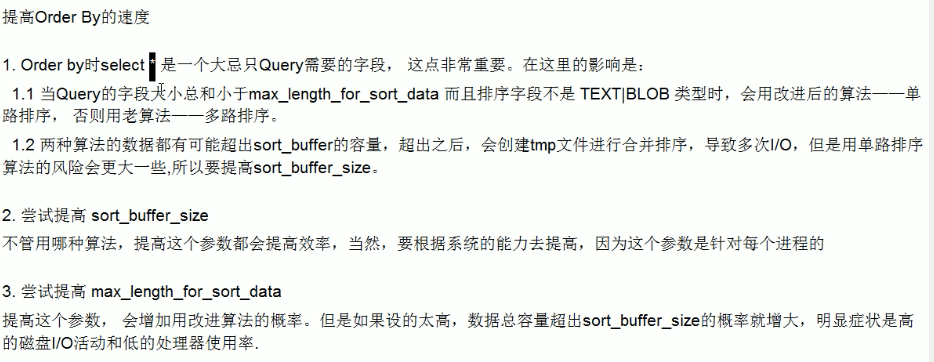
](https://zhangxin-blog.oss-cn-beijing.aliyuncs.com/blog/mysql/zzyy/mq57.png)
小总结
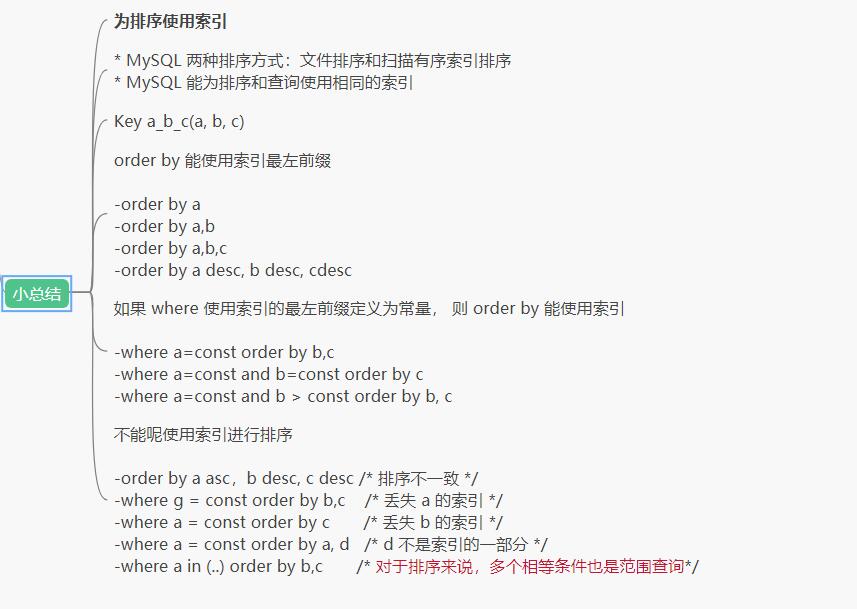
](https://zhangxin-blog.oss-cn-beijing.aliyuncs.com/blog/mysql/zzyy/mq58.jpg)

2.1.3 group by 关键字优化

1
2
3
4
5
6
group by 实质是先排序后分组, 准照索引建的最佳左前缀

当无法使用索引列,增大 max_length_for_sort_data 参数的设置 + 增大 sort_buffer_size 参数的设置

where 高于 having , 能写在 where 中的限定就不要写在 having

2.2 慢日志查询

2.2.1 是什么

1
2
3
4
5
6
7
8
9
MySQL 的慢查询日志是 MySQL 提供的一种日志记录,它用来记录在 MySQL 中响应时间超过阈值的语句,
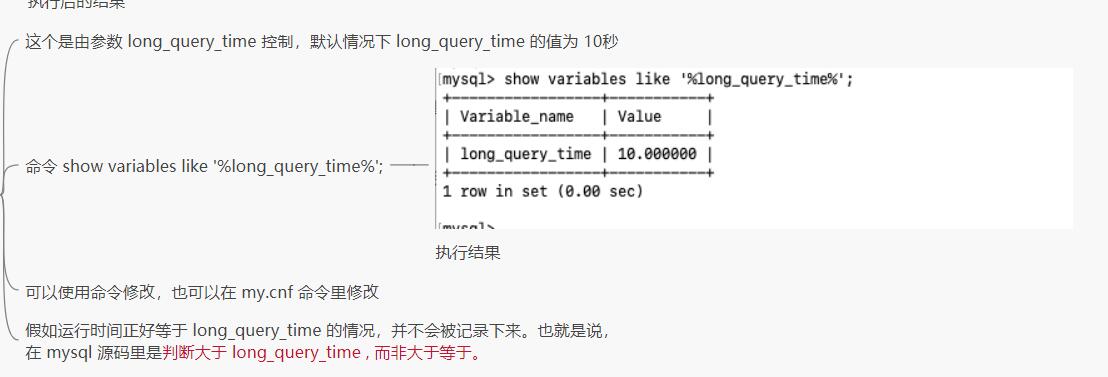
具体指的 运行时间超过 long_query_time 值的 SQL, 则被记录到慢查询日志中

具体值运行时间超过 long_query_time 的SQL, 则会别记录到查询日志中。 long_query_time 的默认时间为10
是指运行10秒以上的语句

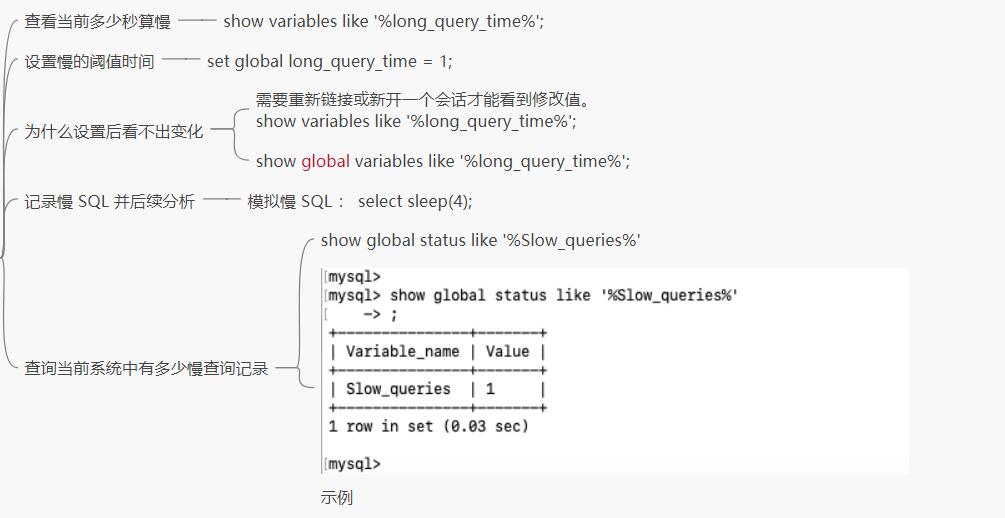
由它来查看哪些 SQL 超出了我们的最大忍耐时间值, 比如一条 SQL 执行超过了5 秒, 我们就算慢 SQL
希望能收集超过 5秒的 SQL, 结合之前的 explain 进行全面分析

2.2.2 怎么玩

说明

1
2
3
默认情况下,MySQL 数据库没有开启慢查询日志,需要我们来手动设置这个参数。
当让,如果不是调优需要的话,一般不建议启动该参数, 因为开启慢查询日志或多或少会带来一定的性能影响。
慢查询日志支持将日志记录写入文件。

查看是否开启以及如何开启

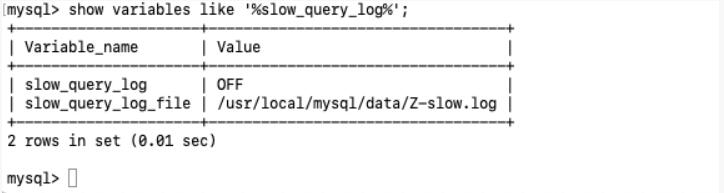
  • 默认—-show variables like ‘%slow_query_log%’;

默认情况下 slow_query_log 的为 off , 表示慢查询日志是禁用的,
可以通过设置 slow_query_log 的值来开启
](https://zhangxin-blog.oss-cn-beijing.aliyuncs.com/blog/mysql/zzyy/mq59.jpg)

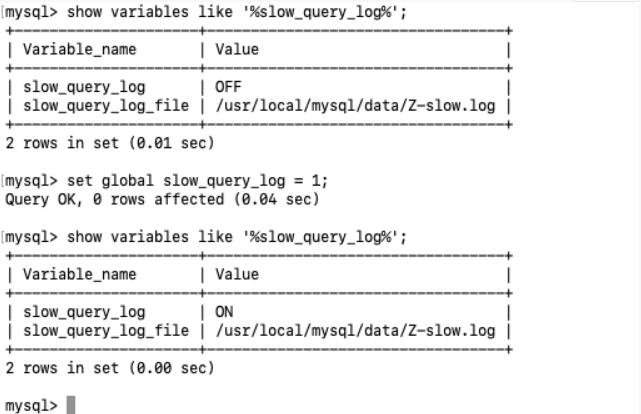
  • 开启—-set global slow_query_log = 1;

使用了 set global slow_query_log = 1; 开启了慢查询日志只对当前数据库生效。
如果 mysql 重启后会失效
](https://zhangxin-blog.oss-cn-beijing.aliyuncs.com/blog/mysql/zzyy/mq60.jpg)

那么慢查询开启了慢查询日志后, 怎么样的 SQL 才会记录到慢查询日志中呢?
](https://zhangxin-blog.oss-cn-beijing.aliyuncs.com/blog/mysql/zzyy/mq62.jpg)

Case
](https://zhangxin-blog.oss-cn-beijing.aliyuncs.com/blog/mysql/zzyy/mq63.jpg)

2.2.3 日志分析工具 mysqldumpslow

在生产环境中,如果需要手工分析日志,查找、分析SQL、显然是个体力活,MySQL提供了日志分析工具 mysqldumpslow。

查看 mysqldumpslow 的帮助信息
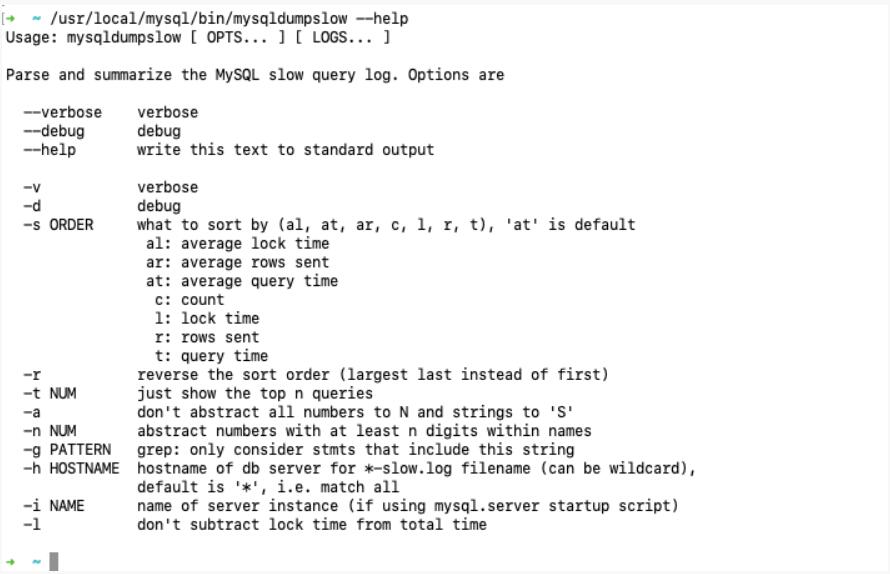
](https://zhangxin-blog.oss-cn-beijing.aliyuncs.com/blog/mysql/zzyy/mq64.jpg)

  • s: 是表示按照何种方式排序;
  • c: 访问次数
  • l: 锁定时间
  • r: 返回记录
  • t: 查询时间
  • al: 平均锁定时间
  • ar: 平均返回记录数
  • at: 平均查询时间
  • t: 即为返回前面多少条的数据
  • g: 后面搭配一个正则匹配模式,大小写不敏感

工作常用参考

1
2
3
4
5
6
7
8
9
10
11
得到返回记录集最多的 10SQL
mysqldumpslow -s r -t 10 /var/bin/mysql/xx-slow.log

得到访问次数最多的 10SQL
mysqldumpslow -s c -t 10 /var/bin/mysql/xx-slow.log

得到按照时间排序的前10条里面含有左连接的查询语句
mysqldumpslow -s c -t 10 -g "left join" /var/bin/mysql/xx-slow.log

另外建议在使用这些命令 结合 | 和 more 使用,否则有可能出现爆屏现象
mysqldumpslow -s r -t 10 /var/bin/mysql/xx-slow.log | more

2.2.4 批量数据脚本

插入 1000w 数据

1.建表

1
2
3
4
5
6
7
8
9
10
11
12
13
14
15
16
17
18
19
20
21
22
23
create database big_data;
use big_data;

# dept
create table dept(
id int primary key auto_increment,
deptno mediumint not null default 0,
dname varchar(20) not null default '',
loc varchar(13) not null default ''
) engine = innodb default charset = utf8;

# emp
create table emp(
id int primary key auto_increment,
empno mediumint not null default 0,
ename varchar(20) not null default '',
job varchar(9) not null default '' comment '工作',
mgr mediumint not null default 0 comment '上级编号',
hirdate date not null comment '入职时间',
sal decimal(18,2) not null comment '薪水',
comm decimal(18,2) not null comment '红利',
deptno mediumint not null default 0 comment '部门编号'
) engine = innodb default charset = utf8;

2.设置参数 log_bin_trust_function_creators

1
2
3
4
5
6
7
8
9
10
11
12
13
14
创建函数, 假如报错:this function has none of DETERMINISTIC ...

# 由于开启过慢查询日志, 因为我们开启了bin-log, 我们就必须为我们的 function 指定一个参数。

show variables like 'log_bin_trust_function_creators'

set global log_bin_trust_function_creators = 1

这样添加参数后,如果mysql 重启,上述参数又会消失, 永久方法:

windows 下 my.ini 加上 log_bin_trust_function_creators = 1

liunx 下 /etc/my.conf 下 my.conf[mysqld] 加上 log_bin_trust_function_creators = 1

3.创建函数,保证每条数据都不同

随机字符串

1
2
3
4
5
6
7
8
9
10
11
12
13
14
15
16
17
18
19
20
21
 

DELIMITER $$
CREATE FUNCTION rand_string(n INT) RETURNS VARCHAR(255)
BEGIN ##方法开始
DECLARE chars_str VARCHAR(100) DEFAULT 'abcdefghijklmnopqrstuvwxyzABCDEFJHIJKLMNOPQRSTUVWXYZ';
##声明一个 字符窜长度为 100 的变量 chars_str ,默认值
DECLARE return_str VARCHAR(255) DEFAULT '';
DECLARE i INT DEFAULT 0;
##循环开始
WHILE i < n DO
SET return_str =CONCAT(return_str,SUBSTRING(chars_str,FLOOR(1+RAND()*52),1));
##concat 连接函数 ,substring(a,index,length) 从index处开始截取
SET i = i + 1;
END WHILE;
RETURN return_str;
END $$

#假如要删除
#drop function rand_string;

随机产生部门编号

1
2
3
4
5
6
7
8
9
10
11
12
13
14
 
#用于随机产生部门编号
DELIMITER $$
CREATE FUNCTION rand_num( )
RETURNS INT(5)
BEGIN
DECLARE i INT DEFAULT 0;
SET i = FLOOR(100+RAND()*10);
RETURN i;
END $$

#假如要删除
#drop function rand_num;

4.创建存储过程
创建往emp表中插入数据的存储过程

1
2
3
4
5
6
7
8
9
10
11
12
13
14
15
16
17
18
19
20
21
 

DELIMITER $$
CREATE PROCEDURE insert_emp10000(IN START INT(10),IN max_num INT(10))
BEGIN
DECLARE i INT DEFAULT 0;
#set autocommit =0 把autocommit设置成0 ;提高执行效率
SET autocommit = 0;
REPEAT ##重复
SET i = i + 1;
INSERT INTO emp10000 (empno, ename ,job ,mgr ,hiredate ,sal ,comm ,deptno ) VALUES ((START+i) ,rand_string(6),'SALESMAN',0001,CURDATE(),FLOOR(1+RAND()*20000),FLOOR(1+RAND()*1000),rand_num());
UNTIL i = max_num ##直到 上面也是一个循环
END REPEAT; ##满足条件后结束循环
COMMIT; ##执行完成后一起提交
END $$

#删除
# DELIMITER ;
# drop PROCEDURE insert_emp;


创建往dept表中插入数据的存储过程

1
2
3
4
5
6
7
8
9
10
11
12
13
14
15
16
17
18
19
 
#执行存储过程,往dept表添加随机数据
DELIMITER $$
CREATE PROCEDURE insert_dept(IN START INT(10),IN max_num INT(10))
BEGIN
DECLARE i INT DEFAULT 0;
SET autocommit = 0;
REPEAT
SET i = i + 1;
INSERT INTO dept (deptno ,dname,loc ) VALUES (START +i ,rand_string(10),rand_string(8));
UNTIL i = max_num
END REPEAT;
COMMIT;
END $$

#删除
# DELIMITER ;
# drop PROCEDURE insert_dept;

5.调用存储过程

dept

1
2
3
4
5
6
7
8
9
10
# dept 表中插入数据
call insert_dept(100, 1000000);
call insert_dept(2000000, 1000000);
call insert_dept(3000000, 1000000);
call insert_dept(4000000, 1000000);
call insert_dept(5000000, 1000000);
call insert_dept(6000000, 1000000);
call insert_dept(7000000, 1000000);
call insert_dept(8000000, 1000000);
call insert_dept(9000000, 1000000);

emp

1
2
3
4
5
6
7
8
9
10
11
# emp 表中插入数据
call insert_emp(100, 1000000);
call insert_emp(2000000, 1000000);
call insert_emp(3000000, 1000000);
call insert_emp(4000000, 1000000);
call insert_emp(5000000, 1000000);
call insert_emp(6000000, 1000000);
call insert_emp(7000000, 1000000);
call insert_emp(8000000, 1000000);
call insert_emp(9000000, 1000000);
call insert_emp(10000000, 1000000);

2.4 Show Profile

1
2
3
**是什么**:是mysql 提供用来分析当前会话中语句执行的资源消耗情况。可以用于 SQL 的调优的测量
**官网**:https://dev.mysql.com/doc/refman/5.7/en/show-profile.html
默认情况下, 参数处于关闭状态,并且保存最近15次的运行结果

2.4.1 分析步骤

](https://zhangxin-blog.oss-cn-beijing.aliyuncs.com/blog/mysql/zzyy/mq65.jpg)

4.查看运行结果:show profiles;
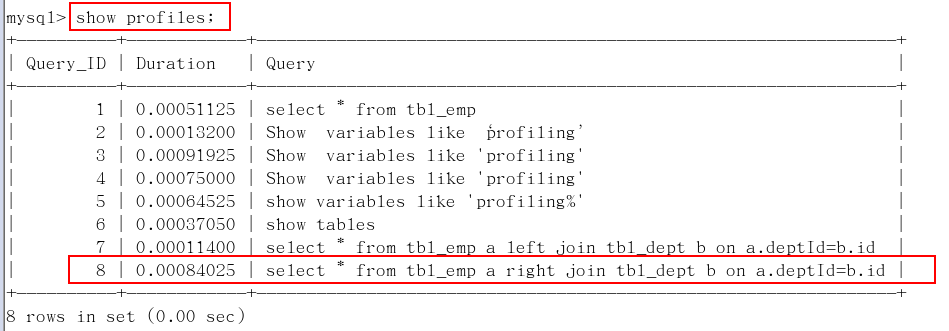
](https://zhangxin-blog.oss-cn-beijing.aliyuncs.com/blog/mysql/zzyy/mq66.png)

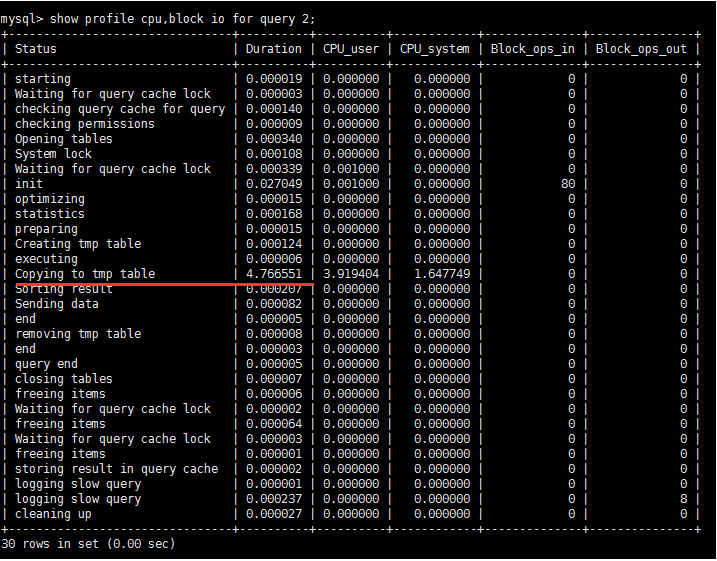
5.诊断SQL : show profile cpu, block io for query 上一步前面的问题 SQL 数字号码;
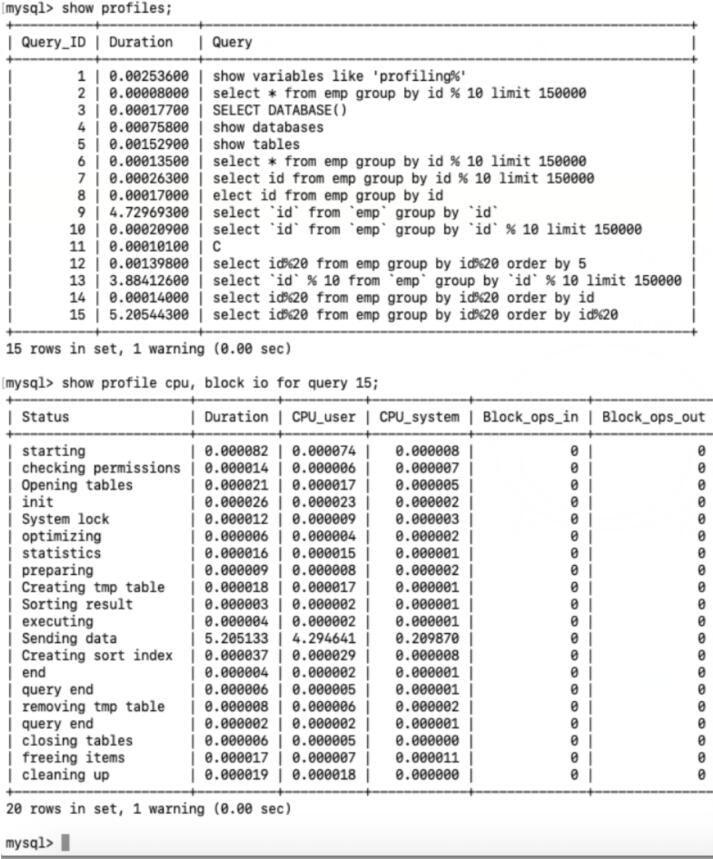
](https://zhangxin-blog.oss-cn-beijing.aliyuncs.com/blog/mysql/zzyy/mq67.jpg)

参数备注

1
2
3
4
5
6
7
8
9
10
11
12
13
14
 

type:
| ALL --显示所有的开销信息
| BLOCK IO --显示块IO相关开销
| CONTEXT SWITCHES --上下文切换相关开销
| CPU --显示CPU相关开销信息
| IPC --显示发送和接收相关开销信息
| MEMORY --显示内存相关开销信息
| PAGE FAULTS --显示页面错误相关开销信息
| SOURCE --显示和Source_function,Source_file,Source_line相关的开销信息
| SWAPS --显示交换次数相关开销的信息


6.日常开发需要注意的事项

converting HEAP to MyISAM 查询结果太大,内存都不够用了往磁盘上面搬了

Create tmp table 创建临时表
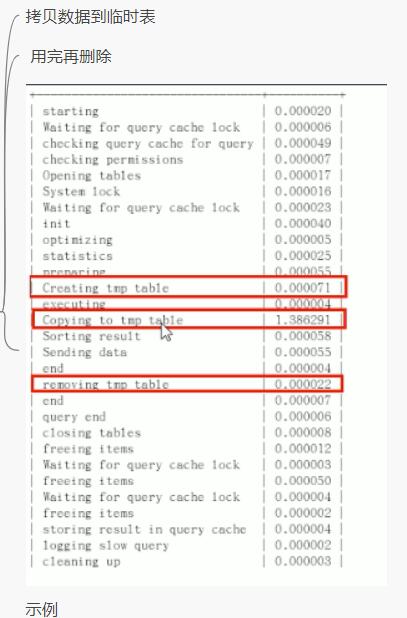
](https://zhangxin-blog.oss-cn-beijing.aliyuncs.com/blog/mysql/zzyy/mq68.jpg)

Copying to tmp table on disk 把内存中的临时表复制到磁盘, 危险!!!!
](https://zhangxin-blog.oss-cn-beijing.aliyuncs.com/blog/mysql/zzyy/mq67.png)

bocked

2.5 全局查询日志(测试环境使用)

配置启用

1
2
3
4
5
6
7
8
在  mysql 的 my.cnf 中设置如下:
# 开启
general_log=1
#记录日志文件的路径
general_log_file=/path/logfile
#输出格式
log_output=FILE

编码启用

1
2
3
4
set global general_log = 1;
set global log_output='TABLE';
此后, 你所编写的 SQL 语句,都将会记录到 mysql 库的 general_log 表中,可以用如下命令查看
select * from mysql.general_log;

永远不要在生产环境启用这个功能!!!