摘要###
Spring Cloud Zuul 是Spring Cloud Netflix 子项目的核心组件之一,可以作为微服务架构中的API网关使用,支持动态路由与过滤功能,本文将对其用法进行详细介绍。
1. Zuul简介
API网关为微服务架构中的服务提供了统一的访问入口,客户端通过API网关访问相关服务。API网关的定义类似于设计模式中的门面模式,它相当于整个微服务架构中的门面,所有客户端的访问都通过它来进行路由及过滤。它实现了请求路由、负载均衡、校验过滤、服务容错、服务聚合等功能。
Zuul包含了对请求的路由和过滤两个最主要的功能:
其中路由功能负责将外部请求转发到具体的微服务实例上,是实现外部访问统一入口的基础而过滤器功能则负责对请求的处理过程进行干预,是实现请求校验、服务聚合等功能的基础.Zuul和Eureka进行整合,将Zuul自身注册为Eureka服务治理下的应用,同时从Eureka中获得其他微服务的消息,也即以后的访问微服务都是通过Zuul跳转后获得。
注意:Zuul服务最终还是会注册进Eureka
提供=代理+路由+过滤三大功能
在pom.xml中添加相关依赖
1
2
3
4
5
6
7
8
9
| <dependency>
<groupId>org.springframework.cloud</groupId>
<artifactId>spring-cloud-starter-netflix-eureka-client</artifactId>
</dependency>
<dependency>
<groupId>org.springframework.cloud</groupId>
<artifactId>spring-cloud-starter-netflix-zuul</artifactId>
</dependency>
|
application.yml
1
2
3
4
5
6
7
8
9
10
11
12
13
14
| server:
port: 8801
spring:
application:
name: zuul-proxy
eureka:
client:
register-with-eureka: true
fetch-registry: true
service-url:
defaultZone: http://localhost:8001/eureka/
|
启动类
1
2
3
4
5
6
7
8
9
10
| @EnableZuulProxy
@EnableDiscoveryClient
@SpringBootApplication
public class ZuulProxyApplication {
public static void main(String[] args) {
SpringApplication.run(ZuulProxyApplication.class, args);
}
}
|
默认路由规则
Zuul和Eureka结合使用,可以实现路由的自动配置,自动配置的路由以服务名称为匹配路径,相当于如下配置:
1
2
3
4
5
6
7
8
|
zuul:
routes:
user-service:
path: /user-service/**
feign-service:
path: /feign-service/**
|
1
2
3
4
5
6
|
zuul:
routes:
user-service:
path: /user-service/**
|
1
2
3
4
5
6
7
|
zuul:
routes:
user-service:
path:/user-service/**
url: http://localhost:8081
|
1
2
3
4
5
6
7
|
zuul:
routes:
user-service:
path:/user-service/**
serviceId: user-service
|
1
2
3
4
5
6
7
|
zuul:
routes:
user-service: /user-service/**
|
Zuul常用配置
1
2
3
4
5
6
7
8
9
10
11
12
13
14
| zuul:
routes:
user-service:
path: /userService/**
feign-service:
path: /feignService/**
ignored-services: user-service,feign-service
prefix: /proxy
sensitive-headers: Cookie,Set-Cookie,Authorization
add-host-header: true
retryable: true
PreLogFilter:
pre:
disable: false
|
2. 过滤器
1
| 路由与过滤是Zuul的两大核心功能,路由功能负责将外部请求转发到具体的服务实例上去,是实现统一访问入口的基础,过滤功能负责对请求过程进行额外的处理,是请求校验过滤及服务聚合的基础。
|
过滤器类型
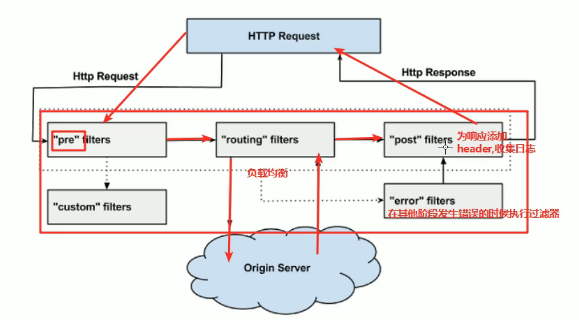
- pre:在请求被路由到目标服务前执行,比如权限校验、打印日志等功能;
- routing:在请求被路由到目标服务时执行,这是使用Apache HttpClient或Netflix Ribbon构建和发送原始HTTP请求的地方;
- post:在请求被路由到目标服务后执行,比如给目标服务的响应添加头信息,收集统计数据等功能;
- error:请求在其他阶段发生错误时执行
过滤器的生命周期
1
| 下图描述了一个HTTP请求到达API网关后,如何在各种不同类型的过滤器中流转的过程。
|

自定义过滤器
1
| 这是一个前置过滤器,用于在请求路由到目标服务前打印请求日志
|
1
2
3
4
5
6
7
8
9
10
11
12
13
14
15
16
17
18
19
20
21
22
23
24
25
26
27
28
29
30
31
32
33
34
35
36
37
38
39
40
41
42
43
44
| @Component
public class PreLogFilter extends ZuulFilter {
private static final Logger LOGGER = LoggerFactory.getLogger(PreLogFilter.class);
@Override
public String filterType() {
return "pre";
}
@Override
public int filterOrder() {
return 0;
}
@Override
public boolean shouldFilter() {
return true;
}
@Override
public Object run() throws ZuulException {
RequestContext currentContext = RequestContext.getCurrentContext();
HttpServletRequest request = currentContext.getRequest();
String remoteHost = request.getRemoteHost();
String method = request.getMethod();
String requestURI = request.getRequestURI();
LOGGER.info("Remote host:{},method:{},uri:{}", remoteHost, method, requestURI);
return null;
}
}
|
过滤器功能演示
添加过滤器后,我们访问http://localhost:8801/user-service/user/1测试下,会打印如下日志。
2019-12-27 21:45:43.445 INFO 15116 --- [nio-8801-exec-4] c.j.springcloud.filter.PreLogFilter : Remote host:0:0:0:0:0:0:0:1,method:GET,uri:/proxy/user-service/user/1