反射:框架设计的灵魂 1 2 3 4 5 6 * 框架:半成品软件。可以在框架的基础上进行软件开发,简化编码 * 反射:将类的各个组成部分封装为其他对象,这就是反射机制 * 好处: 1. 可以在程序运行过程中,操作这些对象。 2. 可以解耦,提高程序的可扩展性。
1. 获取Class对象 1 2 3 4 5 6 7 8 9 10 11 12 * 获取Class对象的方式: 1. Class.forName("全类名"):将字节码文件加载进内存,返回Class对象 * 多用于配置文件,将类名定义在配置文件中。读取文件,加载类 2. 类名.class:通过类名的属性class获取 * 多用于参数的传递 3. 对象.getClass():getClass()方法在Object类中定义着。 * 多用于对象的获取字节码的方式 * 结论: 同一个字节码文件(*.class)在一次程序运行过程中,只会被加载一次, 不论通过哪一种方式获取的Class对象都是同一个。
1 2 3 4 5 6 7 8 9 10 11 12 13 14 15 16 17 18 19 20 21 22 23 24 25 26 27 28 29 30 31 32 33 34 35 36 37 38 39 40 41 42 43 44 45 46 47 48 49 50 51 52 53 54 55 56 57 58 package cn.itcast.domain;public class Person { private String name; private int age; public String a; protected String b; String c; private String d; public Person () { } public Person (String name, int age) { this .name = name; this .age = age; } public String getName () { return name; } public void setName (String name) { this .name = name; } public int getAge () { return age; } public void setAge (int age) { this .age = age; } @Override public String toString () { return "Person{" + "name='" + name + '\'' + ", age=" + age + ", a='" + a + '\'' + ", b='" + b + '\'' + ", c='" + c + '\'' + ", d='" + d + '\'' + '}' ; } public void eat () { System.out.println("eat..." ); } public void eat (String food) { System.out.println("eat..." +food); } }
1 2 3 4 5 6 7 8 9 10 11 12 13 14 15 16 17 18 19 20 21 22 23 24 25 26 import cn.itcast.domain.Person; public static void main (String[] args) throws Exception { Class cls1 = Class.forName("cn.itcast.domain.Person" ); System.out.println(cls1); Class cls2 = Person.class; System.out.println(cls2); Person p = new Person (); Class cls3 = p.getClass(); System.out.println(cls3); System.out.println(cls1 == cls2); System.out.println(cls1 == cls3); }
代码执行结果
1 2 3 4 5 class cn .itcast.domain.Personclass cn .itcast.domain.Personclass cn .itcast.domain.Persontrue true
Class对象功能
1 2 3 4 5 6 7 8 9 10 11 12 13 14 15 16 17 18 19 20 21 22 23 * Class对象功能: * 获取功能: 1. 获取成员变量们 * Field[] getFields() :获取所有public修饰的成员变量 * Field getField(String name) 获取指定名称的 public修饰的成员变量 * Field[] getDeclaredFields() 获取所有的成员变量,不考虑修饰符 * Field getDeclaredField(String name) 2. 获取构造方法们 * Constructor<?>[] getConstructors() * Constructor<T> getConstructor(类<?>... parameterTypes) * Constructor<T> getDeclaredConstructor(类<?>... parameterTypes) * Constructor<?>[] getDeclaredConstructors() 3. 获取成员方法们: * Method[] getMethods() * Method getMethod(String name, 类<?>... parameterTypes) * Method[] getDeclaredMethods() * Method getDeclaredMethod(String name, 类<?>... parameterTypes) 4. 获取全类名 * String getName()
1.1 获取成员变量 1 2 3 4 5 6 7 8 9 * Field:成员变量 * 操作: 1. 设置值 * void set(Object obj, Object value) 2. 获取值 * get(Object obj) 3. 忽略访问权限修饰符的安全检查 * setAccessible(true):暴力反射
1 2 3 4 5 6 7 8 9 10 11 12 13 14 15 16 17 18 19 20 21 22 23 24 25 26 27 28 29 30 31 32 33 34 35 36 37 38 39 40 41 42 43 44 45 public static void main (String[] args) throws Exception { Class personClass = Person.class; Field[] fields = personClass.getFields(); for (Field field : fields) { System.out.println(field); } System.out.println("------------" ); Field a = personClass.getField("a" ); Person p = new Person (); Object value = a.get(p); System.out.println(value); a.set(p,"张三" ); System.out.println(p); System.out.println("===================" ); Field[] declaredFields = personClass.getDeclaredFields(); for (Field declaredField : declaredFields) { System.out.println(declaredField); } Field d = personClass.getDeclaredField("d" ); d.setAccessible(true ); Object value2 = d.get(p); System.out.println(value2); }
运行结果
1 2 3 4 5 6 7 8 9 10 11 12 public java.lang.String cn.itcast.domain.Person.a------------ null Person{name='null' , age=0 , a='张三' , b='null' , c='null' , d='null' } =================== private java.lang.String cn.itcast.domain.Person.nameprivate int cn.itcast.domain.Person.agepublic java.lang.String cn.itcast.domain.Person.aprotected java.lang.String cn.itcast.domain.Person.bjava.lang.String cn.itcast.domain.Person.c private java.lang.String cn.itcast.domain.Person.dnull
如果不使用暴力反射 会报错
1 2 3 4 5 6 Exception in thread "main" java.lang.IllegalAccessException: Class cn.itcast.reflect.ReflectDemo2 can not access a member of class cn .itcast.domain.Person with modifiers "private" at sun.reflect.Reflection.ensureMemberAccess(Reflection.java:102 ) at java.lang.reflect.AccessibleObject.slowCheckMemberAccess(AccessibleObject.java:296 ) at java.lang.reflect.AccessibleObject.checkAccess(AccessibleObject.java:288 ) at java.lang.reflect.Field.get(Field.java:390 ) at cn.itcast.reflect.ReflectDemo2.main(ReflectDemo2.java:79 )
1.2 获取构造方法 1 2 3 4 5 * Constructor:构造方法 * 创建对象: * T newInstance(Object... initargs) * 如果使用空参数构造方法创建对象,操作可以简化:Class对象的newInstance方法
1 2 3 4 5 6 7 8 9 10 11 12 13 14 15 16 17 18 19 20 21 22 23 24 25 26 27 28 29 30 31 32 33 34 35 36 public static void main (String[] args) throws Exception { Class personClass = Person.class; Constructor constructor = personClass.getConstructor(String.class, int .class); System.out.println(constructor); Object person = constructor.newInstance("张三" , 23 ); System.out.println(person); System.out.println("----------" ); Constructor constructor1 = personClass.getConstructor(); System.out.println(constructor1); Object person1 = constructor1.newInstance(); System.out.println(person1); Object o = personClass.newInstance(); System.out.println(o); }
1.3 获取成员方法 1 2 3 4 5 6 * Method:方法对象 * 执行方法: * Object invoke(Object obj, Object... args) * 获取方法名称: * String getName:获取方法名
1 2 3 4 5 6 7 8 9 10 11 12 13 14 15 16 17 18 19 20 21 22 23 24 25 26 27 28 29 30 31 32 33 34 public static void main (String[] args) throws Exception { Class personClass = Person.class; Method eat_method = personClass.getMethod("eat" ); Person p = new Person (); eat_method.invoke(p); Method eat_method2 = personClass.getMethod("eat" , String.class); eat_method2.invoke(p,"饭" ); System.out.println("-----------------" ); Method[] methods = personClass.getMethods(); for (Method method : methods) { System.out.println(method); String name = method.getName(); System.out.println(name); }
** 执行结果(包括父类Object中的)**
1 2 3 4 5 6 7 8 9 10 11 12 13 14 15 16 17 18 19 20 21 22 23 24 25 26 27 28 29 30 31 32 33 34 eat... eat...饭 ----------------- public java.lang.String cn.itcast.domain.Person.toString()toString public java.lang.String cn.itcast.domain.Person.getName()getName public void cn.itcast.domain.Person.setName(java.lang.String)setName public void cn.itcast.domain.Person.setAge(int )setAge public void cn.itcast.domain.Person.eat()eat public void cn.itcast.domain.Person.eat(java.lang.String)eat public int cn.itcast.domain.Person.getAge()getAge public final void java.lang.Object.wait() throws java.lang.InterruptedExceptionwait public final void java.lang.Object.wait(long ,int ) throws java.lang.InterruptedExceptionwait public final native void java.lang.Object.wait(long ) throws java.lang.InterruptedExceptionwait public boolean java.lang.Object.equals(java.lang.Object)equals public native int java.lang.Object.hashCode()hashCode public final native java.lang.Class java.lang.Object.getClass()getClass public final native void java.lang.Object.notify()notify public final native void java.lang.Object.notifyAll()notifyAll
1.4 获取全类名 1 2 3 String className = personClass.getName(); System.out.println(className);
**运行结果 **
反射案例 1 2 3 4 5 6 7 8 9 10 11 * 案例: * 需求:写一个"框架" ,不能改变该类的任何代码的前提下,可以帮我们创建任意类的对象,并且执行其中任意方法 * 实现: 1. 配置文件 2. 反射 * 步骤: 1. 将需要创建的对象的全类名和需要执行的方法定义在配置文件中 2. 在程序中加载读取配置文件 3. 使用反射技术来加载类文件进内存 4. 创建对象 5. 执行方法
src下面新建配置文件pro.properties
1 2 className=cn.itcast.domain.Student methodName=sleep
student类
1 2 3 4 5 6 7 8 9 package cn.itcast.domain;public class Student { public void sleep () { System.out.println("sleep..." ); } }
框架类
1 2 3 4 5 6 7 8 9 10 11 12 13 14 15 16 17 18 19 20 21 22 23 24 25 26 27 28 29 30 31 32 33 34 35 36 37 38 39 40 41 42 43 44 45 46 import java.io.InputStream;import java.lang.reflect.Method;import java.util.Properties;public class ReflectTest { public static void main (String[] args) throws Exception { Properties pro = new Properties (); ClassLoader classLoader = ReflectTest.class.getClassLoader(); InputStream is = classLoader.getResourceAsStream("pro.properties" ); pro.load(is); String className = pro.getProperty("className" ); String methodName = pro.getProperty("methodName" ); Class cls = Class.forName(className); Object obj = cls.newInstance(); Method method = cls.getMethod(methodName); method.invoke(obj); } }
执行结果
注解 :1 2 3 4 5 6 7 8 * 概念:说明程序的。给计算机看的 * 注释:用文字描述程序的。给程序员看的 * 定义:注解(Annotation),也叫元数据。一种代码级别的说明。它是JDK1.5及以后版本引入的一个特性,与类、接口、枚举是在同一个层次。它可以声明在包、类、字段、方法、局部变量、方法参数等的前面,用来对这些元素进行说明,注释。 * 概念描述: * JDK1.5之后的新特性 * 说明程序的 * 使用注解:@注解名
1 2 3 4 * 作用分类: ①编写文档:通过代码里标识的注解生成文档【生成文档doc文档】 ②代码分析:通过代码里标识的注解对代码进行分析【使用反射】 ③编译检查:通过代码里标识的注解让编译器能够实现基本的编译检查【Override】
①编写文档
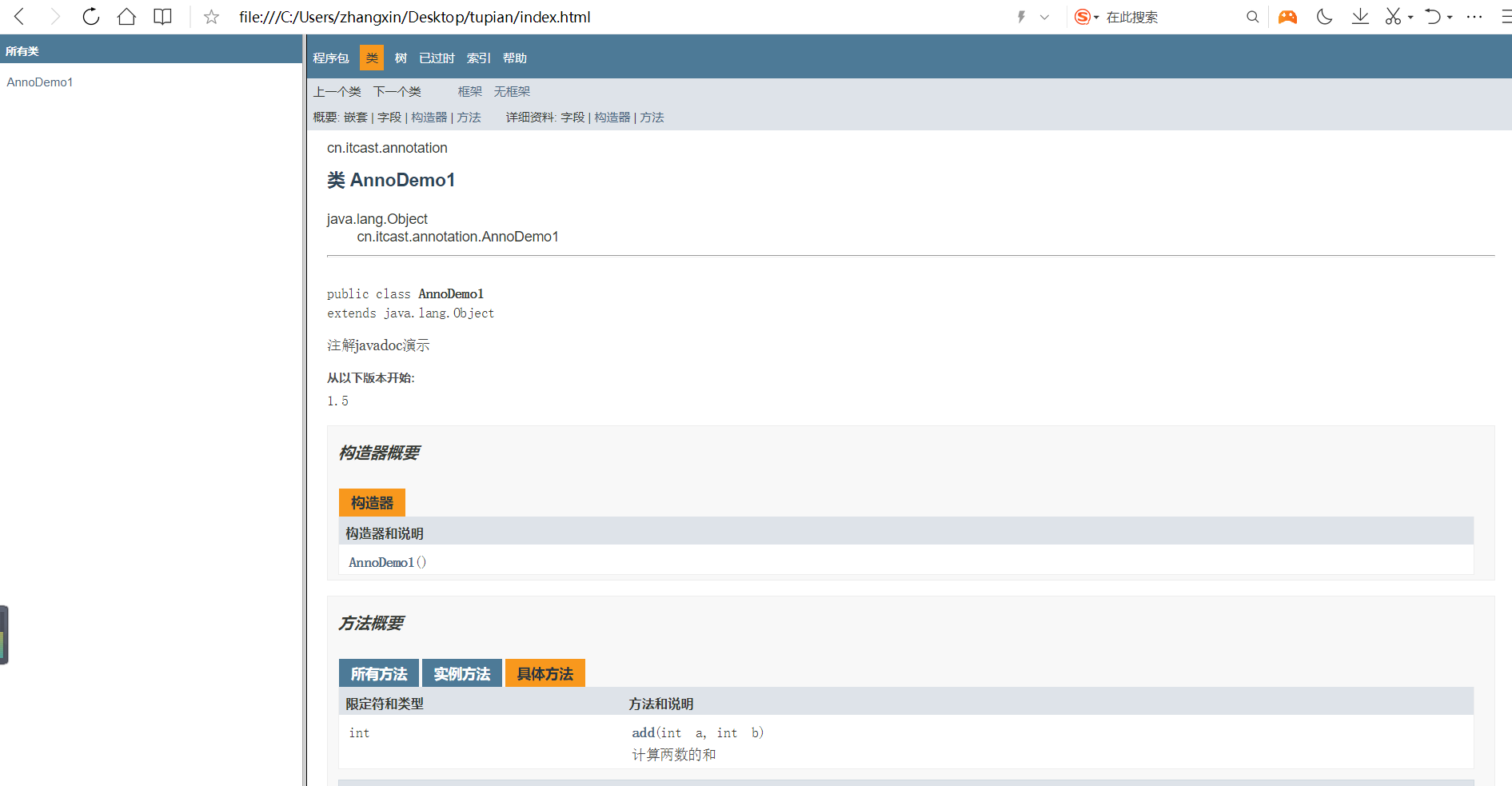
1 2 3 4 5 6 7 8 9 10 11 12 13 14 15 16 17 18 19 20 public class AnnoDemo1 { public int add (int a, int b ) { return a + b; } }
直接Javadoc运行
Java中的注解 1 2 3 4 5 * JDK中预定义的一些注解 * @Override :检测被该注解标注的方法是否是继承自父类(接口)的 * @Deprecated:该注解标注的内容,表示已过时 * @SuppressWarnings:压制警告 * 一般传递参数all @SuppressWarnings("all")
1 2 3 4 5 6 7 8 9 10 11 12 13 14 15 16 17 18 19 20 21 22 23 * 自定义注解 * 格式: 元注解 public @interface 注解名称{ 属性列表; } * 本质:注解本质上就是一个接口,该接口默认继承Annotation接口(javac编译 javap反编译可以查看,不截图了) * public interface MyAnno extends java.lang.annotation.Annotation {} * 属性:接口中的抽象方法 * 要求: 1. 属性的返回值类型有下列取值 * 基本数据类型 * String * 枚举 * 注解 * 以上类型的数组 2. 定义了属性,在使用时需要给属性赋值 1. 如果定义属性时,使用default关键字给属性默认初始化值,则使用注解时,可以不进行属性的赋值。 2. 如果只有一个属性需要赋值,并且属性的名称是value,则value可以省略,直接定义值即可。 3. 数组赋值时,值使用{}包裹。如果数组中只有一个值,则{}可以省略
1 2 3 4 5 6 7 8 9 10 11 12 * 元注解:用于描述注解的注解 * @Target:描述注解能够作用的位置 * ElementType取值: * TYPE:可以作用于类上 * METHOD:可以作用于方法上 * FIELD:可以作用于成员变量上 * @Retention:描述注解被保留的阶段 * @Retention(RetentionPolicy.RUNTIME):当前被描述的注解,会保留到class字节码文件中,并被JVM读取到 * @Retention(RetentionPolicy.CLASS):当前被描述的注解,会保留到class字节码文件中,但不会被JVM读取到 * @Retention(RetentionPolicy.SOURCE):当前被描述的注解,不会保留到class字节码文件中 * @Documented:描述注解是否被抽取到api文档中 * @Inherited:描述注解是否被子类继承
案例1:实现反射中同样的功能 1 2 3 4 5 6 7 8 package cn.itcast.annotation;public class Demo1 { public void show () { System.out.println("demo1...show..." ); } }
1 2 3 4 5 6 7 8 9 10 11 12 13 14 15 16 17 18 19 20 21 22 23 package cn.itcast.annotation;import java.lang.annotation.ElementType;import java.lang.annotation.Retention;import java.lang.annotation.RetentionPolicy;import java.lang.annotation.Target;@Target({ElementType.TYPE}) @Retention(RetentionPolicy.RUNTIME) public @interface Pro { String className () ; String methodName () ; }
1 2 3 4 5 6 7 8 9 10 11 12 13 14 15 16 17 18 19 20 21 22 23 24 25 26 27 28 29 30 31 32 33 34 35 36 37 38 39 40 41 42 43 @Pro(className = "cn.itcast.annotation.Demo1",methodName = "show") public class ReflectTest { public static void main (String[] args) throws Exception { Class<ReflectTest> reflectTestClass = ReflectTest.class; Pro an = reflectTestClass.getAnnotation(Pro.class); String className = an.className(); String methodName = an.methodName(); System.out.println(className); System.out.println(methodName); Class cls = Class.forName(className); Object obj = cls.newInstance(); Method method = cls.getMethod(methodName); method.invoke(obj); } }
运行
1 2 3 cn.itcast.annotation.Demo1 show demo1...show...
案例2 1 2 3 4 5 6 7 * 案例:简单的测试框架 * 小结: 1. 以后大多数时候,我们会使用注解,而不是自定义注解 2. 注解给谁用? 1. 编译器 2. 给解析程序用 3. 注解不是程序的一部分,可以理解为注解就是一个标签
1 2 3 4 5 6 7 8 9 10 11 12 13 14 15 16 17 18 19 20 21 22 23 24 25 26 27 28 29 30 31 32 33 34 35 36 37 package cn.itcast.annotation.demo;public class Calculator { @Check public void add () { String str = null ; str.toString(); System.out.println("1 + 0 =" + (1 + 0 )); } @Check public void sub () { System.out.println("1 - 0 =" + (1 - 0 )); } @Check public void mul () { System.out.println("1 * 0 =" + (1 * 0 )); } @Check public void div () { System.out.println("1 / 0 =" + (1 / 0 )); } public void show () { System.out.println("永无bug..." ); } }
1 2 3 4 5 6 7 8 9 10 11 package cn.itcast.annotation.demo;import java.lang.annotation.ElementType;import java.lang.annotation.Retention;import java.lang.annotation.RetentionPolicy;import java.lang.annotation.Target;@Retention(RetentionPolicy.RUNTIME) @Target(ElementType.METHOD) public @interface Check {}
1
2
3
4
5
6
7
8
9
10
11
12
13
14
15
16
17
18
19
20
21
22
23
24
25
26
27
28
29
30
31
32
33
34
35
36
37
38
39
40
41
42
43
44
45
46
47
48
49
50
51
52
53
54
55
56
57
58
package cn.itcast.annotation.demo;import java.io.BufferedWriter;import java.io.FileWriter;import java.io.IOException;import java.lang.reflect.InvocationTargetException;import java.lang.reflect.Method;public class TestCheck { public static void main (String[] args) throws IOException { Calculator c = new Calculator (); Class cls = c.getClass(); Method[] methods = cls.getMethods(); int number = 0 ; BufferedWriter bw = new BufferedWriter (new FileWriter ("bug.txt" )); for (Method method : methods) { if (method.isAnnotationPresent(Check.class)){ try { method.invoke(c); } catch (Exception e) { number ++; bw.write(method.getName()+ " 方法出异常了" ); bw.newLine(); bw.write("异常的名称:" + e.getCause().getClass().getSimpleName()); bw.newLine(); bw.write("异常的原因:" +e.getCause().getMessage()); bw.newLine(); bw.write("--------------------------" ); bw.newLine(); } } } bw.write("本次测试一共出现 " +number+" 次异常" ); bw.flush(); bw.close(); } }
运行
控制台
bug.txt
1 2 3 4 5 6 7 8 9 add 方法出异常了 异常的名称:NullPointerException 异常的原因:null -------------------------- div 方法出异常了 异常的名称:ArithmeticException 异常的原因:/ by zero -------------------------- 本次测试一共出现 2 次异常