
Node.js中使用MongoDB数据库
1. 数据库概述及环境搭建
1.1 为什么要使用数据库
- 动态网站中的数据都是存储在数据库中的
- 数据库可以用来持久存储客户端通过表单收集的用户信息
- 数据库软件本身可以对数据进行高效的管理
http://www.lovekhh.xyz/blog/9
http://www.lovekhh.xyz/blog/9
1.2 什么是数据库
数据库即存储数据的仓库,可以将数据进行有序的分门别类的存储。它是独立于语言之外的软件,可以通过API去操作它。
常见的数据库软件有:mysql、mongoDB、oracle。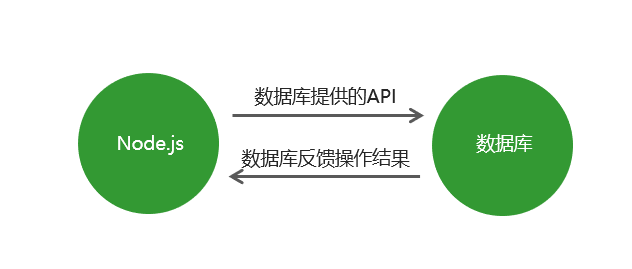
1.3 MongoDB数据库下载安装
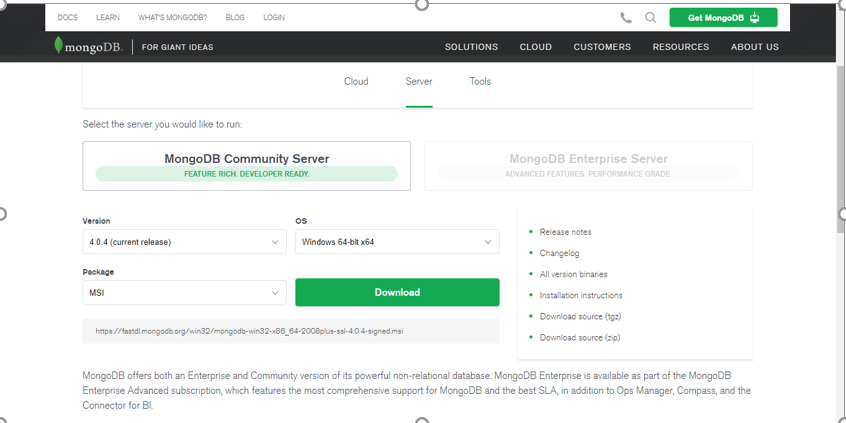
下载地址:
https://www.mongodb.com/download-center/community
###1.4 数据库相关概念
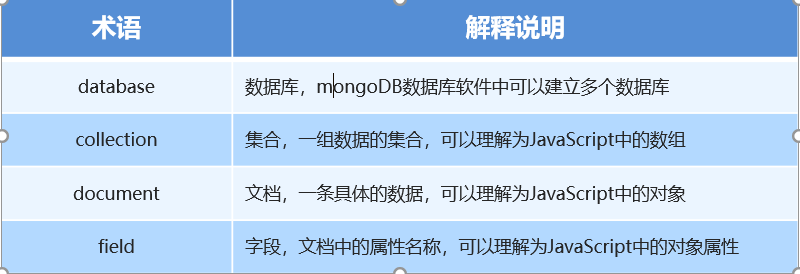
在一个数据库软件中可以包含多个数据仓库,在每个数据仓库中可以包含多个数据集合,每个数据集合中可以包含多条文档(具体的数据)。
1.5 Mongoose第三方包
- 使用Node.js操作MongoDB数据库需要依赖Node.js第三方包mongoose
- 使用npm install mongoose命令下载
###1.6 启动MongoDB
在命令行工具中运行net start mongoDB即可启动MongoDB,否则MongoDB将无法连接。
###1. 数据库连接
使用mongoose提供的connect方法即可连接数据库。
1 | mongoose.connect('mongodb://localhost/playground') |
###1.8 创建数据库
在MongoDB中不需要显式创建数据库,如果正在使用的数据库不存在,MongoDB会自动创建。
2.MongoDB增删改查操作
###2.1 创建文档
创建文档实际上就是向集合中插入数据。
分为两步:
- 创建集合实例。
- 调用实例对象下的save方法将数据保存到数据库中。
1
2
3
4
5
6
7
8
9// 创建集合实例
const course = new Course({
name: 'Node.js course',
author: '黑马讲师',
tags: ['node', 'backend'],
isPublished: true
});
// 将数据保存到数据库中
course.save();1
2
3
4
5
6Course.create({name: 'JavaScript基础', author: '黑马讲师', isPublish: true}, (err, doc) => {
// 错误对象
console.log(err)
// 当前插入的文档
console.log(doc)
});1
2
3Course.create({name: 'JavaScript基础', author: '黑马讲师', isPublish: true})
.then(doc => console.log(doc))
.catch(err => console.log(err))
###2.2 mongoDB数据库导入数据
mongoimport –d 数据库名称 –c 集合名称 –file 要导入的数据文件
找到mongodb数据库的安装目录,将安装目录下的bin目录放置在环境变量中。
###2.3 查询文档
1 | // 根据条件查找文档(条件为空则查找所有文档) |
1 | // 返回文档集合 |
###2.4.1 查询文档
1 | // 根据条件查找文档(条件为空则查找所有文档) |
1 | // 返回文档集合 |
###2.4.2 查询文档
1 | // 根据条件查找文档 |
1 | // 返回文档 |
###2.4.3 查询文档
1 |
|
1 | // 匹配包含 |
1 | // 选择要查询的字段 |
1 | // 将数据按照年龄进行排序 |
1 | // skip 跳过多少条数据 limit 限制查询数量 |
###2.5 删除文档
1 | // 删除单个 |
1 |
|
###2.6 更新文档
1 | // 更新单个 |
1 | // 更新多个 |
###2.7 mongoose验证
在创建集合规则时,可以设置当前字段的验证规则,验证失败就则输入插入失败。
- required: true 必传字段
- minlength:3 字符串最小长度
- maxlength: 20 字符串最大长度
- min: 2 数值最小为2
- max: 100 数值最大为100
- enum: [‘html’, ‘css’, ‘javascript’, ‘node.js’]
- trim: true 去除字符串两边的空格
- validate: 自定义验证器
- default: 默认值
获取错误信息:error.errors[‘字段名称’].message
###2.8 集合关联
通常不同集合的数据之间是有关系的,例如文章信息和用户信息存储在不同集合中,但文章是某个用户发表的,要查询文章的所有信息包括发表用户,就需要用到集合关联。
- 使用id对集合进行关联
- 使用populate方法进行关联集合查询
###2.9 集合关联实现
1 | // 用户集合 |
本博客所有文章除特别声明外,均采用 CC BY-NC-SA 4.0 许可协议。转载请注明来自 阿鑫的博客ッ!
评论


