1 引入
1.1 作用
替我们生成常用增删改查操作的 SQL 语句。
1.2 代码官方发布地址
https://gitee.com/free
https://gitee.com/free/Mapper/wikis/1.1-java?parent=1.integration
2 快速入门
2.1创建测试数据
1
2
3
4
5
6
7
8
9
10
11
12
13
14
| CREATETABLE`tabple_emp`(
`emp_id` intNOTNULLAUTO_INCREMENT,
`emp_name` varchar(500)NULL,
`emp_salary` double(15,5)NULL,
`emp_age` intNULL,
PRIMARYKEY(`emp_id`)
);
INSERT INTO `tabple_emp` (`emp_name`,`emp_salary`,`emp_age`)VALUES('tom','1254.37','27');
INSERT INTO `tabple_emp` (`emp_name`,`emp_salary`,`emp_age`)VALUES('jerry','6635.42','38');
INSERT INTO `tabple_emp` (`emp_name`,`emp_salary`,`emp_age`)VALUES('bob','5560.11','40');
INSERT INTO `tabple_emp` (`emp_name`,`emp_salary`,`emp_age`)VALUES('kate','2209.11','22');
INSERT INTO `tabple_emp` (`emp_name`,`emp_salary`,`emp_age`)VALUES('justin','4203.15','30');
|
2.2 搭建开发环境(快速入门)
创建SpringBoot mapper工程
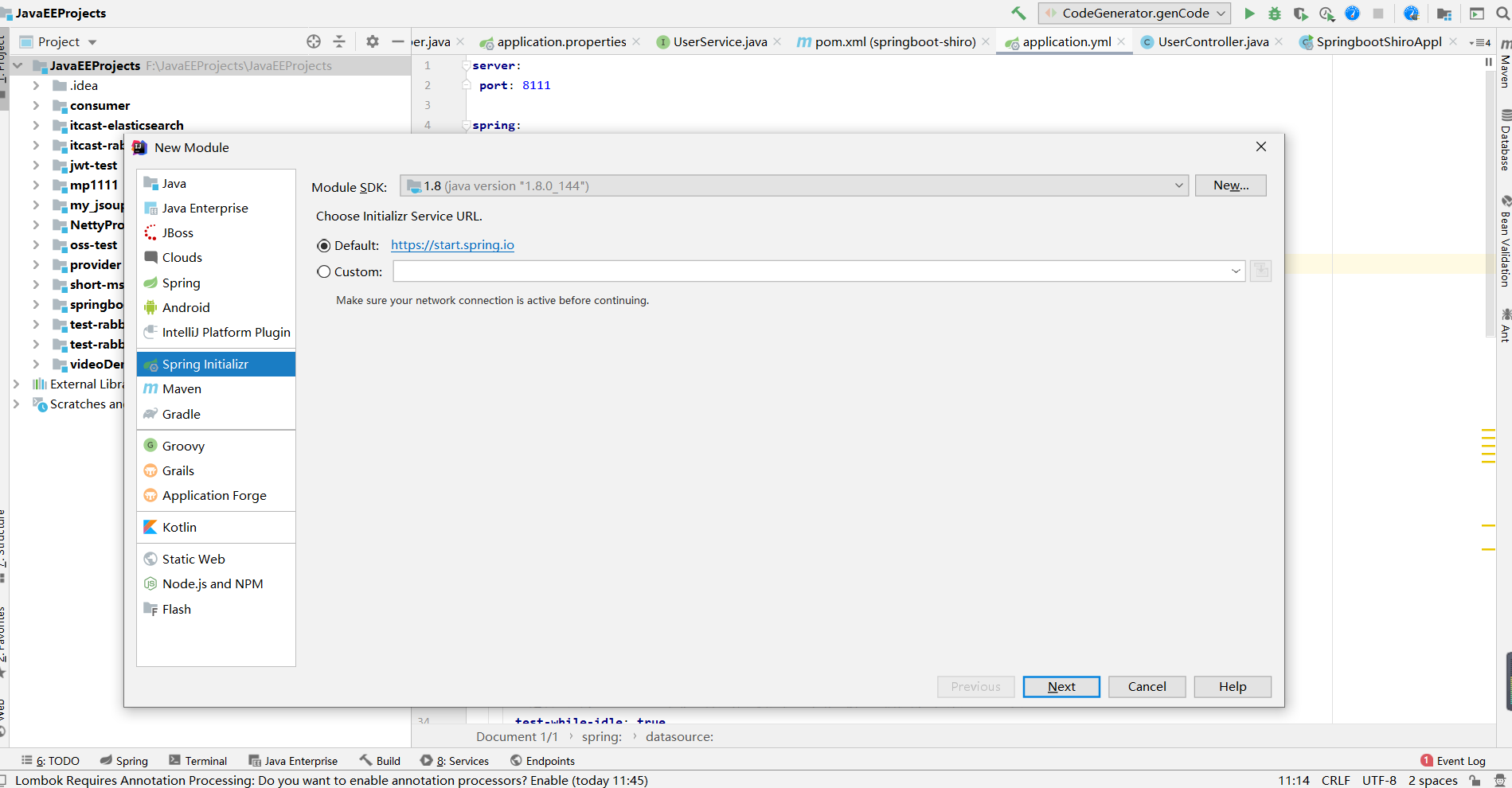
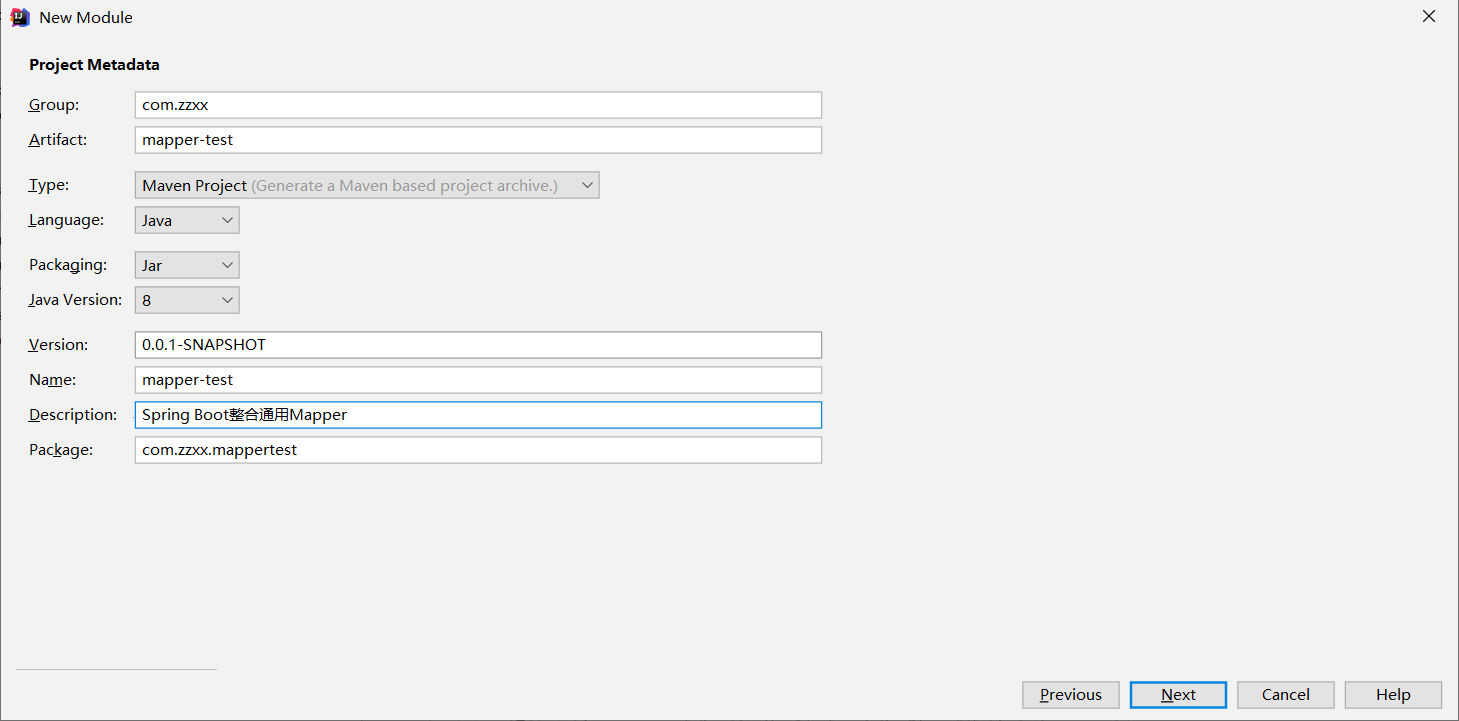
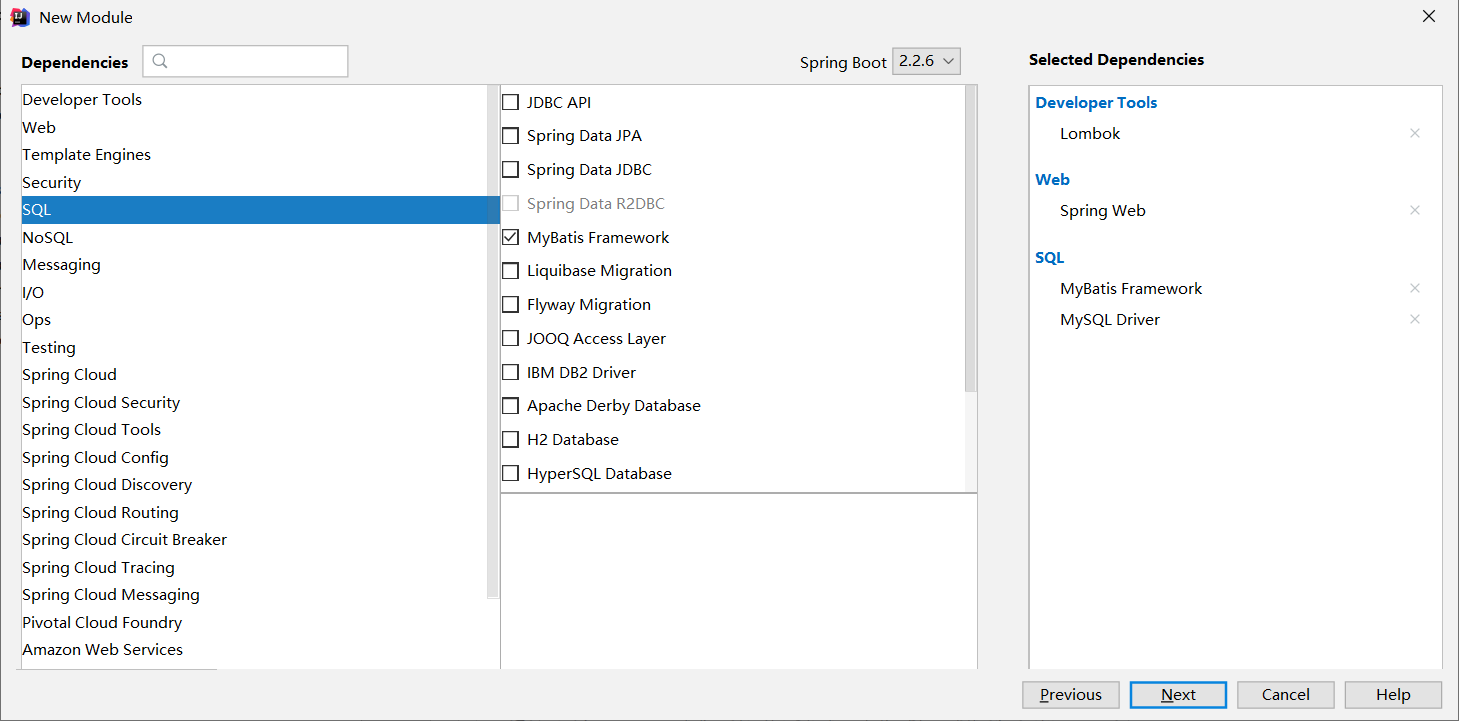
导入依赖
1
2
3
4
5
6
7
8
9
10
11
12
13
14
15
16
17
18
19
20
21
22
23
24
25
26
27
28
| <dependency>
<groupId>tk.mybatis</groupId>
<artifactId>mapper-spring-boot-starter</artifactId>
<version>2.0.2</version>
</dependency>
<dependency>
<groupId>org.springframework.boot</groupId>
<artifactId>spring-boot-starter-web</artifactId>
</dependency>
<dependency>
<groupId>org.mybatis.spring.boot</groupId>
<artifactId>mybatis-spring-boot-starter</artifactId>
<version>2.1.2</version>
</dependency>
<dependency>
<groupId>mysql</groupId>
<artifactId>mysql-connector-java</artifactId>
<scope>runtime</scope>
</dependency>
<dependency>
<groupId>org.projectlombok</groupId>
<artifactId>lombok</artifactId>
<optional>true</optional>
</dependency>
|
- 通用mapper是在springboot集成了Mybatis的基础上进行使用的
如果你需要对通用 Mapper 进行配置,你可以在 Spring Boot 的配置文件中配置 mapper. 前缀的配置。
例如在 yml 格式中配置:
1
2
3
4
5
6
7
8
9
10
11
12
13
14
15
16
17
18
19
20
21
22
| #端口配置
server:
port: 8088
#jdbc配置
spring:
datasource:
driver-class-name: com.mysql.jdbc.Driver
url: jdbc:mysql://localhost:3306/jpa?useUnicode=true&characterEncoding=utf8&serverTimezone=GMT%2B8
username: root
password: 123456
#mybatis配置
mybatis:
#实体类所在包名
type-aliases-package:com.zzxx.mappertest.entity
#通用mapper配置
mapper:
#公用接口类路径
mappers: tk.mybatis.mapper.common.Mapper #通用基类配置
identity: MYSQL
|
注意:mybatis.mapper-locations=classpath:mapper/*.xml就不用配置了,因为不生成mapper.xml文件
@MapperScan 注解配置
你可以给带有 @Configuration 的类配置该注解,或者直接配置到 Spring Boot 的启动类上,如下:
1
2
3
4
5
6
7
8
9
10
11
12
13
14
15
16
17
|
package com.zzxx.mappertest;

import org.springframework.boot.SpringApplication;
import org.springframework.boot.autoconfigure.SpringBootApplication;
import tk.mybatis.spring.annotation.MapperScan;

@SpringBootApplication
@MapperScan("com.zzxx.mappertest.mapper")
public class MapperTestApplication {

    public static void main(String[] args) {
        SpringApplication.run(MapperTestApplication.class, args);
    }

}
|
注意:这里使用的 tk.mybatis.spring.annotation.MapperScan !
Java 实体类 考虑到基本数据类型在 Java 类中都有默认值,会导致 MyBatis 在执行相关操作 时很难判断当前字段是否为 null,所以在 MyBatis 环境下使用 Java 实体类时尽量不 要使用基本数据类型,都使用对应的包装类型。
1
2
3
4
5
6
7
8
9
10
11
12
13
14
15
16
17
18
19
20
21
22
23
| import lombok.AllArgsConstructor;
import lombok.Data;
import lombok.NoArgsConstructor;
import javax.persistence.*;
@Data
@AllArgsConstructor
@NoArgsConstructor
@Table(name="tabple_emp")
public class Employee {
@Id
@GeneratedValue(strategy= GenerationType.IDENTITY)
private Integer empId;
private String empName;
@Column(name="emp_salary")
private Double empSalary;
private Integer empAge;
}
|
注意:Mybatis通用接口mapper依赖JPA,所以实体类得用JPA建立对象和表的映射关系
Dao层
1
2
3
4
5
6
7
8
9
| import com.zzxx.mappertest.entity.Employee;
import org.springframework.stereotype.Repository;
import tk.mybatis.mapper.common.Mapper;
@Repository
public interface EmployeeMapper extends Mapper<Employee> {
}
|
测试类
1
2
3
4
5
6
7
8
9
10
11
12
13
14
15
16
17
18
19
20
21
| @SpringBootTest
class MapperTestApplicationTests {
@Autowired
EmployeeMapper employeeMapper;
@Test
public void testSelectOne() {
Employee employeeQueryCondition = new Employee(null, "bob", 5560.11, null);
Employee employeeQueryResult = employeeMapper.selectOne(employeeQueryCondition);
System.out.println(employeeQueryResult);
}
}
|
结果
1
2
| Employee(empId=3, empName=bob, empSalary=5560.11, empAge=40)
|
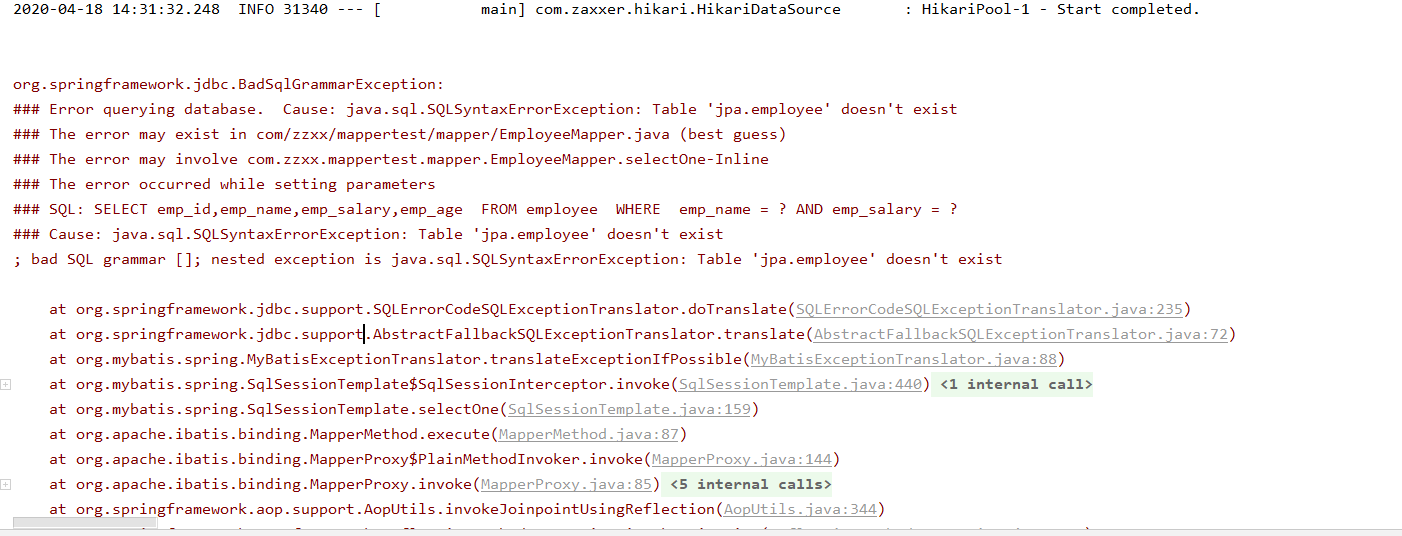
注意:如果实体类上不加 @Table(name=”tabple_emp”)与数据库表名映射会报错(默认为驼峰命名映射)t同样字段上面默认也为驼峰命名,不匹配需要加注解@Column(name=”表字段”)
3. 常用注解
3.1 @Table 注解
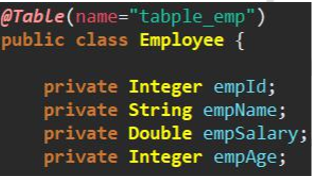
作用:建立实体类和数据库表之间的对应关系。
默认规则:实体类类名首字母小写作为表名。Employee 类→employee 表。
用法:在@Table 注解的 name 属性中指定目标数据库表的表名
3.2 @Column 注解
作用:建立实体类字段和数据库表字段之间的对应关系。
默认规则: 实体类字段:驼峰式命名 数据库表字段:使用“_”区分各个单词
用法:在@Column 注解的 name 属性中指定目标字段的字段名
(假设诉数据库为emp_salary_apple)

3.3 @Id注解
通用 Mapper 在执行 xxxByPrimaryKey(key)方法时,有两种情况。
情况 1:没有使用@Id 注解明确指定主键字段
1
| SELECT emp_id,emp_name,emp_salary_apple,emp_age FROM tabple_emp WHERE emp_id = ? ANDemp_name=?ANDemp_salary_apple=?ANDemp_age=?
|
之所以会生成上面这样的 WHERE 子句是因为通用 Mapper 将实体类中的所有 字段都拿来放在一起作为联合主键。
情况 2:使用@Id 主键明确标记和数据库表中主键字段对应的实体类字段。

3.4@GeneratedValue 注解
作用:让通用 Mapper 在执行 insert 操作之后将数据库自动生成的主键值回写到实 体类对象中。
自增主键用法:

3.5@Transient主键
用于标记不与数据库表字段对应的实体类字段。
1
| @Transient privateStringotherThings;
|
4. 常用方法
4.1 selectOne 方法
通用 Mapper 替我们自动生成的 SQL 语句情况
1
2
3
| SELECT emp_id,emp_name,emp_salary,emp_age FROM tabple_emp WHERE emp_name = ? AND emp_salary = ?
Parameters: bob(String), 5560.11(Double)
Total: 1
|
实体类封装查询条件生成 WHERE 子句的规则
- 使用非空的值生成 WHERE 子句
- 在条件表达式中使用“=”进行比较
要求必须返回一个实体类结果,如果有多个,则会抛出异常
4.2xxxByPrimaryKey 方法
需要使用@Id 主键明确标记和数据库表主键字段对应的实体类字段,否则通用 Mapper 会将所有实体类字段作为联合主键。
1
2
3
4
5
6
7
8
9
10
11
12
13
14
| @Test
public void testSelectByPrimaryKey() {
Integer empId = 3;
Employee employee = employeeMapper.selectByPrimaryKey(empId);
System.out.println(employee);
}
|
1
2
3
4
5
6
7
8
9
10
11
12
13
14
| @Test
public void testExistsWithPrimaryKey() {
Integer empId = 33;
boolean exists = employeeMapper.existsWithPrimaryKey(empId);
System.out.println(exists);
}
|
4.insert 方法
1
2
3
4
5
6
7
8
9
10
11
12
13
14
15
16
17
| @Test
public void testInsert() {
Employee employee = new Employee(null, "emp03", 3000.00, 23);
System.out.println(employeeMapper.insert(employee));
Integer empId = employee.getEmpId();
System.out.println("empId="+empId);(主键回填)
}
1
empId=7
|
实体类主键字段上必须有 @GeneratedValue(strategy= GenerationType.IDENTITY)注解才会主键回填
4.4xxxSelective 方法
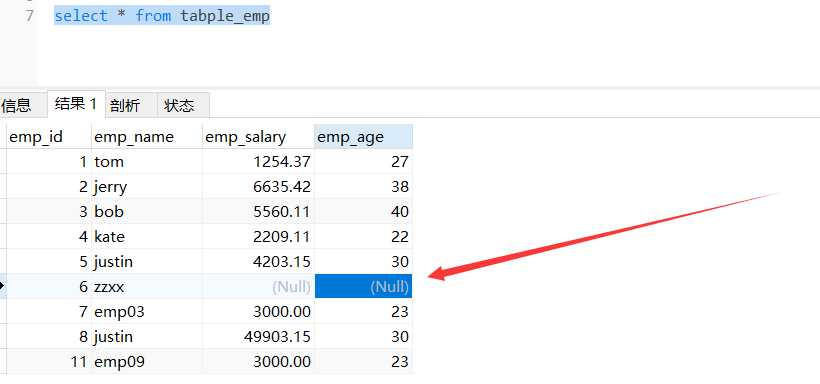
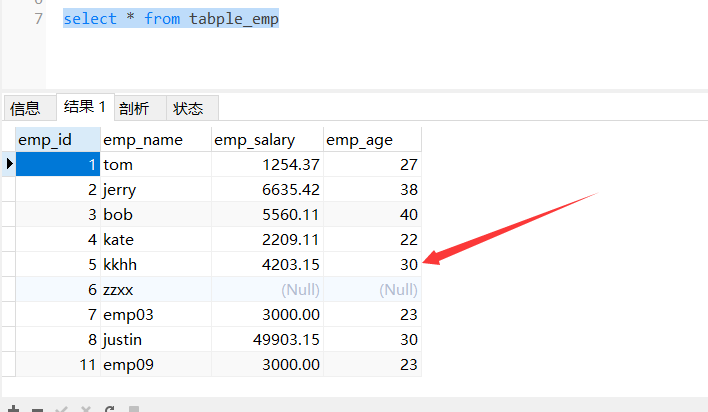
非主键字段如果为 null 值,则不加入到 SQL 语句中。
这个很重要,尤其修改的时候。
1
2
3
4
5
6
7
8
9
10
11
12
13
|
@Test
public void testUpdaet() {
Employee employee = new Employee();
employee.setEmpName("zzxx");
employee.setEmpId(6);
System.out.println(employeeMapper.updateByPrimaryKey(employee));
}
|
输出
1
2
3
4
5
6
7
8
9
10
| @Test
public void testupdateByPrimaryKeySelective() {
Employee employee = new Employee();
employee.setEmpName("kkhh");
employee.setEmpId(5);
int i = employeeMapper.updateByPrimaryKeySelective(employee);
System.out.println();
}
|
4.5 delete
1
2
3
4
5
6
|
Employee employee = null;
employeeService.removeEmployee(employee);
|

1
2
3
4
5
6
7
8
9
10
11
| @Test
public void testDeleteByPrimaryKey() {
Integer empId = 13;
int i= employeeService.removeEmployeeById(empId);
}
|
5. QBC 查询
5.1概念
Query By Criteria
Criteria 是 Criterion 的复数形式。意思是:规则、标准、准则。在 SQL 语句中相当 于查询条件。
QBC 查询是将查询条件通过 Java 对象进行模块化封装。
示例代码
1
2
3
4
5
6
7
8
9
10
11
12
13
14
15
16
17
18
19
20
21
22
23
24
25
26
27
28
29
30
31
32
33
34
35
36
37
38
39
40
41
42
43
| @Test
public void testSelectByExample() {
Example example = new Example(Employee.class);
example.orderBy("empSalary").asc().orderBy("empAge").desc();
example.setDistinct(true);
Example.Criteria criteria01 = example.createCriteria();
Example.Criteria criteria02 = example.createCriteria();
criteria01.andGreaterThan("empSalary", 3000)
.andLessThan("empAge", 25);
criteria02.andLessThan("empSalary", 5000)
.andGreaterThan("empAge", 30);
example.or(criteria02);
List<Employee> empList = employeeMapper.selectByExample(example);
for (Employee employee : empList) {
System.out.println(employee);
}
}
|
结果
1
2
3
4
5
6
| #sql语句
SELECT distinct emp_id,emp_name,emp_salary,emp_age FROM tabple_emp WHERE ( emp_salary > ? and emp_age < ? ) or ( emp_salary < ? and emp_age > ? ) order by emp_salary ASC,emp_age DESC
Employee(empId=1, empName=tom, empSalary=3254.37, empAge=24)
Employee(empId=5, empName=kkhh, empSalary=4203.15, empAge=31)
|
分页
1
2
3
4
5
6
7
8
9
10
11
12
13
14
15
| @Test
public void testSelectByRowBounds() {
int pageNo = 1;
int pageSize = 5;
int index = (pageNo - 1) * pageSize;
RowBounds rowBounds = new RowBounds(index, pageSize);
List<Employee> empList = employeeService.getEmpListByRowBounds(rowBounds);
for (Employee employee : empList) {
System.out.println(employee);
}
}
|
结果
1
2
3
4
5
6
7
8
9
10
|
SELECT emp_id,emp_name,emp_salary,emp_age FROM tabple_emp
Employee(empId=1, empName=tom, empSalary=3254.37, empAge=24)
Employee(empId=2, empName=jerry, empSalary=6635.42, empAge=38)
Employee(empId=3, empName=bob, empSalary=5560.11, empAge=40)
Employee(empId=4, empName=kate, empSalary=2209.11, empAge=22)
Employee(empId=5, empName=kkhh, empSalary=4203.15, empAge=31)
|



