lambda和stream Api 都是Java8的新特性 首先 简单介绍一下java8
Java8 (jdk 1.8) 是Java语言开发的一个主要版本
Java8 是Oracle 公司于2014年3月发布,可以看成是自Java5以来最具革命性的版本。
Java8为Java语言、编译器、类库、开发工具与JVM带来了大量新特性。
简介:
速度更快
代码更少 :增加新的语法 lambda表达式
强大的 Stream API
便于并行
最大化减少空指针异常 Optional
Nashorn引擎,允许在JVM上运行JS应用
Lambda & Stream API
————————————————https://blog.csdn.net/weixin_41793969/article/details/105489106
1. Lambda表达式 1.1 为什么要使用lambda表达式 Lambda是一个匿名函数,我们可以把lambda表达式理解为是 一段可以传递的代码,即代码像数据一样进行传递。使用它可以写出更简洁、更灵活的代码。作为一种更紧凑的代码风格。
先来看一个简单案例:
需求:开启一个线程,在控制台输出 hello sky
下面分别使用三种方法实现
1. 实现runnable接口
先定义一个类实现Runnable接口
1
2
3
4
5
6
public class MyRunnable implements Runnable { @Override public void run () { System.out.println("Hello sky !!!" ); } }
调用
1 2 3 4 5 MyRunnable myRunable = new MyRunnable ();Thread t1 = new Thread (myRunable);t1.start();
2. 匿名内部类
1 2 3 4 5 6 7 new Thread (new Runnable () {@Override public void run () {System.out.println("Hello sky !!!" ); } }).start();
3.lambda表达式
1 2 new Thread (() -> System.out.println("Hello sky !!!" )).start();
1.2 Lambda表达式语法 在Java8语言中引入了一种新的语法元素和操作符 “->” ,该操作符被称为 Lambda操作符 或 箭头操作符 。它将Lambda分为两个部分
左侧:指定了Lambda表达式需要的参数列表
右侧:指定了Lambda体 ,是抽象方法的实现逻辑,也即是Lambda表达式要执行的功能。
1 2 3 4 5 6 7 8 9 10 11 12 13 14 15 16 17 18 19 20 21 22 23 24 25 26 27 28 Runnable r = () -> { System.out.println("Hello Lambda !" ); }; Consumer<String> con1 = (String str) -> { System.out.println(str); }; Consumer<String> con2 = (str) -> { System.out.println(str); }; Consumer<String> con3 = str -> { System.out.println(str); }; Comparator<Integer> com = (x,y) -> { System.out.println("两个参数,有返回值" ); return Integer.compare(x,y); }; Comparator<Integer> com2 = (x,y) -> Integer.compare(x,y);
类型推断:
上述Lambda表达式中的参数类型都是由编译器推断得出的。Lambda表达式中无需指定类型,程序依然可以编译,这是因为javac根据程序的上下文,在后台推断得出了参数的类型,Lambda表达式的类型推断依赖于上下文环境,如上述语法格式三,就是根据Consumer中指定的泛型,可推断出参数类型为String.
1.3 函数式接口 1.3.1 什么是函数式接口?
只包含一个抽象方法的接口,称之为 函数式接口
你可以通过 Lambda 表达式来创建该接口的对象。(若 Lambda 表达式 抛出一个受检异常(即:非运行时异常),那么该异常需要在目标接口的抽 象方法上进行声明)。
我们可以在一个接口上使用@FuntionalInterface注解,这样就可以检查它是否是一个函数式接口。
在java.util.function包下定义了Java8的丰富的函数式接口
1.3.2 如何理解函数式接口
Java从诞生之日起就是一直倡导“一切皆对象”,在Java里面,面向对象(OOP)是一切。但是随着python、Scala等语言的兴起和新技术的挑战,java不得不做出调整以便支持更加广泛的技术要求,也即java不但可以支持OOP还可以支持OOF(面向函数编程)
在函数式编程语言当中,函数被当做一等公民对待。在将函数作为一等公民的 编程语言中,Lambda表达式的类型是函数。但是在Java8中,有所不同。在 Java8中,Lambda表达式是对象,而不是函数,它们必须依附于一类特别的 对象类型——函数式接口。
简单来说,在Java8中,Lambda表达式就是一个函数式接口的实例。这就是Lambda表达式和函数式接口的关系。也就是说,只要一个对象是函数式接口的实例,那么该对象就可以用Lambda表达式类表示
所有以前用匿名函数实现类表示的现在都可以用Lambda表达式来写
1.3.3 定义函数式接口
先看一个源码中的案例,用上面我们用到的Runnable为例
1
2
3
4
5
6
7
8
9
10
11
12
13
14
15
16
@FunctionalInterface public interface Runnable { public abstract void run () ; }
自定义函数式接口
1
2
3
4
5
@FunctionalInterface public interface MyInterface { int add (int a, int b) ; }
注意:
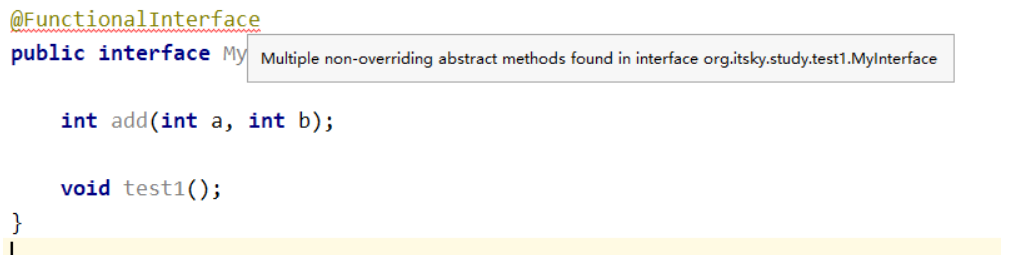
@FunctionalInterface 注解的作用只是检查这个接口是否为 函数式接口,并不是一定要加上这个注解
在idea中,如果接口不符合函数式接口的规范,编辑器会直接报错
在Java8中,接口中方法可以有默认实现,通过default关键字修饰的方法 就不是一个必须被实现的抽象方法,这种接口也是符合函数式接口规范的
1
2
3
4
5
6
7
8
@FunctionalInterface public interface MyInterface { int add (int a, int b) ; default void test1 () {} }
1.3.4 函数式接口作为参数传递 1 2 3 4 5 6 7 8 9 10 11 12 13 14 15 16 17 18 19 20 21 22 23 24 25 26 27 28 29 30 31 public class LambdaTest4 { public static void main (String[] args) { happyMoney(100 , m -> System.out.println("今天花了" +m)); List<String> list = Arrays.asList("北京" , "上海" , "南京" , "六安" , "合肥" , "东京" ); List<String> list1 = filterString2(list, s -> s.contains("京" )); System.out.println(list1); } static void happyMoney (double money, Consumer<Double> con) { con.accept(money); } static List<String> filterString (List<String> list, Predicate<String> pre) { List<String> newlist = new ArrayList <>(); for (String s : list) { if (pre.test(s)){ newlist.add(s); } } return newlist; } static List<String> filterString2 (List<String> list, Predicate<String> pre) { List<String> newlist = new ArrayList <>(); list.forEach(s -> {if (pre.test(s)){ newlist.add(s); }}); return newlist; } }
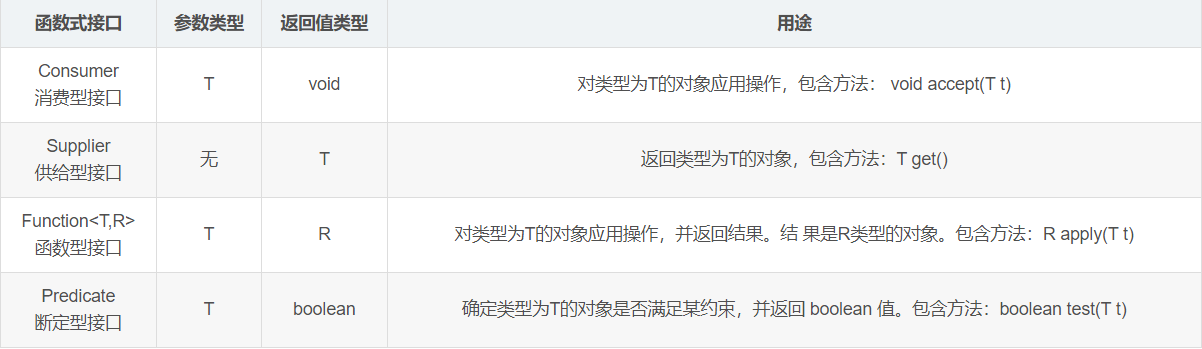
Java 四大内置核心函数式接口
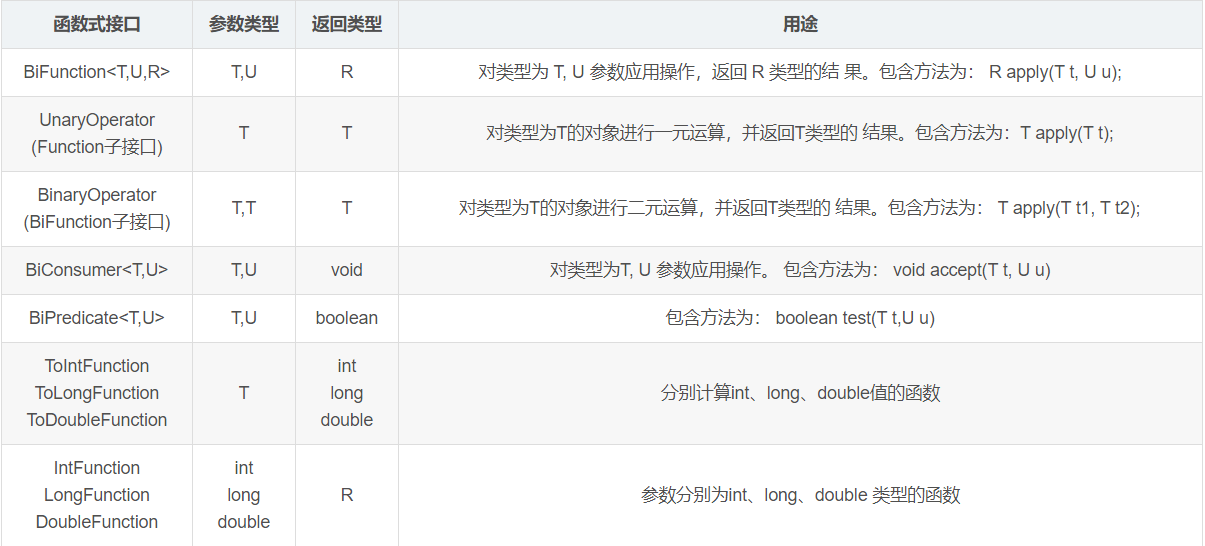
其他接口
1.4 方法引用与构造器引用 1.4.1 方法引用
当要传递给Lambda体的操作,已经有实现的方法了,可以使用方法引用
方法引用可以看做是Lambda表达式深层次的表达。换句话说,方法引用就 是Lambda表达式,也就是函数式接口的一个实例,通过方法的名字来指向 一个方法,可以认为是Lambda表达式的一个语法糖。
要求:实现接口的抽象方法的参数列表和返回值类型,必须与方法引用的 方法的参数列表 和 返回值类型 保持一致!
格式:使用操作符 “::” 将类(或对象) 与 方法名分隔开来。
如下三种主要使用情况:
对象::实例方法名
类::静态方法名
类::实例方法名
先定义一个Employee类和EmployeeData类(提供假数据)
1 2 3 4 5 6 7 8 9 10 11 12 import com.sun.org.apache.xpath.internal.operations.Equals;import java.util.Objects;@Data @AllArgsConstructor @NoArgsConstructor public class Employee { private int id; private String name; private int age; private double salary;
1 2 3 4 5 6 7 8 9 10 11 12 13 14 15 16 17 18 19 20 public class EmployeeData { public static List<Employee> getEmployees () { List<Employee> list = new ArrayList <>(); list.add(new Employee (1001 , "鲁班七号" , 34 , 6000.38 )); list.add(new Employee (1002 , "黄忠" , 12 , 9876.12 )); list.add(new Employee (1003 , "孙尚香" , 33 , 3000.82 )); list.add(new Employee (1004 , "后羿" , 26 , 7657.37 )); list.add(new Employee (1005 , "成吉思汗" , 65 , 5555.32 )); list.add(new Employee (1006 , "狄仁杰" , 42 , 9500.43 )); list.add(new Employee (1007 , "伽罗" , 26 , 4333.32 )); list.add(new Employee (1008 , "马可波罗" , 35 , 2500.32 )); list.add(new Employee (1008 , "马可波罗" , 35 , 2500.32 )); return list; } }
方法引用测试代码:
1 2 3 4 5 6 7 8 9 10 11 12 13 14 15 16 17 18 19 20 21 22 23 24 25 26 27 28 29 30 31 32 33 34 35 36 37 38 39 40 41 42 43 44 45 46 47 48 49 50 51 52 53 54 55 56 57 58 59 60 61 62 63 64 65 66 67 68 69 70 71 72 73 74 75 76 77 78 79 80 81 82 83 84 85 86 87 88 89 90 91 92 93 94 95 96 97 98 99 100 101 public static void test1 () { Consumer<String> con1 = str -> System.out.println(str); con1.accept("北京" ); System.out.println("*******************" ); PrintStream ps = System.out; Consumer<String> con2 = ps::println; con2.accept("beijing" ); } public static void test2 () { Employee emp = new Employee (1001 ,"Tom" ,23 ,5600 ); Supplier<String> sup1 = () -> emp.getName(); System.out.println(sup1.get()); System.out.println("*******************" ); Supplier<String> sup2 = emp::getName; System.out.println(sup2.get()); } public static void test3 () { Comparator<Integer> com1 = (t1,t2) -> Integer.compare(t1,t2); System.out.println(com1.compare(12 ,21 )); System.out.println("*******************" ); Comparator<Integer> com2 = Integer::compare; System.out.println(com2.compare(12 ,3 )); } public static void test4 () { Function<Double,Long> func = new Function <Double, Long>() { @Override public Long apply (Double d) { return Math.round(d); } }; System.out.println("*******************" ); Function<Double,Long> func1 = d -> Math.round(d); System.out.println(func1.apply(12.3 )); System.out.println("*******************" ); Function<Double,Long> func2 = Math::round; System.out.println(func2.apply(12.6 )); } public static void test5 () { Comparator<String> com1 = (s1,s2) -> s1.compareTo(s2); System.out.println(com1.compare("abc" ,"abd" )); System.out.println("*******************" ); Comparator<String> com2 = String :: compareTo; System.out.println(com2.compare("abd" ,"abm" )); } public static void test6 () { BiPredicate<String,String> pre1 = (s1,s2) -> s1.equals(s2); System.out.println(pre1.test("abc" ,"abc" )); System.out.println("*******************" ); BiPredicate<String,String> pre2 = String :: equals; System.out.println(pre2.test("abc" ,"abd" )); } public static void test7 () { Employee employee = new Employee (1001 , "Jerry" , 23 , 6000 ); Function<Employee,String> func1 = e -> e.getName(); System.out.println(func1.apply(employee)); System.out.println("*******************" ); Function<Employee,String> func2 = Employee::getName; System.out.println(func2.apply(employee)); }
1.4.2 构造器引用 格式: ClassName::new
与函数式接口相结合,自动与函数式接口中方法兼容。 可以把构造器引用赋值给定义的方法,要求构造器参数列表要与接口中抽象 方法的参数列表一致!且方法的返回值即为构造器对应类的对象。
例如:
Function<Integer,MyClass> fun = (n) -> new MyClass(n);
等同于:
Function<Integer,MyClass> fun = MyClass::new;
1.4.3 数组引用 格式:type[]::new
例如:
Function<Integer,Integer[]> fun = (n) -> new Integer[n];
等同于:
Function<Integer,Integer[]> fun = (n) -> Integer[]::new;
1 2 3 4 5 6 7 8 9 10 11 12 13 14 15 16 17 18 19 20 21 22 23 24 25 26 27 28 29 30 31 32 33 34 35 36 37 38 39 40 41 42 43 44 45 46 47 48 49 50 51 52 53 54 55 56 57 58 59 60 61 62 63 64 65 66 public static void test1 () { Supplier<Employee> sup = new Supplier <Employee>() { @Override public Employee get () { return new Employee (); } }; System.out.println("*******************" ); Supplier<Employee> sup1 = () -> new Employee (); System.out.println(sup1.get()); System.out.println("*******************" ); Supplier<Employee> sup2 = Employee :: new ; System.out.println(sup2.get()); } public static void test2 () { Function<Integer,Employee> func1 = id -> new Employee (id); Employee employee = func1.apply(1001 ); System.out.println(employee); System.out.println("*******************" ); Function<Integer,Employee> func2 = Employee :: new ; Employee employee1 = func2.apply(1002 ); System.out.println(employee1); } public static void test3 () { BiFunction<Integer,String,Employee> func1 = (id,name) -> new Employee (id,name); System.out.println(func1.apply(1001 ,"Tom" )); System.out.println("*******************" ); BiFunction<Integer,String,Employee> func2 = Employee :: new ; System.out.println(func2.apply(1002 ,"Tom" )); } public static void test4 () { Function<Integer,String[]> func1 = length -> new String [length]; String[] arr1 = func1.apply(5 ); System.out.println(Arrays.toString(arr1)); System.out.println("*******************" ); Function<Integer,String[]> func2 = String[] :: new ; String[] arr2 = func2.apply(10 ); System.out.println(Arrays.toString(arr2)); }
2 Stream API 2.1 Stream API说明
Java8中有两大最为重要的改变。第一个是 Lambda 表达式;另外一个则 是 Stream API
Stream API(java.util.stream)把真正的函数式编程风格引入到java中。这 是目前为止对Java类库最好的补充,因为Stream API可以极大提供Java程 序员的生产力,让程序员写出高效率、干净、简洁的代码。
Stream API 是Java8中处理集合的关键抽象概念,它可以指定你希望对集合进行的操作,可以执行非常复杂的查找、过滤、和映射数据等操作。使用Stream API对集合进行操作,就类似于使用SQL执行的数据库查询。也可以使用 Stream API 来并行执行操作。简言之,Stream API 提供了一种 高效且易于使用的处理数据的方式。
2.2 为什么要使用Stream API
实际开发中,项目中多数数据源都来自于Mysql,Oracle等。但现在数据源可以更多了,有MongoDB,Redis等,而这些NoSQL的数据就需要Java层面去处理了。
Stream 和 Collection 的区别:
Collection 是一种静态的内存数据结构,而Stream 是有关计算的
前者主要面向内存,存储在内存中,后者主要面向CPU,通过CPU计算实现。
2.3 什么是Stream 是数据渠道,用于操作数据源(集合、数组等)所生成的元素序列。
集合讲的是数据,Stream讲的是计算
Stream 自己不会存储元素。
Stream 自己不会改变源对象。相反,他们会返回一个持有结果的新Stream。
Stream 操作时延迟执行的。这意味着他们会等到需要结果的时候才执行。
2.4 Stream 操作的三个步骤
创建Stream
中间操作
终止操作一旦执行终止操作,就执行中间操作链,并产生结果。之后将不会再被使用
2.4.1 创建Stream 1. 通过集合创建
default Stream stream() 返回一个顺序流
default Stream parallelStream() 返回一个并行流
1 2 3 4 5 6 7 8 9 10 11 12 13 public class StreamAPITest1 { public static void main (String[] args) { List<String> list = Arrays.asList("java" ,"python" ,"go" ); Stream<String> stream = list.stream(); Stream<String> parallelStream = list.parallelStream(); stream.forEach(s -> System.out.println(s)); System.out.println("----------------------" ); parallelStream.forEach(s -> System.out.println(s)); } }
2.通过数组创建
Java8中的Arrays的静态方法 stream() 可以获取数组流
1 2 3 public static <T> Stream<T> stream (T[] array) { return stream(array, 0 , array.length); }
重载形式,能够处理对应基本类型的数组:
public static IntStream stream(int[] array)
public static LongStream stream(long[] array)
public static DoubleStream stream(double[] array)
1 2 3 4 5 6 7 8 int [] array1 = new int []{1 ,2 ,3 ,4 ,5 };IntStream intStream = Arrays.stream(array1);double [] array2 = new double []{11 ,22 ,33 ,44 };DoubleStream doubleStream = Arrays.stream(array2);intStream.forEach(s -> System.out.println(s)); doubleStream.forEach(s -> System.out.prinln(s));
3. 通过stream的 of()
可以调用Stream类静态方法of() ,通过显示值创建一个流,它可以接收任意数量的参数。
4. 创建无限流
可以使用静态方法Stream.iterate() 和 Stream.generate(),创建无限流。
迭代
生成
1 2 3 4 5 6 7 8 9 Stream<Integer> iterateStream = Stream.iterate(0 , t -> t + 2 ).limit(10 ); iterateStream.forEach(s -> System.out.println(s)); Stream<Double> generateStream = Stream.generate(Math::random).limit(10 ); generateStream.forEach(System.out::println);
2.4.2 Stream 中间操作 多个中间操作可以连接起来形成一个流水线,除非流水线上触发终止操作,否则中间操作不会执行任何的处理,而在终止操作执行时一次性全部处理,称为惰性求值
2.4.2.1 筛选与切片
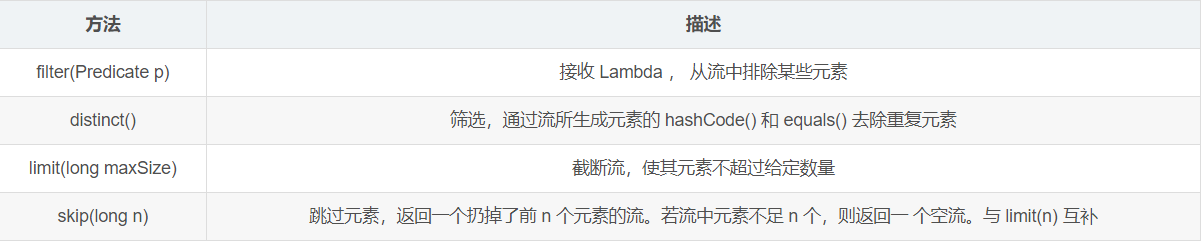
1 2 3 4 5 6 7 8 9 10 11 12 List<Employee> list = EmployeeData.getEmployees(); list.stream().filter(employee -> employee.getSalary()>7000 ).forEach(System.out::println); System.out.println("-------------------" ); list.stream().limit(3 ).forEach(System.out::println); System.out.println("-------------------" ); list.stream().skip(3 ).forEach(System.out::println); System.out.println("-------------------" ); list.stream().distinct().forEach(System.out::println);
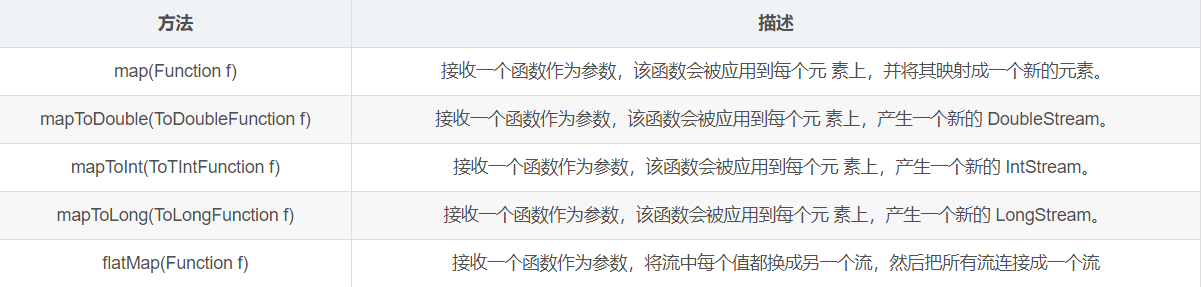
2.4.2.2 映射
1 2 3 4 5 6 7 8 9 10 11 12 List<String> list1 = Arrays.asList("aa" , "bb" , "cc" , "dd" , "ee" ); list1.stream().skip(1 ).map(str -> str.toUpperCase()).forEach(System.out::println); System.out.println("-------------------" ); list.stream().map(Employee::getName).filter(name -> name.length()>3 ).forEach(System.out::println); Stream<Stream<Character>> streamStream = list1.stream().map(StreamAPITest2::fromStringToStream); streamStream.forEach(System.out::println); System.out.println("-------------------" ); Stream<Character> characterStream = list1.stream().flatMap(StreamAPITest2::fromStringToStream); characterStream.forEach(System.out::println);
1 2 3 4 5 6 7 8 public static Stream<Character> fromStringToStream (String str) { ArrayList<Character> list = new ArrayList <>(); for (Character c : str.toCharArray()) { list.add(c); } return list.stream(); }
flatMap 有个类似的例子
如 list集合 如果想添加一个元素 这个元素本身也是集合
元素就是集合
相当于集合(元素)先遍历出来 再一个个添加到集合中
1 2 3 4 5 6 7 8 9 10 11 12 13 ArrayList list1 = new ArrayList ();list1.add(1 ); list1.add(2 ); list1.add(3 ); ArrayList list2 = new ArrayList ();list2.add(4 ); list2.add(5 ); list2.add(6 ); list1.addAll(list2);
2.4.2.3 排序
1 2 3 4 5 6 7 8 9 10 11 12 13 14 List<Integer> list2 = Arrays.asList(1 ,4 ,7 ,3 ,2 ,8 ,111 ,4 ); list2.stream().sorted().forEach(System.out::println); list.stream().sorted(((o1, o2) -> { int compare = Integer.compare(o1.getAge(), o2.getAge()); if (compare == 0 ){ return Double.compare(o1.getSalary(),o2.getSalary()); }else { return compare; } })).forEach(System.out::println);
2.4.3 Stream 的终止操作
终止操作会从流的流水线生成结果。其结果可以是任何不是流的值,如:List、Integer、void
流进行终止操作后,不能再次使用
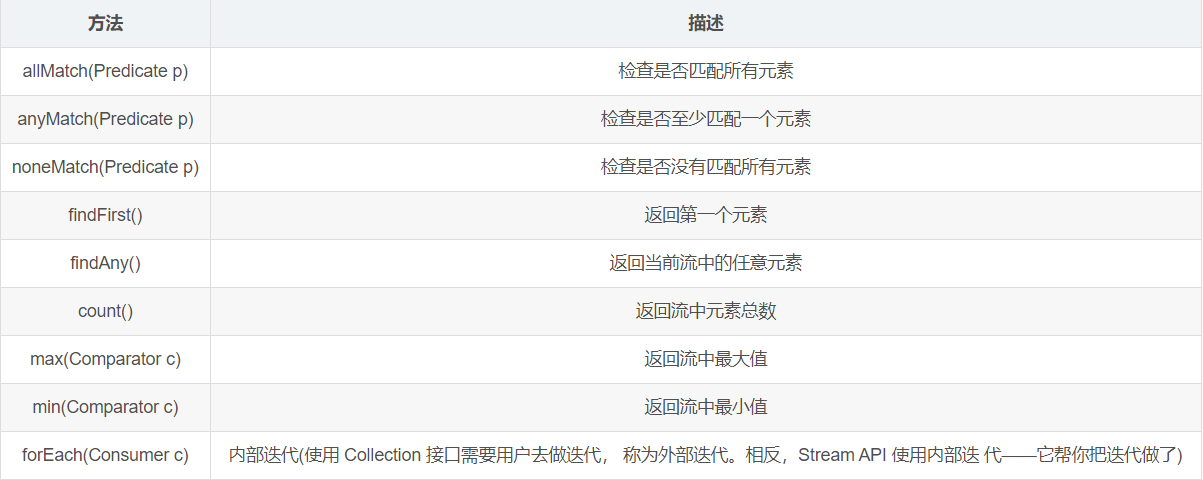
2.4.3.1 匹配与查找
1 2 3 4 5 6 7 8 9 10 11 12 13 14 15 16 17 18 19 20 21 22 23 24 25 26 27 28 29 30 List<Employee> employees = EmployeeData.getEmployees(); boolean allMatch = employees.stream().allMatch(e -> e.getAge() > 18 );System.out.println(allMatch); boolean noneMatch = employees.stream().noneMatch(e -> e.getName().startsWith("孙" ));System.out.println(noneMatch); Optional<Employee> first = employees.stream().findFirst(); Employee employee = first.get();System.out.println(employee); Employee employee1 = employees.parallelStream().findAny().get();System.out.println(employee1); long count = employees.stream().count();System.out.println(count); Stream<Double> doubleStream = employees.stream().map(e -> e.getSalary()); Double maxSalary = doubleStream.max(Double::compare).get();System.out.println(maxSalary); Employee minSalaryEmp = employees.stream().min((o1, o2) -> Double.compare(o1.getSalary(), o2.getSalary())).get();System.out.println(minSalaryEmp); employees.stream().forEach(System.out::println); employees.forEach(System.out::println);
2.4.3.2 规约
map 和 reduce 的连接通常称为 map-reduce 模式,因 Google 用它来进行网络搜索而出名。
1 2 3 4 5 6 7 List<Integer> list = Arrays.asList(1 , 2 , 3 , 4 , 5 , 6 , 7 , 8 , 9 , 10 ); Integer sum = list.stream().reduce(0 , Integer::sum);System.out.println(sum); Optional<Double> sumSalary = employees.stream().map(e -> e.getSalary()).reduce((s1, s2) -> s1 + s2); System.out.println(sumSalary.get());
2.4.3.3 收集
1 2 3 4 5 6 7 8 9 10 List<Employee> employees = EmployeeData.getEmployees(); List<Employee> employeeList = employees.stream().filter(e -> e.getSalary() > 6000 ).collect(Collectors.toList()); employeeList.forEach(System.out::println); System.out.println(); Set<Employee> employeeSet = employees.stream().filter(e -> e.getSalary() > 6000 ).collect(Collectors.toSet()); employeeSet.forEach(System.out::println);
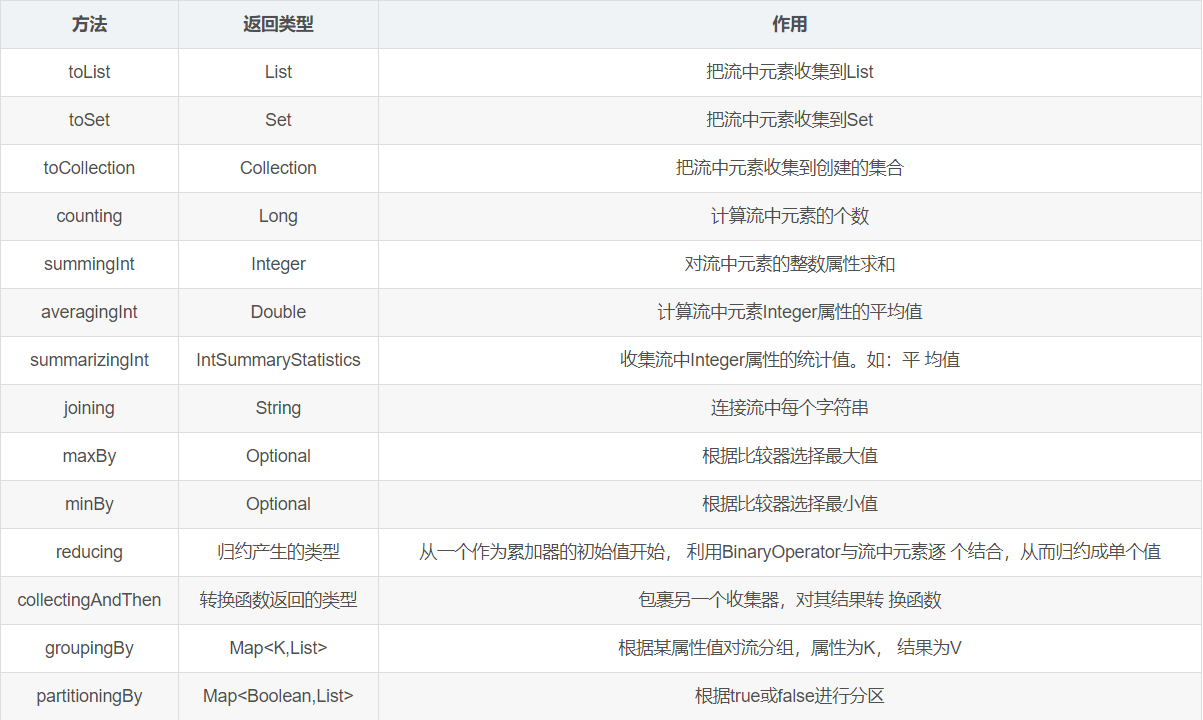
Collector 接口中方法的实现决定了如何对流执行收集的操作(如收集到 List、Set、 Map)。 另外, Collectors 实用类提供了很多静态方法,可以方便地创建常见收集器实例, 具体方法与实例如下表:
1 2 3 4 5 6 7 8 9 10 11 12 13 14 15 List<Employee> emps= list.stream().collect(Collectors.toList()); Set<Employee> emps= list.stream().collect(Collectors.toSet()); Collection<Employee> emps =list.stream().collect(Collectors.toCollection(ArrayList::new )); long count = list.stream().collect(Collectors.counting());int total=list.stream().collect(Collectors.summingInt(Employee::getSalary));double avg = list.stream().collect(Collectors.averagingInt(Employee::getSalary));int SummaryStatisticsiss= list.stream().collect(Collectors.summarizingInt(Employee::getSalary));String str= list.stream().map(Employee::getName).collect(Collectors.joining()); Optional<Emp>max= list.stream().collect(Collectors.maxBy(comparingInt(Employee::getSalary))); Optional<Emp> min = list.stream().collect(Collectors.minBy(comparingInt(Employee::getSalary))); int total=list.stream().collect(Collectors.reducing(0 , Employee::getSalar, Integer::sum));int how= list.stream().collect(Collectors.collectingAndThen(Collectors.toList(), List::size));Map<Emp.Status, List<Emp>> map= list.stream() .collect(Collectors.groupingBy(Employee::getStatus)); Map<Boolean,List<Emp>> vd = list.stream().collect(Collectors.partitioningBy(Employee::getManage));