模式匹配语法中,采用 match 关键字声明,每个分支采用 case 关键字进行声明,当需 要匹配时,会从第一个 case 分支开始,如果匹配成功,那么执行对应的逻辑代码,如果匹 配不成功,继续执行下一个分支进行判断。如果所有 case 都不匹配,那么会执行 case _分支, 类似于 Java 中 default 语句。
1)说明
如果所有 case 都不匹配,那么会执行 case _ 分支,类似于 Java 中 default 语句, 若此时没有 case _ 分支,那么会抛出 MatchError。
每个 case 中,不需要使用 break 语句,自动中断 case。
match case 语句可以匹配任何类型,而不只是字面量。
=> 后面的代码块,直到下一个 case 语句之前的代码是作为一个整体执行,可以 使用{}括起来,也可以不括。
objectTest01_PatternMatchBase{ defmain(args: Array[String]): Unit = { // 1. 基本定义语法 val x: Int = 5 val y: String = x match { case1 => "one" case2 => "two" case3 => "three" case _ => "other" } println(y)
// 2. 示例:用模式匹配实现简单二元运算 val a = 25 val b = 13
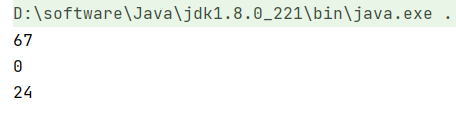
defmatchDualOp(op: Char): Int = op match { case '+' => a + b case '-' => a - b case '*' => a * b case '/' => a / b case '%' => a % b case _ => -1 } println(matchDualOp('+')) println(matchDualOp('/')) println(matchDualOp('\\'))
} }
8.2 模式守卫
1)说明
如果想要表达匹配某个范围的数据,就需要在模式匹配中增加条件守卫。
2)案例实操
1 2 3 4 5 6 7 8 9 10 11 12 13 14 15 16 17 18
objectTest01_PatternMatchBase{ defmain(args: Array[String]): Unit = {
// 3. 模式守卫 // 求一个整数的绝对值 defabs(num: Int): Int = { num match { case i if i >= 0 => i case i if i < 0 => -i } }
objectTest02_MatchTypes{ defmain(args: Array[String]): Unit = {
println("==================================")
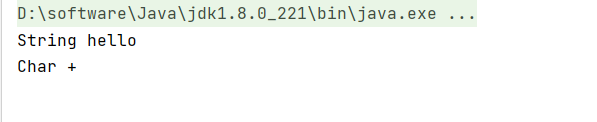
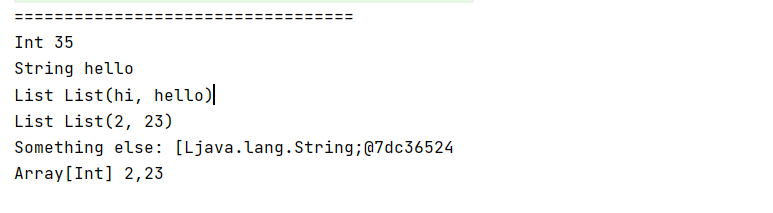
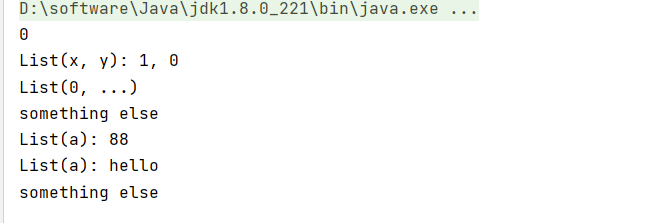
// 2. 匹配类型 defdescribeType(x: Any): String = x match { case i: Int => "Int " + i case s: String => "String " + s case list: List[String] => "List " + list case array: Array[Int] => "Array[Int] " + array.mkString(",") case a => "Something else: " + a }
objectTest02_MatchTypes{ defmain(args: Array[String]): Unit = {
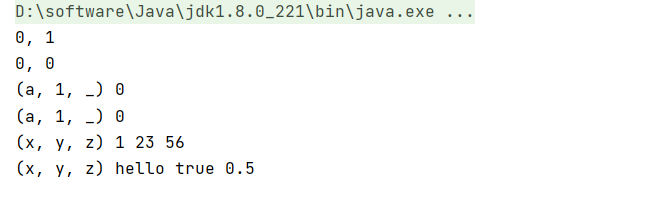
// 5. 匹配元组 for (tuple <- List( (0, 1), (0, 0), (0, 1, 0), (0, 1, 1), (1, 23, 56), ("hello", true, 0.5) )){ val result = tuple match { case (a, b) => "" + a + ", " + b case (0, _) => "(0, _)" case (a, 1, _) => "(a, 1, _) " + a case (x, y, z) => "(x, y, z) " + x + " " + y + " " + z case _ => "something else" } println(result) } } }
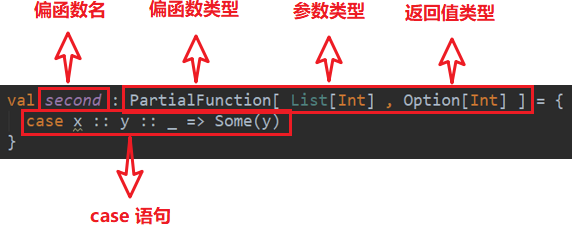
val second: PartialFunction[List[Int], Option[Int]] = { case x :: y :: _ => Some(y) }
注:该偏函数的功能是返回输入的List 集合的第二个元素
2)偏函数原理
上述代码会被 scala 编译器翻译成以下代码,与普通函数相比,只是多了一个用于参数
检查的函数——isDefinedAt,其返回值类型为 Boolean。
1 2 3 4 5 6 7 8 9 10 11 12 13
val second = newPartialFunction[List[Int], Option[Int]] { //检查输入参数是否合格 overridedefisDefinedAt(list: List[Int]): Boolean = list match { case x :: y :: _ => true case _ => false } //执行函数逻辑 overridedefapply(list: List[Int]): Option[Int] = list match { case x :: y :: _ => Some(y) } }
// 偏函数的应用,求绝对值 // 对输入数据分为不同的情形:正、负、0 val positiveAbs: PartialFunction[Int, Int] = { case x if x > 0 => x } val negativeAbs: PartialFunction[Int, Int] = { case x if x < 0 => -x } val zeroAbs: PartialFunction[Int, Int] = { case0 => 0 }
defabs(x: Int): Int = (positiveAbs orElse negativeAbs orElse zeroAbs) (x)
defmain(args: Array[String]): Unit = { val list = List(1,2,3,4,5,6,"test") val list1 = list.map { a => a match { case i: Int => i + 1 case s: String =>s + 1 } } println(list1.filter(a=>a.isInstanceOf[Int])) }
方法一: List(1,2,3,4,5,6,"test").filter(_.isInstanceOf[Int]).map(_.asInstanceOf[Int] + 1).foreach(println) 方法二: List(1, 2, 3, 4, 5, 6, "test").collect { case x: Int => x + 1 }.foreach(println)