SpringCloud入门简介 1. 十分钟了解SpringCloud 1.1 为什么需要学习Spring Cloud 不论是商业应用还是用户应用,在业务初期都很简单,我们通常会把它实现为单体结构的应用。但是,随着业务逐渐发展,产品思想会变得越来越复杂,单体结构的应用也会越来越复杂。这就会给应用带来如下的几个问题:
代码结构混乱:业务复杂,导致代码量很大,管理会越来越困难。同时,这也会给业务的快速迭代带来巨大挑战;
开发效率变低:开发人员同时开发一套代码,很难避免代码冲突。开发过程会伴随着不断解决冲突的过程,这会严重的影响开发效率;
排查解决问题成本高:线上业务发现 bug,修复 bug 的过程可能很简单。但是,由于只有一套代码,需要重新编译、打包、上线,成本很高。
1.2 什么是Spring Cloud Spring Cloud是一系列框架的有序集合。它利用Spring Boot的开发便利性巧妙地简化了分布式系统基础设施的开发,如服务发现注册、配置中心、智能路由、消息总线、负载均衡、断路器、数据监控等,都可以用Spring Boot的开发风格做到一键启动和部署。Spring Cloud并没有重复制造轮子,它只是将各家公司开发的比较成熟、经得起实际考验的服务框架组合起来,通过Spring Boot风格进行再封装屏蔽掉了复杂的配置和实现原理,最终给开发者留出了一套简单易懂、易部署和易维护的分布式系统开发工具包。
SpringCloud :分布式微服务架构的一站式解决方案,是多种微服务架构落地技术的集合体,俗称微服务全家桶。
服务注册与发现
服务调用
服务熔断
负载均衡
服务降级
服务消息队列
配置中心管理
服务网关
服务监控
全链路追踪
自动化构建部署
SpringCloud 是微服务一站式服务解决方案,微服务全家桶。它是微服务开发的主流技术栈 。它采用了名称,而非数字版本号。
SpringCloud 和 springCloud Alibaba 目前是最主流的微服务框架组合。
1.3 设计目标与优缺点 设计目标
优缺点 微服务的框架那么多比如:dubbo、Kubernetes,为什么就要使用Spring Cloud的呢?
优点:
产出于Spring大家族,Spring在企业级开发框架中无人能敌,来头很大,可以保证后续的更新、完善
轻轻松松几行代码,注解或者配置就完成了熔断、负载均衡、注册中心的各种平台功能
Spring Cloud 社区活跃度很高,教程很丰富,遇到问题很容易找到解决方案
服务拆分粒度更细,耦合度比较低,有利于资源重复利用,有利于提高开发效率
可以更精准的制定优化服务方案,提高系统的可维护性
减轻团队的成本,可以并行开发,不用关注其他人怎么开发,先关注自己的开发
微服务可以是跨平台的,可以用任何一种语言开发
适于互联网时代,产品迭代周期更短
缺点:
微服务过多,治理成本高,不利于维护系统
分布式系统开发的成本高(容错,分布式事务等)对团队挑战大
总的来说优点大过于缺点,目前看来Spring Cloud是一套非常完善的分布式框架,目前很多企业开始用微服务、Spring Cloud的优势是显而易见的。因此对于想研究微服务架构的同学来说,学习Spring Cloud是一个不错的选择。
1.4 Spring Cloud发展前景 Spring Cloud对于中小型互联网公司来说是一种福音,因为这类公司往往没有实力或者没有足够的资金投入去开发自己的分布式系统基础设施,使用Spring Cloud一站式解决方案能在从容应对业务发展的同时大大减少开发成本。同时,随着近几年微服务架构和Docker容器概念的火爆,也会让Spring Cloud在未来越来越“云”化的软件开发风格中立有一席之地,尤其是在五花八门的分布式解决方案中提供了标准化的、全站式的技术方案,意义可能会堪比当年Servlet规范的诞生,有效推进服务端软件系统技术水平的进步。
整体架构
主要项目 Spring Cloud的子项目,大致可分成两类,一类是对现有成熟框架”Spring Boot化”的封装和抽象,也是数量最多的项目;第二类是开发了一部分分布式系统的基础设施的实现,如Spring Cloud Stream扮演的就是kafka, ActiveMQ这样的角色。
Spring Cloud Config 集中配置管理工具,分布式系统中统一的外部配置管理,默认使用Git来存储配置,可以支持客户端配置的刷新及加密、解密操作。
Spring Cloud Netflix
Netflix OSS 开源组件集成,包括Eureka、Hystrix、Ribbon、Feign、Zuul等核心组件。
Eureka:服务治理组件,包括服务端的注册中心和客户端的服务发现机制;
Ribbon:负载均衡的服务调用组件,具有多种负载均衡调用策略;
Hystrix:服务容错组件,实现了断路器模式,为依赖服务的出错和延迟提供了容错能力;
Feign:基于Ribbon和Hystrix的声明式服务调用组件;
Zuul:API网关组件,对请求提供路由及过滤功能。
Spring Cloud Bus 用于传播集群状态变化的消息总线,使用轻量级消息代理链接分布式系统中的节点,可以用来动态刷新集群中的服务配置。
Spring Cloud Consul 基于Hashicorp Consul的服务治理组件。
Spring Cloud Security 安全工具包,对Zuul代理中的负载均衡OAuth2客户端及登录认证进行支持。
Spring Cloud Sleuth Spring Cloud应用程序的分布式请求链路跟踪,支持使用Zipkin、HTrace和基于日志(例如ELK)的跟踪。
Spring Cloud Stream 轻量级事件驱动微服务框架,可以使用简单的声明式模型来发送及接收消息,主要实现为Apache Kafka及RabbitMQ。
Spring Cloud Task 用于快速构建短暂、有限数据处理任务的微服务框架,用于向应用中添加功能性和非功能性的特性。
Spring Cloud Zookeeper 基于Apache Zookeeper的服务治理组件。
Spring Cloud Gateway API网关组件,对请求提供路由及过滤功能。
Spring Cloud OpenFeign 基于Ribbon和Hystrix的声明式服务调用组件,可以动态创建基于Spring MVC注解的接口实现用于服务调用,在Spring Cloud 2.0中已经取代Feign成为了一等公民。
1.5 Spring Cloud的版本关系 Spring Cloud是一个由许多子项目组成的综合项目,各子项目有不同的发布节奏。 为了管理Spring Cloud与各子项目的版本依赖关系,发布了一个清单,其中包括了某个Spring Cloud版本对应的子项目版本。 为了避免Spring Cloud版本号与子项目版本号混淆,Spring Cloud版本采用了名称而非版本号的命名,这些版本的名字采用了伦敦地铁站的名字,根据字母表的顺序来对应版本时间顺序,例如Angel是第一个版本,Brixton是第二个版本。 当Spring Cloud的发布内容积累到临界点或者一个重大BUG被解决后,会发布一个”service releases”版本,简称SRX版本,比如Greenwich.SR2就是Spring Cloud发布的Greenwich版本的第2个SRX版本。目前Spring Cloud的最新版本是Hoxton。
Spring Cloud和SpringBoot版本对应关系
注意 :Hoxton版本是基于SpringBoot 2.2.x版本构建的,不适用于1.5.x版本。随着2019年8月SpringBoot 1.5.x版本停止维护,Edgware版本也将停止维护。
和Spring Boot的关系
Spring Boot 是 Spring 的一套快速配置脚手架,可以基于Spring Boot 快速开发单个微服务,Spring Cloud是一个基于Spring Boot实现的云应用开发工具。Spring -> Spring Boot > Spring Cloud 这样的关系。
Spring Boot可以离开Spring Cloud独立使用开发项目,但是Spring Cloud离不开Spring Boot,属于依赖的关系
Spring Boot专注于快速、方便集成的单个个体微服务,Spring Cloud是关注全局的服务治理框架
Spring Boot使用了默认大于配置的理念,很多集成方案已经帮你选择好了,能不配置就不配置,Spring Cloud很大的一部分是基于Spring Boot来实现,可以不基于Spring Boot吗?不可以
1.6 由停更引发的“升级惨案” 以前
现在
2. 前置准备 2.1 dependencyManagement Maven使用dependencyManagement元素来提供了一种管理依赖版本号的方式。
通常会在一个组织或者项目的最顶层的父pom中看到dependencyManagement元素
使用pom.xml中的dependencyManagement元素能让所有在子项目中引用一个依赖而不用显式的列出版本号。
Maven会沿着父子层次向上走,知道找到一个拥有dependencyManagement元素的项目,然后它就会使用这个dependencyManagement元素中指定的版本号
1
2
3
4
5
6
7
8
9
10
<dependencyManagement> <dependencies> <dependency> <groupId>mysql</groupId> <artifactId>mysql-connector-java</artifactId> <version>5.1 .2 </version> </dependency> ... </dependencies> </dependencyManagement>
然后在子项目里就可以添加mysql-connector时可以不指定版本号,例如:
1
2
3
4
5
6
<dependencies> <dependency> <groupId>mysql</groupId> <artifactId>mysql-connector-java</artifactId> </dependency> </dependencies>
这样做的好处是:如果有多个子项目都需要引用同一样依赖,则可以避免在每个使用的子项目里都声明一个版本号,这样当想升级或切换到另一个版本时,只需要在顶层父容器里更新,而不需要一个一个子项目的修改;另外如果某个子项目需要另外的一个版本号,只需要声明version即可。
注意:
dependencyManagement里只是声明依赖,并不实现引入,因此子项目需要显式的声明需要用的依赖。
如果不在子项目中声明依赖,是不会从父项目中继承下来的;只有在子项目中写了该依赖项,并且没有指定具体版本才会从父项目中继承该项,并且version和scope都读取自父pom。
如果子项目中指定了版本号,那么会使用子项目中指定的jar版本。
2.2 IDEA如何进行热部署 1 2 3 4 5 6 <dependency > <groupId > org.springframework.boot</groupId > <artifactId > spring-boot-devtools</artifactId > <scope > runtime</scope > <optional > true</optional > </dependency >
2.添加plugin到pom.xml 1 2 3 4 5 6 7 8 9 10 11 12 <build > <plugins > <plugin > <groupId > org.springframework.boot</groupId > <artifactId > spring-boot-maven-plugin</artifactId > <configuration > <fork > true</fork > <addResources > true</addResources > </configuration > </plugin > </plugins > </build >
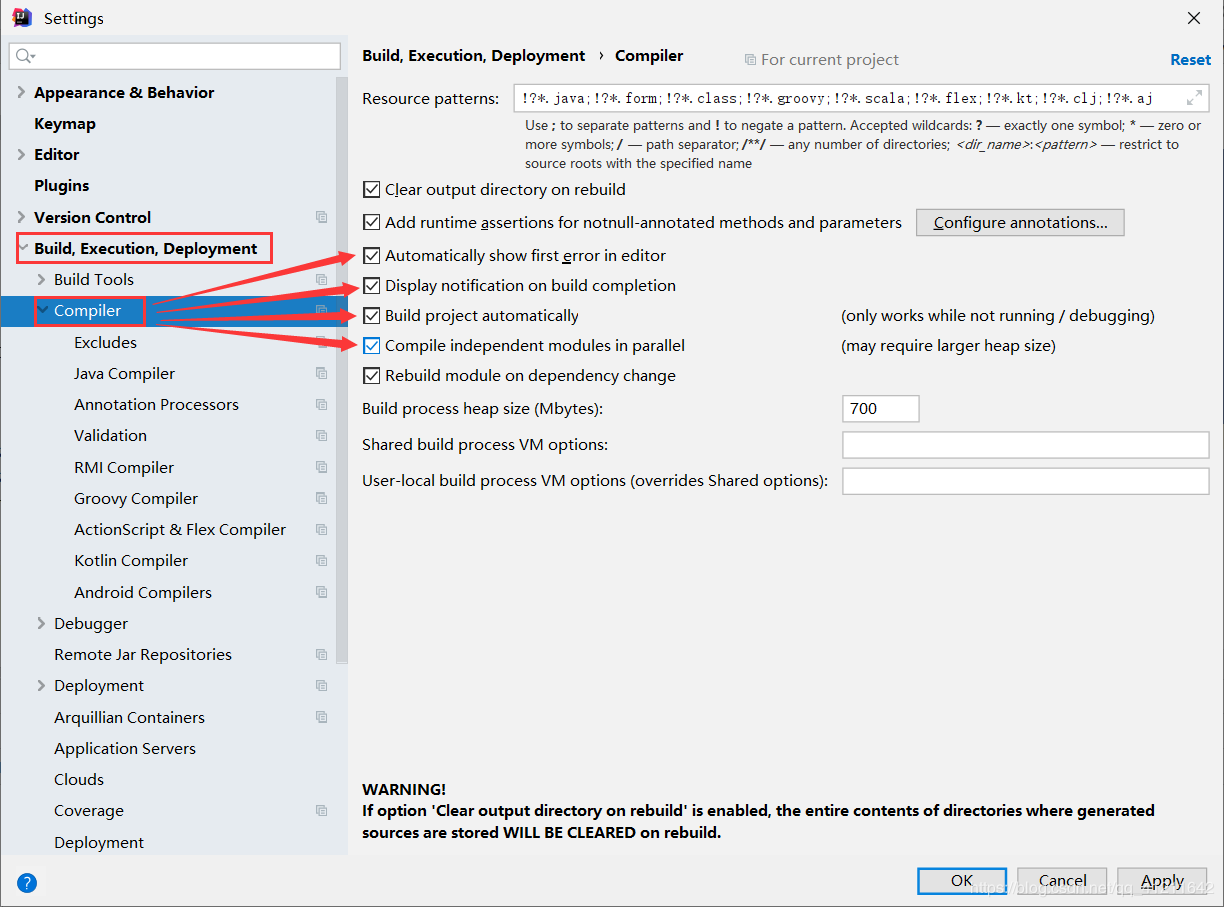
3.开启自动编译选项
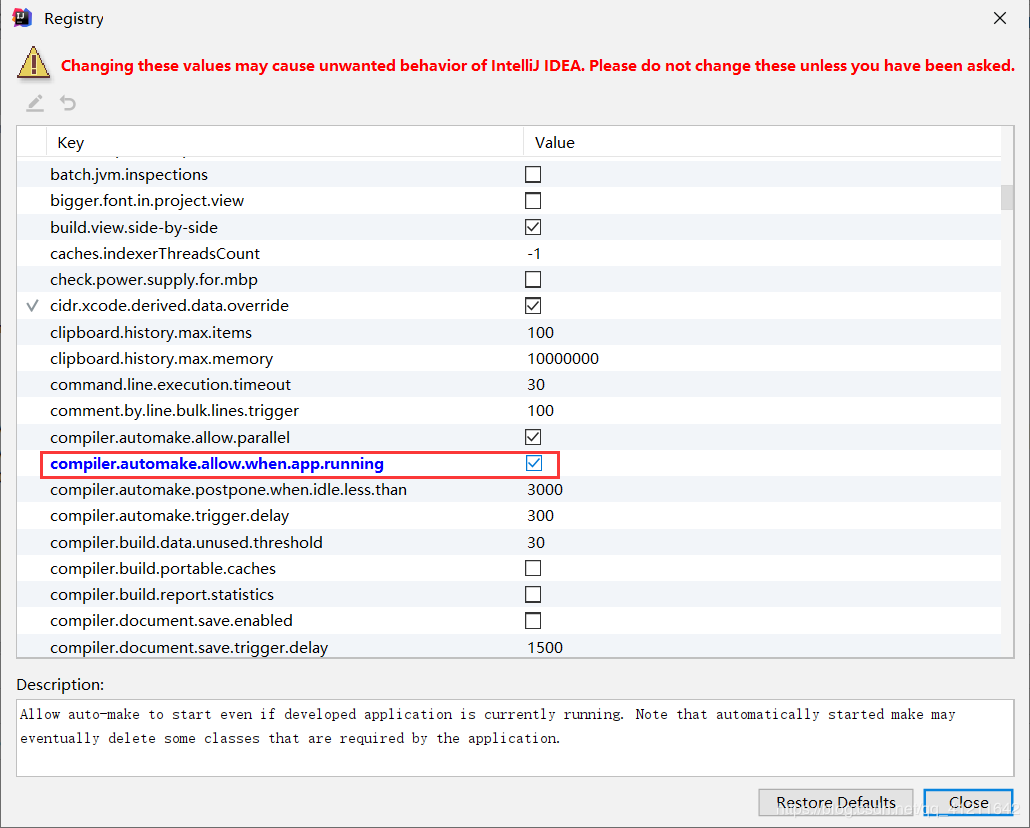
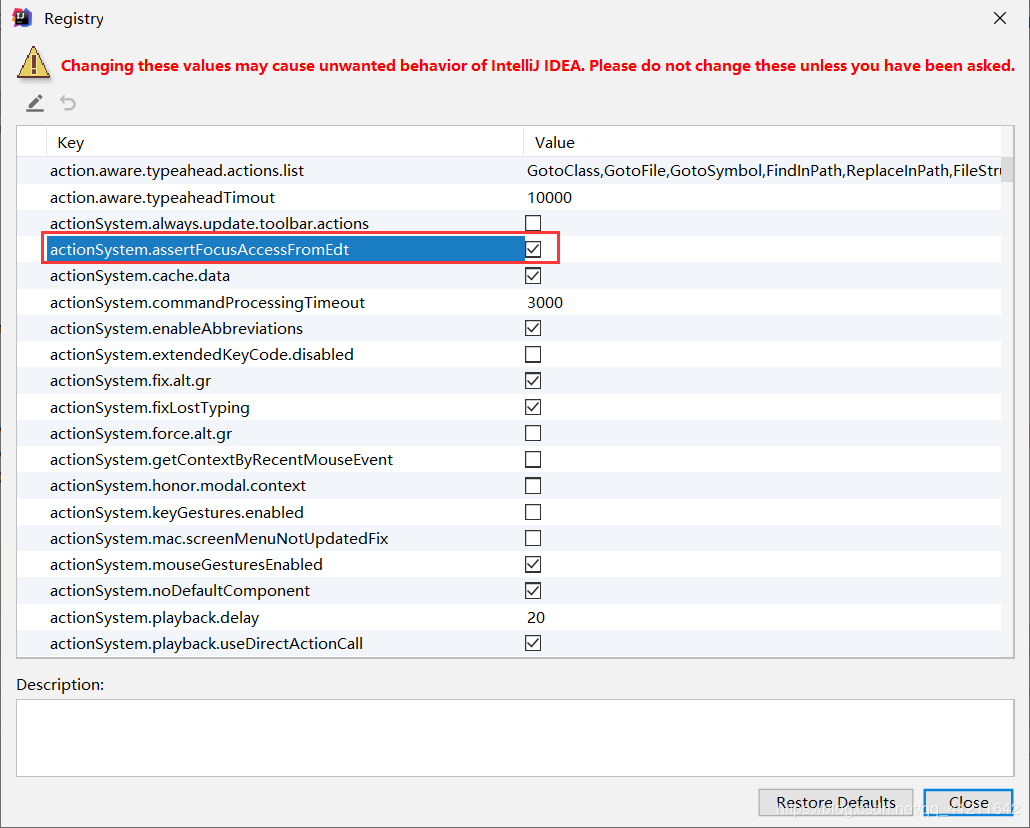
4. 注册开启 Ctrl+Shift+Alt+? 选择Registry
5. 重启IDEA
重启IDEA,启动项目,当修改Java代码IDEA就会自动进行编译了。
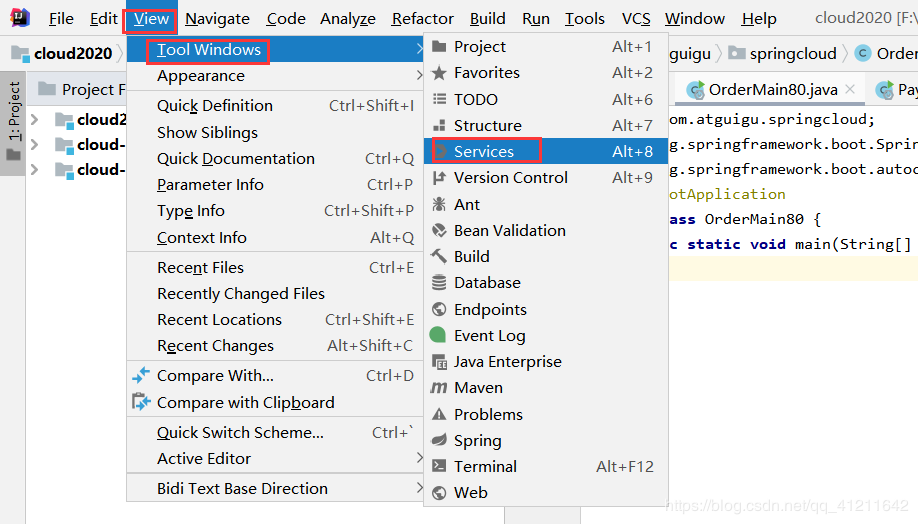
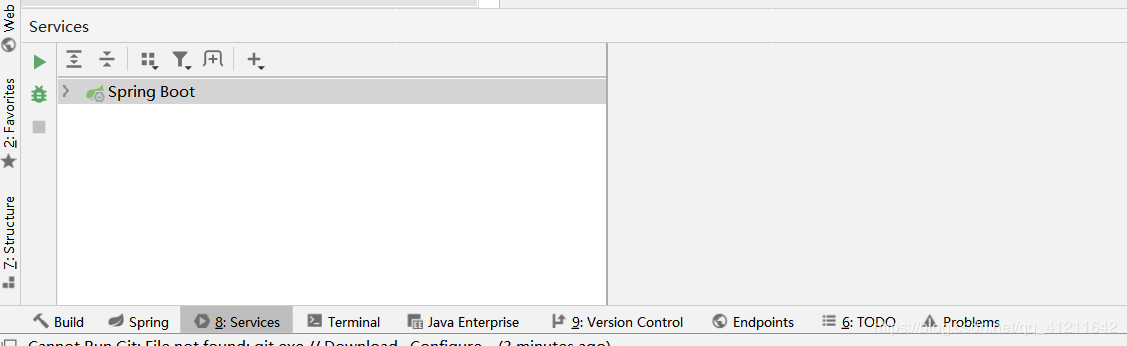
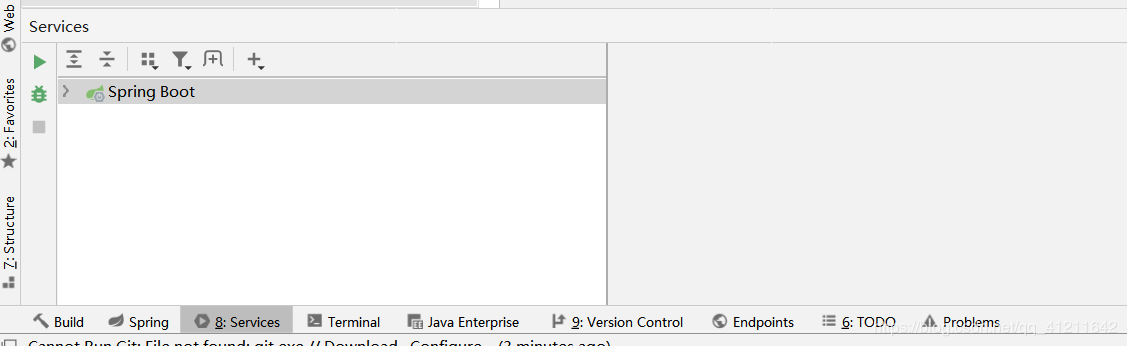
2.3 微服务下开启IDEA的Services(Dashboard)窗口 1.微服务下开启IDEA的Services(Dashboard)窗口
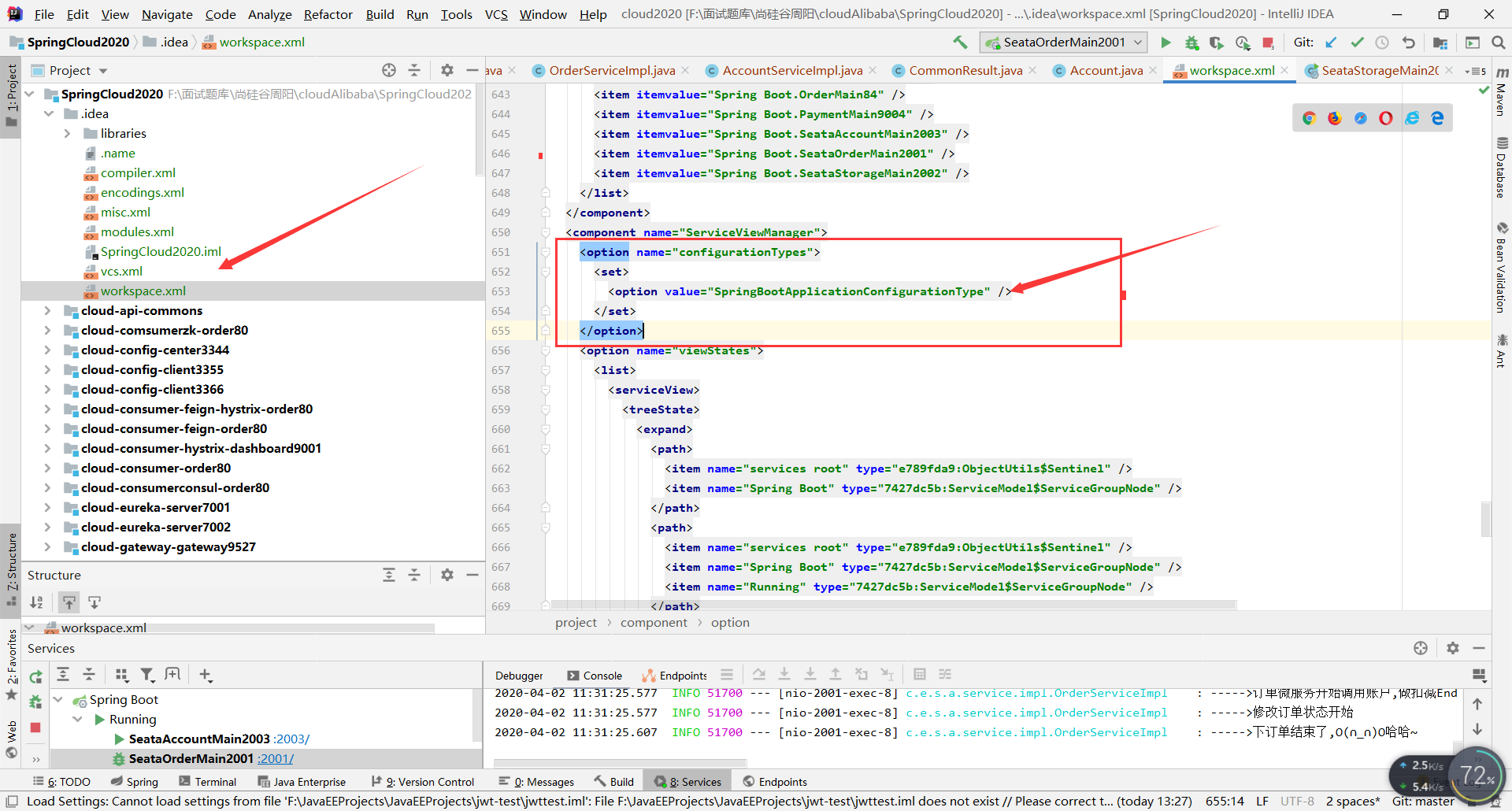
2. 修改ServiceViewManager
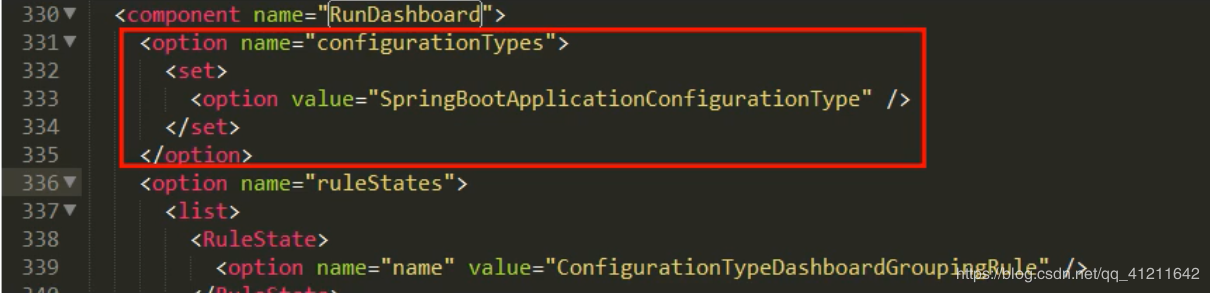
找到ServiceViewManager,添加如下代码:
1 2 3 4 5 <option name="configurationTypes" > <set> <option value="SpringBootApplicationConfigurationType" /> </set> </option>
3. 重启IDEA
关闭并重启IDEA,选择 View–>ToolWindows–>Services 开启即可。
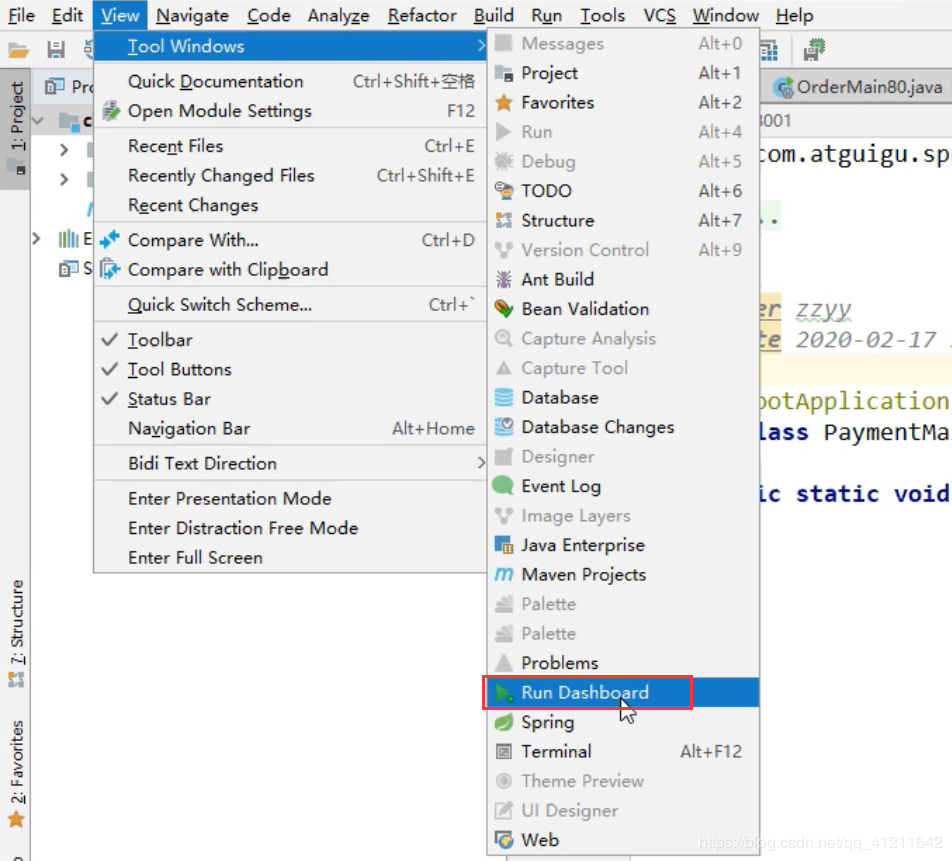
4. 老版本IDEA
如果是老一些的版本可以采用下面的方法:workspace.xml 中插入代码的位置不是在ServiceViewManager而是RunDashboard
5. 个人方法
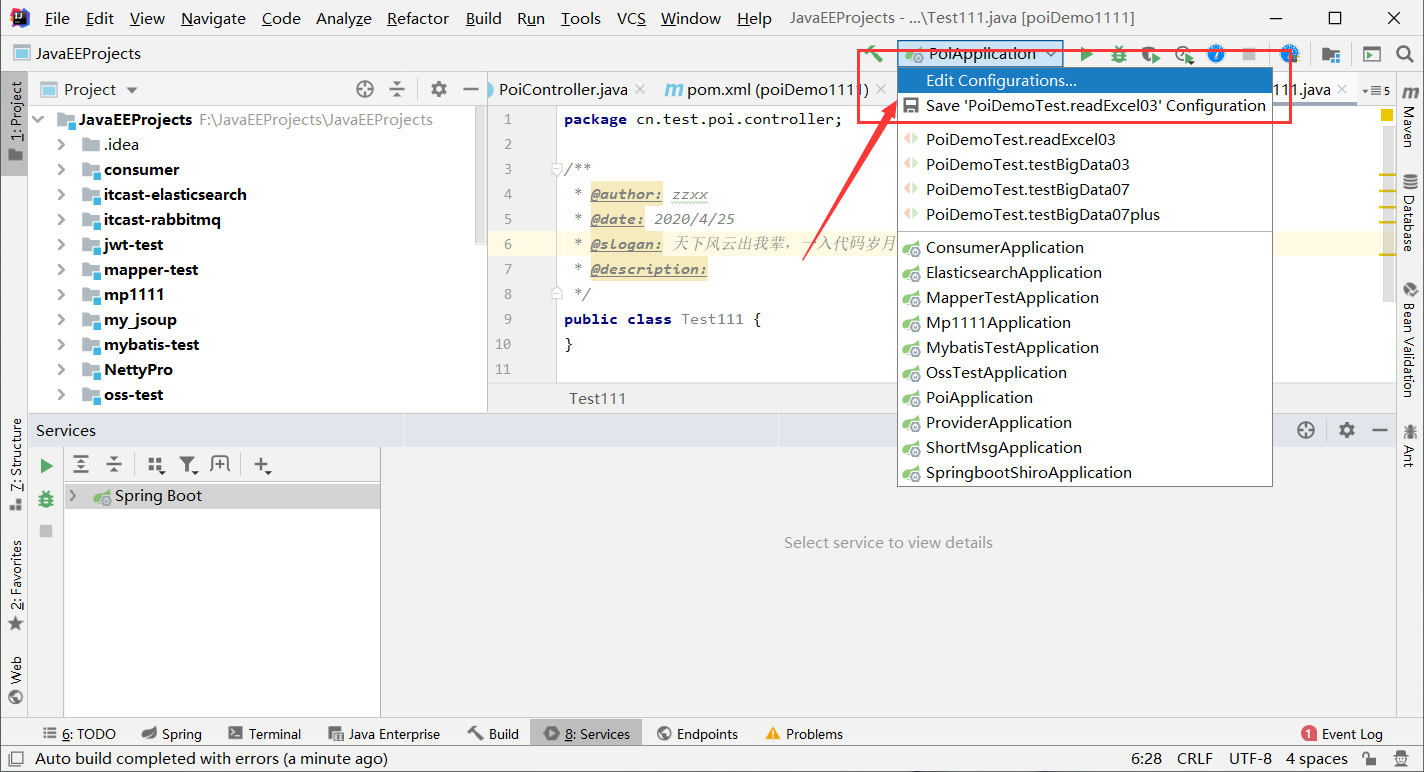
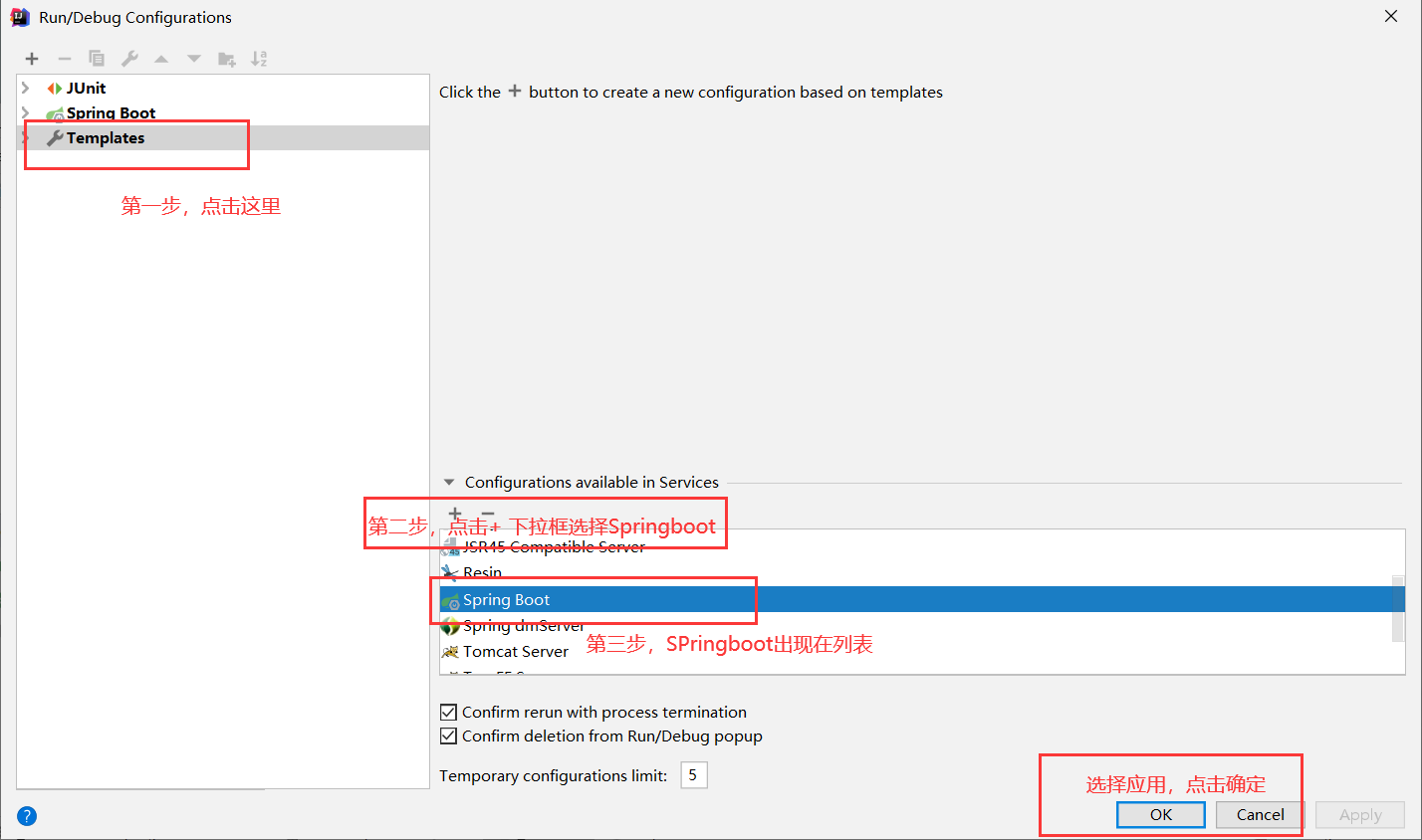
如果发现上面两种方式都不行,那就直接简单粗暴一步到位
如果想关闭,直接在第三步那里 选择SpringBoot 点击 “-” 即可
3. 第一个微服务架构 构建父工程,后面的项目模块都在此工程中:
3.1 父工程pom配置 1 2 3 4 5 6 7 8 9 10 11 12 13 14 15 16 17 18 19 20 21 22 23 24 25 26 27 28 29 30 31 32 33 34 35 36 37 38 39 40 41 42 43 44 45 46 47 48 49 50 51 52 53 54 55 56 57 58 59 60 61 62 63 64 65 66 67 68 69 70 71 72 73 74 75 76 77 78 79 80 81 82 83 84 85 86 87 88 89 90 91 92 93 94 95 96 97 98 99 100 101 102 103 104 105 106 107 <?xml version="1.0" encoding="UTF-8" ?> <project xmlns ="http://maven.apache.org/POM/4.0.0" xmlns:xsi ="http://www.w3.org/2001/XMLSchema-instance" xsi:schemaLocation ="http://maven.apache.org/POM/4.0.0 http://maven.apache.org/xsd/maven-4.0.0.xsd" > <modelVersion > 4.0.0</modelVersion > <groupId > com.dkf.cloud</groupId > <artifactId > cloud2020</artifactId > <version > 1.0-SNAPSHOT</version > <packaging > pom</packaging > <properties > <project.build.sourceEncoding > UTF-8</project.build.sourceEncoding > <maven.compiler.source > 1.8</maven.compiler.source > <maven.compiler.target > 1.8</maven.compiler.target > <junit.version > 4.12</junit.version > <log4j.version > 1.2.17</log4j.version > <lombok.version > 1.16.18</lombok.version > <mysql.version > 5.1.47</mysql.version > <druid.version > 1.1.16</druid.version > <mybatis.spring.boot.version > 1.3.0</mybatis.spring.boot.version > </properties > <dependencyManagement > <dependencies > <dependency > <groupId > org.apache.maven.plugins</groupId > <artifactId > maven-project-info-reports-plugin</artifactId > <version > 3.0.0</version > </dependency > <dependency > <groupId > org.springframework.boot</groupId > <artifactId > spring-boot-dependencies</artifactId > <version > 2.2.2.RELEASE</version > <type > pom</type > <scope > import</scope > </dependency > <dependency > <groupId > org.springframework.cloud</groupId > <artifactId > spring-cloud-dependencies</artifactId > <version > Hoxton.SR1</version > <type > pom</type > <scope > import</scope > </dependency > <dependency > <groupId > com.alibaba.cloud</groupId > <artifactId > spring-cloud-alibaba-dependencies</artifactId > <version > 2.1.0.RELEASE</version > <type > pom</type > <scope > import</scope > </dependency > <dependency > <groupId > mysql</groupId > <artifactId > mysql-connector-java</artifactId > <version > ${mysql.version}</version > <scope > runtime</scope > </dependency > <dependency > <groupId > com.alibaba</groupId > <artifactId > druid</artifactId > <version > ${druid.version}</version > </dependency > <dependency > <groupId > org.mybatis.spring.boot</groupId > <artifactId > mybatis-spring-boot-starter</artifactId > <version > ${mybatis.spring.boot.version}</version > </dependency > <dependency > <groupId > junit</groupId > <artifactId > junit</artifactId > <version > ${junit.version}</version > </dependency > <dependency > <groupId > log4j</groupId > <artifactId > log4j</artifactId > <version > ${log4j.version}</version > </dependency > </dependencies > </dependencyManagement > <build > <plugins > <plugin > <groupId > org.springframework.boot</groupId > <artifactId > spring-boot-maven-plugin</artifactId > <configuration > <fork > true</fork > <addResources > true</addResources > </configuration > </plugin > </plugins > </build > </project >
3.2 提供者
cloud-provider-payment8001 子工程的pom文件:
pom 1 2 3 4 5 6 7 8 9 10 11 12 13 14 15 16 17 18 19 20 21 22 23 24 25 26 27 28 29 30 31 32 33 34 35 36 37 38 39 40 41 42 43 44 45 46 47 48 49 50 51 52 53 54 55 56 57 58 59 60 61 62 63 64 65 66 67 68 69 70 71 72 73 <?xml version="1.0" encoding="UTF-8" ?> <project xmlns ="http://maven.apache.org/POM/4.0.0" xmlns:xsi ="http://www.w3.org/2001/XMLSchema-instance" xsi:schemaLocation ="http://maven.apache.org/POM/4.0.0 http://maven.apache.org/xsd/maven-4.0.0.xsd" > <parent > <artifactId > cloud2020</artifactId > <groupId > com.dkf.cloud</groupId > <version > 1.0-SNAPSHOT</version > </parent > <modelVersion > 4.0.0</modelVersion > <artifactId > cloud-provider-payment8001</artifactId > <dependencies > <dependency > <groupId > org.springframework.cloud</groupId > <artifactId > spring-cloud-starter-netflix-eureka-client</artifactId > </dependency > <dependency > <groupId > com.atguigu.springcloud</groupId > <artifactId > cloud-api-commons</artifactId > <version > ${project.version}</version > </dependency > <dependency > <groupId > org.springframework.boot</groupId > <artifactId > spring-boot-starter-web</artifactId > </dependency > <dependency > <groupId > org.springframework.boot</groupId > <artifactId > spring-boot-starter-actuator</artifactId > </dependency > <dependency > <groupId > org.mybatis.spring.boot</groupId > <artifactId > mybatis-spring-boot-starter</artifactId > </dependency > <dependency > <groupId > com.alibaba</groupId > <artifactId > druid-spring-boot-starter</artifactId > <version > 1.1.10</version > </dependency > <dependency > <groupId > mysql</groupId > <artifactId > mysql-connector-java</artifactId > </dependency > <dependency > <groupId > org.springframework.boot</groupId > <artifactId > spring-boot-starter-jdbc</artifactId > </dependency > <dependency > <groupId > org.springframework.boot</groupId > <artifactId > spring-boot-devtools</artifactId > <scope > runtime</scope > <optional > true</optional > </dependency > <dependency > <groupId > org.projectlombok</groupId > <artifactId > lombok</artifactId > <optional > true</optional > </dependency > <dependency > <groupId > org.springframework.boot</groupId > <artifactId > spring-boot-starter-test</artifactId > <scope > test</scope > </dependency > </dependencies > </project >
yml文件 1 2 3 4 5 6 7 8 9 10 11 12 13 14 15 16 server: port: 8001 spring: application: name: cloud-provider-payment8001 datasource: type: com.alibaba.druid.pool.DruidDataSource driver-class-name: org.gjt.mm.mysql.Driver url: jdbc:mysql://localhost:3306/cloud2020?useUnicode=true&characterEncoding=utf-8&useSSL=false username: root password: 123456 mybatis: mapper-locations: classpath:mapper/*.xml type-aliases-package: com.dkf.springcloud.entities
主启动类 1 2 3 4 5 6 7 8 9 10 11 package com.dkf.springcloud;import org.springframework.boot.SpringApplication;import org.springframework.boot.autoconfigure.SpringBootApplication;@SpringBootApplication public class PaymentMain8001 { public static void main (String[] args) { SpringApplication.run(PaymentMain8001.class, args); } }
建表SQL 1 2 3 4 5 6 7 8 9 create table `payment`( `id` bigint (20 ) not null auto_increment comment 'ID' , `serial` varchar (200 ) default '' , PRIMARY KEY (`id`) )ENGINE= InnoDB AUTO_INCREMENT= 1 DEFAULT CHARSET= utf8 select * from payment;
entities 1 2 3 4 5 6 7 8 9 10 11 12 13 14 import lombok.AllArgsConstructor;import lombok.Data;import lombok.NoArgsConstructor;import java.io.Serializable;@Data @AllArgsConstructor @NoArgsConstructor public class Payment implements Serializable { private long id; private String serial; }
1 2 3 4 5 6 7 8 9 10 11 12 13 14 15 16 17 18 19 import lombok.AllArgsConstructor;import lombok.Data;import lombok.NoArgsConstructor;@Data @AllArgsConstructor @NoArgsConstructor public class CommonResult <T> { private Integer code; private String message; private T data; public CommonResult (Integer code, String message) { this (code, message, null ); } }
dao 1 2 3 4 5 6 7 8 @Mapper public interface PaymentDao { int create (Payment payment) ; Payment getPaymentById (@Param("id") Long id) ; }
resource下创建mapper文件夹,新建PaymentMapper.xml。在yml里有所有entity别名类所在包,所有payment不用写全类名
1 2 3 4 5 6 7 8 9 10 11 12 13 14 15 16 17 <?xml version="1.0" encoding="UTF-8" ?> <!DOCTYPE mapper PUBLIC "-//mybatis.org//DTD Mapper 3.0//EN" "http://mybatis.org/dtd/mybatis-3-mapper.dtd" > <mapper namespace="com.xzq.springcloud.dao.PaymentDao" > <resultMap id="BaseResultMap" type="com.xzq.springcloud.entities.Payment" > <id column="id" property="id" jdbcType="BIGINT" /> <id column="serial" property="serial" jdbcType="VARCHAR" /> </resultMap> <insert id="create" parameterType="Payment" useGeneratedKeys="true" keyProperty="id" > insert into payment (serial) values (#{serial}) </insert> <select id="getPaymentById" parameterType="Long" resultMap="BaseResultMap" > select * from payment where id = #{id} </select> </mapper>
service 1 2 3 4 5 6 public interface PaymentService { int create (Payment payment) ; Payment getPaymentById (@Param("id") Long id) ; }
1 2 3 4 5 6 7 8 9 10 11 12 13 14 15 16 17 @Service public class PaymentServiceImpl implements PaymentService { @Autowired private PaymentDao paymentDao; @Override public int create (Payment payment) { return paymentDao.create(payment); } @Override public Payment getPaymentById (Long id) { return paymentDao.getPaymentById(id); } }
controller 1 2 3 4 5 6 7 8 9 10 11 12 13 14 15 16 17 18 19 20 21 22 23 24 25 26 27 28 29 30 31 @RestController @Slf4j public class PaymentController { @Resource private PaymentService paymentService; @PostMapping(value = "/payment/create") public CommonResult create (@RequestBody Payment payment) { int result = paymentService.create(payment); log.info("****插入结果:" + result); if (result > 0 ){ return new CommonResult (200 , "插入数据库成功" , result); } return new CommonResult (444 , "插入数据库失败" , null ); } @GetMapping(value = "/payment/{id}") public CommonResult getPaymentById (@PathVariable("id") Long id) { Payment result = paymentService.getPaymentById(id); log.info("****查询结果:" + result); if (result != null ){ return new CommonResult (200 , "查询成功" , result); } return new CommonResult (444 , "没有对应id的记录" , null ); } }
3.3 消费者 新建模块cloud-consumer-order80
消费者现在只模拟调用提供者的Controller方法,没有持久层配置,只有Controller和实体类
当然也要配置主启动类和启动端口
pom文件 1 2 3 4 5 6 7 8 9 10 11 12 13 14 15 16 17 18 19 20 21 22 23 24 25 26 27 28 29 30 31 32 33 34 35 36 37 38 39 40 41 42 43 44 45 46 47 48 49 50 51 <?xml version="1.0" encoding="UTF-8" ?> <project xmlns="http://maven.apache.org/POM/4.0.0" xmlns:xsi="http://www.w3.org/2001/XMLSchema-instance" xsi:schemaLocation="http://maven.apache.org/POM/4.0.0 http://maven.apache.org/xsd/maven-4.0.0.xsd" > <parent> <artifactId>cloud2020</artifactId> <groupId>com.dkf.cloud</groupId> <version>1.0 -SNAPSHOT</version> </parent> <modelVersion>4.0 .0 </modelVersion> <artifactId>cloud-customer-order80</artifactId> <dependencies> <dependency> <groupId>org.springframework.cloud</groupId> <artifactId>spring-cloud-starter-netflix-eureka-client</artifactId> </dependency> <!--<dependency><!– 引入自己定义的api通用包,可以使用Payment支付Entity –>--> <!--<groupId>com.atguigu.springcloud</groupId>--> <!--<artifactId>cloud-api-commons</artifactId>--> <!--<version>${project.version}</version>--> <!--</dependency>--> <dependency> <groupId>org.springframework.boot</groupId> <artifactId>spring-boot-starter-web</artifactId> </dependency> <dependency> <groupId>org.springframework.boot</groupId> <artifactId>spring-boot-starter-actuator</artifactId> </dependency> <dependency> <groupId>org.springframework.boot</groupId> <artifactId>spring-boot-devtools</artifactId> <scope>runtime</scope> <optional>true </optional> </dependency> <dependency> <groupId>org.projectlombok</groupId> <artifactId>lombok</artifactId> <optional>true </optional> </dependency> <dependency> <groupId>org.springframework.boot</groupId> <artifactId>spring-boot-starter-test</artifactId> <scope>test</scope> </dependency> </dependencies> </project>
application.yml OrderMain80.java 1 2 3 4 5 6 7 @SpringbootApplication public class OrderMain80 { public static void main (String[] args) { SpringApplication.run(OrderMain80.class,args); } }
entites包 entites包中的类也拷贝到本项目中
entities/CommonResult.java
entities/Payment.java
配置RestTemplate
ApplicationContextConfig 内容:
1 2 3 4 5 6 7 8 9 10 11 12 13 14 15 16 17 18 19 package com.dkf.springcloud.config;import org.springframework.context.annotation.Bean;import org.springframework.context.annotation.Configuration;import org.springframework.web.client.RestTemplate;@Configuration public class ApplicationContextConfig { @Bean public RestTemplate getRestTemplate () { return new RestTemplate (); } }
Controller 1 2 3 4 5 6 7 8 9 10 11 12 13 14 15 16 17 18 19 20 21 22 23 24 25 @RestController @Slf4j public class OrderController { public static final String PAYMENY_URL = "http://localhost:8001" ; @Resource private RestTemplate restTemplate; @PostMapping("customer/payment/create") public CommonResult<Payment> create (Payment payment) { return restTemplate.postForObject(PAYMENY_URL + "/payment/create" , payment, CommonResult.class); } @GetMapping("customer/payment/{id}") public CommonResult<Payment> getPaymentById (@PathVariable("id") Long id) { return restTemplate.getForObject(PAYMENY_URL + "/payment/" + id, CommonResult.class); } }
3.4 工程重构
上面 两个子项目,有多次重复的 导入 jar,和重复的 Entity 实体类。可以把 多余的部分,加入到一个独立的模块中,将这个模块打包,并提供给需要使用的 module
新建一个 cloud-api-commons 子模块
将 entities 包里面的实体类放到这个子模块中,也将 pom 文件中,重复导入的 jar包放到这个新建的 模块的 pom 文件中。如下:
1 2 3 4 5 6 7 8 9 10 11 12 13 14 15 16 17 18 19 20 21 22 23 24 25 26 27 28 29 30 31 32 33 34 35 36 <?xml version="1.0" encoding="UTF-8" ?> <project xmlns="http://maven.apache.org/POM/4.0.0" xmlns:xsi="http://www.w3.org/2001/XMLSchema-instance" xsi:schemaLocation="http://maven.apache.org/POM/4.0.0 http://maven.apache.org/xsd/maven-4.0.0.xsd" > <parent> <artifactId>cloud2020</artifactId> <groupId>com.dkf.cloud</groupId> <version>1.0 -SNAPSHOT</version> </parent> <modelVersion>4.0 .0 </modelVersion> <artifactId>cloud-api-commons</artifactId> <dependencies> <dependency> <groupId>org.springframework.boot</groupId> <artifactId>spring-boot-devtools</artifactId> <scope>runtime</scope> <optional>true </optional> </dependency> <dependency> <groupId>org.projectlombok</groupId> <artifactId>lombok</artifactId> <optional>true </optional> </dependency> <!-- 这个是新添加的,之前没用到,后面会用到。关于这个hutool 是个功能强大的工具包,官网:https: <dependency> <groupId>cn.hutool</groupId> <artifactId>hutool-all</artifactId> <version>5.1 .0 </version> </dependency> </dependencies> </project>
mvn跳过test,mvc clean,mvn install
将此项目打包 install 到 maven仓库。
将 提供者 和 消费者 两个项目中的 entities 包删除,并删除掉加入到 cloud-api-commons 模块的 依赖配置。
将 打包到 maven 仓库的 cloud-api-commons 模块,引入到 提供者 和 消费者的 pom 文件中,如下所示
1 2 3 4 5 6 <dependency > <groupId > com.dkf.cloud</groupId > <artifactId > cloud-api-commons</artifactId > <version > ${project.version}</version > </dependency >
3.5 问题 如果是上面只有两个微服务,通过 RestTemplate ,是可以相互调用的,但是当微服务项目的数量增大,就需要服务注册中心。目前没有学习服务调用相关技术,使用 SpringCloud 自带的 RestTemplate 来实现RPC